Don't Autobots run on Android?As an Autobot, it is in my best interest to use an Android, sir. Apple drives me bananas.
Follow along with the video below to see how to install our site as a web app on your home screen.
Note: This feature may not be available in some browsers.
Don't Autobots run on Android?As an Autobot, it is in my best interest to use an Android, sir. Apple drives me bananas


Any idea how they would track alignment? Checking if the steering wheel is constantly off of a 0 degree base maybe? If you’re constantly steering 1/2 degrees right or left to counter a misalignment it would warn you?Sreenshot promised earlier:
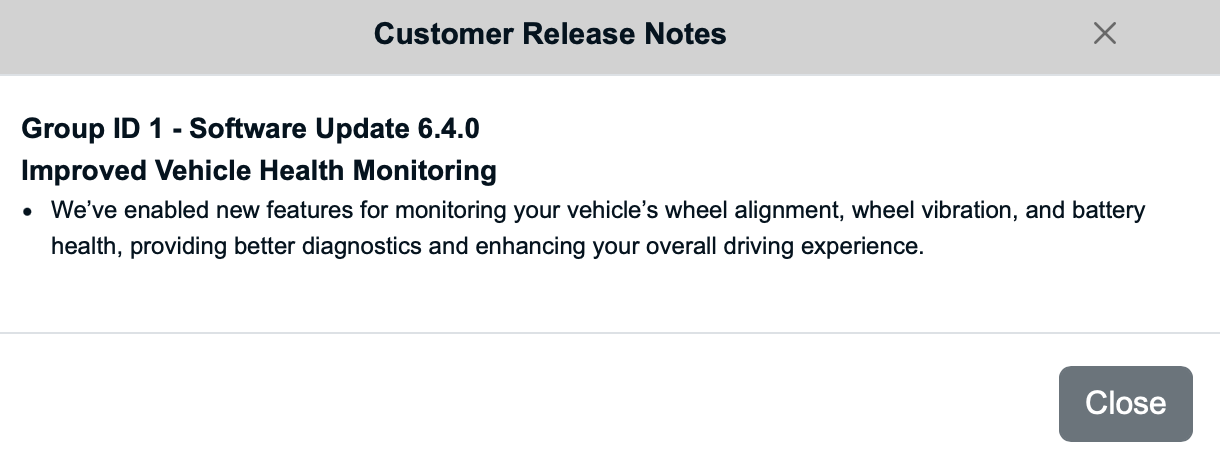

Could be a boilerplate release note for newer vehicles than ours. They could see if you're in the center of the lane and how much you're fighting the wheel left or right. They could even detect road crown with the built-in windshield camera but that's a stretch.Any idea how they would track alignment? Checking if the steering wheel is constantly off of a 0 degree base maybe? If you’re constantly steering 1/2 degrees right or left to counter a misalignment it would warn you?
I know if you lift your truck and the steering wheel is not recentered it does set of a code and warning. You are probably closer than you think to what it does.Any idea how they would track alignment? Checking if the steering wheel is constantly off of a 0 degree base maybe? If you’re constantly steering 1/2 degrees right or left to counter a misalignment it would warn you?

I almost spit my beer out on that one. I think you are correct. Just need to update software to fix CP4/fuel pump issues like mentioned in Fords recall…..funny guy!Does this update also fix the CP4 issue?


No, we run over themDon't Autobots run on Android?
 .
.

For the record, I told @BroncOh about that so I deserve the credit@BroncOh was 100% correct, deuce deuce model is a dud with OTA, scheduling didn't do anything as he suspected. Off to dealer or pulling a rabbit out of my rear with justification to better half on some new "tools" to update truck
. Double Deuce Club baby!
@BroncOh was 100% correct, deuce deuce model is a dud with OTA, scheduling didn't do anything as he suspected. Off to dealer or pulling a rabbit out of my rear with justification to better half on some new "tools" to update truck
I'm impatient with technology and want instant gratification.Damn....you just changed the settings and think it's going to happen overnight. It doesn't work like that. My late build 2022 has NEVER been to the dealer or used any OBD connection to force the OTA to work. For awhile I thought I was going to need to do my own updates....started all the readings, found the cables etc etc etc.....then....bam....it all started OTA updates on it's own. All I can think is either the changes I made to the settings worked or my VIN was low on the list to get the OTA updates. I don't know for sure, but that's what happened with mine.
I'm impatient with technology and want instant gratification.


That sounds more like the update issues many of us experienced before. There is a long thread here in the forum about it. Quite a few members - including myself took matters into our own hands either purchased or leased the adapter and bought a 1 days subscription from Ford to do the updates by hand.I called the ford pass hotline today as my 2022 has never received an update. Lady was super nice but mentioned there are prerequisites which I wasn't doing.
Even though I had automatic updates on, I didn't have a scheduled update time. Apparently the scheduled time is a prerequisite. Also, she mentioned the parking break must be on for the update process to start. Since I pretty much never use my parking break, it would make sense why I haven't received an update.
I'll find out tomorrow if this works. I'm so far behind it will have to sequentially run through the old updates so it may take a bit. Fingers crossed.
Mine is also 934 and 23186_PRODUCT.My 2022 now shows a Sync Revision of 934. So what's the 2020-2022 crowd showing as their Sync Revision currently??

My 2022 has not updated OTA and is on the original Sync4 version, no matter what I've tried. I am ready with Mongoose to to establish an FDRS account and perform updates. I've heard there is a certain order/technique to update the modules....but I can find no checklist or info. Should I just link up and have a go at FDRS?
 www.fordtremor.com