Forscan for 2022

I have the app, the license, and the obdlink. I want to back up the original prior to making changes, then back up the changes. Can you backup all in one effort or do I need to backup each module separately? Tried YouTube but could not find that one. There needs to be a beginners channel or something. I want to perform the same as most have. How to you change the stereo screen? The cobra sounds cool.
 
I have the app, the license, and the obdlink. I want to back up the original prior to making changes, then back up the changes. Can you backup all in one effort or do I need to backup each module separately? Tried YouTube but could not find that one. There needs to be a beginners channel or something. I want to perform the same as most have. How to you change the stereo screen? The cobra sounds cool.
Here's a Best Practices post by @Modman to help get you started:


You can't back up all modules at once, though. Need to do it per module. What I do is before I make changes to any module I check if I've backed it up already - I have a folder on disk where I put the backups, with a common naming scheme.

If I haven't backed it up, I do so, then make my changes. If I have backed it up already then I just go ahead with the change. That way I have a backup of each factory module I make changes to without having to proactively back them all up (there's a lot of modules you'll never touch).

Here's a screenshot of my folder if you want to steal the naming scheme:

1675475255020.webp


The date I backed it up really shouldn't matter, but I do it out of habit. By prefixing with "FACTORY" I can always do another backup in the future with my own modifications if I so choose, but still know that these are the original factory configurations.

I've also written down all of my modifications in OneNote, so I can always rebuild my modifications from that.
 
Here's a Best Practices post by @Modman to help get you started:


You can't back up all modules at once, though. Need to do it per module. What I do is before I make changes to any module I check if I've backed it up already - I have a folder on disk where I put the backups, with a common naming scheme.

If I haven't backed it up, I do so, then make my changes. If I have backed it up already then I just go ahead with the change. That way I have a backup of each factory module I make changes to without having to proactively back them all up (there's a lot of modules you'll never touch).

Here's a screenshot of my folder if you want to steal the naming scheme:

View attachment 111612

The date I backed it up really shouldn't matter, but I do it out of habit. By prefixing with "FACTORY" I can always do another backup in the future with my own modifications if I so choose, but still know that these are the original factory configurations.

I've also written down all of my modifications in OneNote, so I can always rebuild my modifications from that.
Thank you very much.
 
Anybody aware if it is possible to disable the honk after a remote start, and what module if so?
 
Anybody aware if it is possible to disable the honk after a remote start, and what module if so?
Are you hitting lock twice? Mine doesn't honk for a remote start and only does if I hit lock twice.

FYI remote start is lock once and then remote start twice.
 
Are you hitting lock twice? Mine doesn't honk for a remote start and only does if I hit lock twice.

FYI remote start is lock once and then remote start twice.
Thanks. You’re correct, I just tried it to verify.

I had the idea from somewhere dating back to my 2012 F150 that you had to hit lock twice for remote start.

Live and learn
 
Thanks. You’re correct, I just tried it to verify.

I had the idea from somewhere dating back to my 2012 F150 that you had to hit lock twice for remote start.

Live and learn
I think one of my previous vehicles also required you to hit lock twice. Glad it wasn't something more.
 
Hi All,
Not sure if this belongs in this thread. There is a CEL that keeps coming on. I have connected to FORScan, and it doesn't read the fault. I had a buddy read it with his OBD scanner (Not FORSscan), and no fault codes. The light will go off after I drive it around. The truck is at the dealer now, getting some water intrusion issues repaired. I mentioned the CEL to them, and they also found no codes. The truck runs fine, with no shaking, and no misfires, it's perfect.
 
Okay @Modman, time for some fun... not sure if your familiarity will help decipher some of the codes/acronyms presented in the F150 and other resources.

I have a 7.3L 4x4 non-fx4. The HDC switch I needed just showed up. I plan to enable HDC and curious for shits and grins if I can get rock crawl to load also. I pulled a module list from a 7.3L tremor VIN.

I think the main areas are these based on reading the F150 resources.
IPC 720-10-01: Mine is xxx0 xxxx xxxx, the tremor is xxx4 xxxx xxxx. (F150 resources indicate that toggles trail control on/off with those numbers)

ABS 760-03-01: Mine is 5xx0 xB, the tremor is 4xx8 x3 (I think the first digit of 4vs5 is HDC, unclear about those other two differences initially, the 4th digit is PATS? that sixth digit isn't listed in the data I've found)

ABS 760-04-01: Mine is x9xx xxxx x1xx, the tremor is xBxx xxxx x3xx.
F150 data says
9:SDMOO Enabled • SDMDC Disabled • SDMABSC Enabled
B:SDMOO Enabled • SDMDC TCCM • SDMABSC Enabled

1:SDMGM Disabled • SDMGM Disabled • SDMGM Disabled • SDMGM Enabled
3:SDMGM Disabled • SDMGM Disabled • SDMGM Enabled • SDMGM Enabled

Got any thoughts?
 
Okay @Modman, time for some fun... not sure if your familiarity will help decipher some of the codes/acronyms presented in the F150 and other resources.

I have a 7.3L 4x4 non-fx4. The HDC switch I needed just showed up. I plan to enable HDC and curious for shits and grins if I can get rock crawl to load also. I pulled a module list from a 7.3L tremor VIN.

I think the main areas are these based on reading the F150 resources.
IPC 720-10-01: Mine is xxx0 xxxx xxxx, the tremor is xxx4 xxxx xxxx. (F150 resources indicate that toggles trail control on/off with those numbers)

ABS 760-03-01: Mine is 5xx0 xB, the tremor is 4xx8 x3 (I think the first digit of 4vs5 is HDC, unclear about those other two differences initially, the 4th digit is PATS? that sixth digit isn't listed in the data I've found)

ABS 760-04-01: Mine is x9xx xxxx x1xx, the tremor is xBxx xxxx x3xx.
F150 data says
9:SDMOO Enabled • SDMDC Disabled • SDMABSC Enabled
B:SDMOO Enabled • SDMDC TCCM • SDMABSC Enabled

1:SDMGM Disabled • SDMGM Disabled • SDMGM Disabled • SDMGM Enabled
3:SDMGM Disabled • SDMGM Disabled • SDMGM Enabled • SDMGM Enabled

Got any thoughts?

Sounds like a fun project!! Would you be ok sending me your VIN in a PM? I'd like to compare mine and yours, at least from an As-Built standpoint from the Motorcraft site...

I'll take a look at the module info I have in the mean time.
 
Sounds like a fun project!! Would you be ok sending me your VIN in a PM? I'd like to compare mine and yours, at least from an As-Built standpoint from the Motorcraft site...

I'll take a look at the module info I have in the mean time.
Sure, will do.
 
Okay, reviewing VIN pulls on four tremors and three FX4, all lariats. I've found some tremor and non-tremor consistent things, but haven't identified something that looks like HDC setting.

720-10-01 0010 0024 006C = all the non-tremor
720-10-01 0014 0024 0070 = all the tremor

ABS 760-01-01 3 of 4 tremors are xxxx xx37, all the others including mine and one tremor are xxxx xx38.
ABS 760-01-02 either the digits match or have no pattern
ABS 760-01-03 either the digits match or have no pattern
ABS 760-01-04 either the digits match or have no pattern
ABS 760-02-01 either the digits match or have no pattern, with the exception of xxxx 5xxx which all the tremors are but F150 data indicates this could be tire size
ABS 760-02-02 all match


ABS 760-03-01 is a bit funky, I don't see a pattern on something pointing to HDC.
760-03-01 Xxxx xx That first character is all over the place as well but that one previously was attributed to HDC. (mine is 5 and so is one of the tremors)
760-03-01 x04x xx is present on all but one tremor which is x0Cx xx so those digits don't seem relevant.
760-03-01 xxx8 x3 shows on all tremors, xxx0 xB on all the non-tremor regardless of FX4. , so that may be something.
760-03-01 xxxx Xx That fifth character is all over the place so it doesn't seem relevant.


ABS 760-04-01
760-04-01 xBxx x3xx xx shows on both tremors, x9xx x1xx xx on all the non-tremor regardless of FX4, so that may be something.

ABS 760-04-02 all match

Looking over the F150 sheet it appears I probably should have gathered data from 7D0-01-02 and 706-02-02 as well in terms of camera settings.
 
ABS 760-03-01 is a bit funky, I don't see a pattern on something pointing to HDC.
760-03-01 Xxxx xx That first character is all over the place as well but that one previously was attributed to HDC. (mine is 5 and so is one of the tremors)
760-03-01 x04x xx is present on all but one tremor which is x0Cx xx so those digits don't seem relevant.
760-03-01 xxx8 x3 shows on all tremors, xxx0 xB on all the non-tremor regardless of FX4. , so that may be something.
760-03-01 xxxx Xx That fifth character is all over the place so it doesn't seem relevant.
HDC is referenced in the "common" tab on the F150 sheet for this address:

1675987166656.webp


I thought this address looked interesting but mine is all zeros:

1675986889894.webp


I'll keep looking some more...
 
Note, my As-Built for the ABS module address:

760-03-01 D048 83

My first digit is "D" where yours is "5" and last is "8" where yours is "0"

The last two digits "83" are the checksum so that doesn't matter...

However, the F150 sheet also shows this for the first digit:

1675988392565.webp


Which would mean that my truck doesn't have it, but I have a Tremor. This may be another area where the F150 Sync4 and SuperDuty Sync4 memory addresses are not aligned... I have found several others along the way...
 
I've been comparing code of a few tremors and a few Fx4. For the Fx4 I couldn't find any common changes except ones that I've already done for other things (720-01-02 and 720-07-01 changes, weird they were showing as standard on FX4).

Well if the add two theory is correct for the purpose of HDC I need to go from 5040 FB to 7040 FB. I can give that a shot. I believe the this portion is likely relevant to a tremor because I've looked up 4 different ones and yours also matches: xxx8 x3
 
Wow I'm going cross eyed and typing goofy codes in my earlier post.

Honing in, I'm thinking:
720-10-01 0010 0024 006C = all the non-tremor
720-10-01 0014 0024 0070 = all the tremor (likely turns on the feature in the console).

760-03-01 xxx8 x3 is common on tremors that I've looked up (half dozen) but I'm not sure if it has anything to do with rock crawl or not.

760-04-01 xBxx xxxx x3xx is also common on tremors, again not sure if rock crawl relevant.

@Modman with the resources you're familiar with do have any thoughts? There is a F150 post where a guy changed 760-04-01 for crawl but its a different position character. The "livinitup's Forscan 2021-23 F150" spread sheet also seems to indicate crawl in this module but again not sure which one or both changes do what on a superduty.
 
Okay got HDC working changing 5xxx xx to 7xxx xx on 760-03-01.

I got rock crawl to load up changing 720-10-01 and 760-04-01 (seemed like that 3 made it show up) but when actually putting it into 4L and trying to turn on rock crawl if said drive mode not available, also pushing HDC with those settings caused a trail control module fault. I ended up needing to clear DTC and only apply that 5xxx xx to 7xxx xx on 760-03-01 change after resetting everything. So HDC is back and selectable. Rock crawl needs more figuring out, if even possible.
 
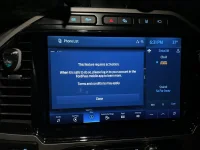
Since you need a subscription for the navigation is there a way to remove it from the screen or bypass this message?
 

Attachments

  • 05D974B8-D067-4C3D-B42E-B3C9F188014E.webp
    05D974B8-D067-4C3D-B42E-B3C9F188014E.webp
    107.8 KB · Views: 97
Since you need a subscription for the navigation is there a way to remove it from the screen or bypass this message?
Does that come up when you hit the Nav button just to show the map or are you trying to do something more?
 
Does that come up when you hit the Nav button just to show the map or are you trying to do something more?
The map pops up when you hit the navigation. That message pops up any time you want to put in an address or to the favorites I had programmed.
 
Back
Top Bottom