-
Featured
- #61
Navigation
Install the app
How to install the app on iOS
Follow along with the video below to see how to install our site as a web app on your home screen.
Note: This feature may not be available in some browsers.
More options
Style variation
You are using an out of date browser. It may not display this or other websites correctly.
You should upgrade or use an alternative browser.
You should upgrade or use an alternative browser.
2022 Sync 4 software update with full screen carplay/android auto
- OP 🔹 JHForman812
- Start date
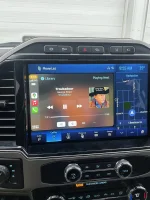

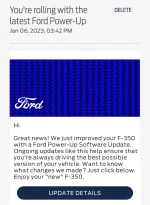
My android auto looks different today...no power up notification though so IDK maybe it was a google update. Never had this split before.
Edit: Android auto hasn't updated on my phone since dec1 so...not sure.

New split with music and gps blacked out. It also when the truck started the gps was 3/4 of the screen top right had last used addresses.

Edit: Android auto hasn't updated on my phone since dec1 so...not sure.
New split with music and gps blacked out. It also when the truck started the gps was 3/4 of the screen top right had last used addresses.
Last edited:


Got my VXDIAG Nano today and FDRS installed and all configured.
Will be attempting to do the updates tomorrow. Here is hoping I don't brick my truck
Will be attempting to do the updates tomorrow. Here is hoping I don't brick my truck
Looking fwd to hear your results.Got my VXDIAG Nano today and FDRS installed and all configured.
Will be attempting to do the updates tomorrow. Here is hoping I don't brick my truck


- Dec 21, 2021
- 1,661
- 3,656
- 2022 7.3L F250
- Assorted vintage trucks, motorcycles, and bicycles.
What's this button do??My android auto looks different today...no power up notification though so IDK maybe it was a google update. Never had this split before.
Edit: Android auto hasn't updated on my phone since dec1 so...not sure.
Made my music full screen wasn't there before. Hit it again it went to app launcher.
Idk about carplay but playing music over Android auto uses a lot of battery anyways so if I didn't plug in I'd say 8 hours it's dead. Which might just be android jank. It's literally just playing downloaded music, not even using gps.Worth noting that disabling wireless CarPlay and plugging in via USB should solve this. Though understandable if you only want to use it wirelessly.


I don't have the update yet. But my truck goes in next Friday for 10k service

Good point! CarPlay does indeed consume a lot of battery as well. Any wireless protocol will, as it's constantly using the WiFi chip constantly and heavily, which isn't cheap power-wise.Idk about carplay but playing music over Android auto uses a lot of battery anyways so if I didn't plug in I'd say 8 hours it's dead. Which might just be android jank. It's literally just playing downloaded music, not even using gps.
The problem is, at least with CarPlay, it will still connect over WiFi for data transfer if wireless CarPlay is supported and enabled, just charging over the cable. The interference problems will still exist as a result. This can absolutely be a feature - you can unplug your phone for any reason without interrupting your CarPlay experience - but this is one of the downsides. Other downside being slower charging due to the added power draw.
- Dec 21, 2021
- 1,661
- 3,656
- 2022 7.3L F250
- Assorted vintage trucks, motorcycles, and bicycles.
I turned wireless Android Auto off because I noticed even without using any of it, it was draining the hell outta my phone battery. I was also getting data spikes, and again, I wasn't using google maps or spotify or anything. It was just that maps was launched and projected to the screen. If I need any of it, I'll plug in. I have a 128gb usb drive w music and so far, the Ford nav has been fine other than not being able to find a couple addresses.
So good news and bad news.
I was able to update the BCM successfully which fixes the deep sleep bug my truck had. I was also able to update a few other modules fine (wireless charging and HVAC)
However, it's failing to install the GMW update for some reason. I'm getting this:

I was able to update the BCM successfully which fixes the deep sleep bug my truck had. I was also able to update a few other modules fine (wireless charging and HVAC)
However, it's failing to install the GMW update for some reason. I'm getting this:

I’d have to say one of my biggest peeves with the system right now is, if I’m using the ford Navvie and listening to Amazon in the side bar, when I receive a text the entire screen temporarily switches to car play to show I received a text then back to the ford navigation. Pretty annoying.

This is a Java runtime error. Somewhere in the code a Function is being called that expects an argument named Template to have a non empty value, and whatever is calling that function is passing an empty string or array.So good news and bad news.
I was able to update the BCM successfully which fixes the deep sleep bug my truck had. I was also able to update a few other modules fine (wireless charging and HVAC)
However, it's failing to install the GMW update for some reason. I'm getting this:
View attachment 108702
Not sure that helps at all since you don't have the source code lol, but that's what is happening.
Yeah, I actually work as a Software Analyst lolThis is a Java runtime error. Somewhere in the code a Function is being called that expects an argument named Template to have a non empty value, and whatever is calling that function is passing an empty string or array.
Not sure that helps at all since you don't have the source code lol, but that's what is happening.
Jesse @ infotainment thinks it might be due to the VXDIAG Nano. Apparently there is a way for me to update manually and offered to send me the update file.
Otherwise I might just wait for it to come OTA now that my BCM is updated (deep sleep bug was preventing OTA updates from working)
Yeah, I actually work as a Software Analyst lol
Jesse @ infotainment thinks it might be due to the VXDIAG Nano. Apparently there is a way for me to update manually and offered to send me the update file.
Otherwise I might just wait for it to come OTA now that my BCM is updated (deep sleep bug was preventing OTA updates from working)
Senior full stack engineer.


Good lord how many os us software nerds are there. Just wait until you get to the part where it copies the files to the USB stick and you will be screaming. Such simple code and it takes so darn long.
Anyway, be sure you make sure the VXDIAG has the latest firmware update. Also when FDRS asks you if you want to install a piece of software let it do that as well. Short of that I would suggest reinstalling FDRS as I did not run into this issue.
I did not try the other modules, I just did the GWM and the APIM.
Anyway, be sure you make sure the VXDIAG has the latest firmware update. Also when FDRS asks you if you want to install a piece of software let it do that as well. Short of that I would suggest reinstalling FDRS as I did not run into this issue.
I did not try the other modules, I just did the GWM and the APIM.
Ah, I declined when it asked to install the newer software package, as I thought it was just an additional feature I wasn't going to use.Good lord how many os us software nerds are there. Just wait until you get to the part where it copies the files to the USB stick and you will be screaming. Such simple code and it takes so darn long.
Anyway, be sure you make sure the VXDIAG has the latest firmware update. Also when FDRS asks you if you want to install a piece of software let it do that as well. Short of that I would suggest reinstalling FDRS as I did not run into this issue.
I did not try the other modules, I just did the GWM and the APIM.
I might try reinstalling along with letting it install the additional software.

I have the same issue updating the GWM. Same error.
Latest FDRS, Mongoose cable. The BCM, wireless charge module, and HVAC modules all updated without issue.
One thing I see is that FDRS says:
FDRS has detected an issue with the VCI software package installed on this PC. This may be because the version installed is out of date. Go to the following link to download....
When you click on the link, and click on the VCI update, there's no page there.
Link is
https://www.fordtechservice.dealerc...ds/diagnosticsites/vcmdvd/mcs/idssoftware.asp
When you choose the VCI one, there's no page found.
If I use the j2534 toolbox, it says the driver is up to date.
Latest FDRS, Mongoose cable. The BCM, wireless charge module, and HVAC modules all updated without issue.
One thing I see is that FDRS says:
FDRS has detected an issue with the VCI software package installed on this PC. This may be because the version installed is out of date. Go to the following link to download....
When you click on the link, and click on the VCI update, there's no page there.
Link is
https://www.fordtechservice.dealerc...ds/diagnosticsites/vcmdvd/mcs/idssoftware.asp
When you choose the VCI one, there's no page found.
If I use the j2534 toolbox, it says the driver is up to date.


![What did you do to your Tremor today? [2019-2024]](https://www.fordtremor.com/data/files/featured_images/featuredimages_thumb_6.webp?1792713217)
Tremor Forum Photos
Latest Discussions
-

-
-

-

-
 Nevada FOR SALE 2024 F350 Tremor Glacier Gray, Las Vegas, NV.
- Latest: Ragin Cajun
-