14.4" Screen for the 2020-2021 Trucks

I spent a bit more time playing with the system this afternoon trying to set things up. I was a bit disappointed at first with the display quality of the screen. Then I remembered that I never removed the factory screen protector. All's good now... :ROFLMAO:

As discussed previously, it doesn't seem like you can connect to AA while simultaneously being connected to WiFi. I had the truck parked close to my house where it would pickup WiFi, but it wouldn't connect to it and my phone at the same time. I quickly looked into Hostspotting over Bluetooth and couldn't get that to work either.

From other forums it looks like some guys really have these dialed in. I'm probably going to try and get the unit to connect to my truck's hotspot for data, and stop using Android Auto.
 
Does anyone have one with the exhaust brake button up top?
I can’t get a straight answer from them and none of the pictures on their site show it.
Thanks!
 
  • Like
Reactions: Twn
Does anyone have one with the exhaust brake button up top?
I can’t get a straight answer from them and none of the pictures on their site show it.
Thanks!

I have one, no issues on my install. It's a little awkward to use now though since you can barely see the buttons.
 
Fantastic option for the smaller screened trucks!!!
The non-BS2s...
Looks interesting but what is the advantage of this over the OEM screens other than a larger screen? Any added functionality?
Some have wanted the ability to play videos and other tablet-type functions on their vehicle screen. I would do this for the price vs. some of those other options.

I really like the way this looks and integrates into the dash. If they come out with an option for 22 I may have to consider it more, although still not sure if the "why-buy" is there vs the 12" screen.

Since I'm not paying for connected nav mine has become more of just an Android Auto interface anyway. If it retains the other factory functionality it would be a good way to unlock some streaming/web/app possibilities. Guessing the one-year version of Sync4 for 22 may preclude that option, though...
 
I'm going to hold out and let a few of you do the test drive on this mod. No one answered my question about this new screen working with my Nav TV Module. That'll definitely be a deal breaker for me.
 
I'm going to hold out and let a few of you do the test drive on this mod. No one answered my question about this new screen working with my Nav TV Module. That'll definitely be a deal breaker for me.
I have the Nav TV, and thinking about buying the screen (hence starting the thread). If the interface still uses the OEM Sync module behind the dash, I can't think that it won't work.
 
I have one, no issues on my install. It's a little awkward to use now though since you can barely see the buttons.

Thanks for the reply!
So do the factory buttons just relocate into the top of this unit or does the unit have its own button up top?
 
Thanks for the reply!
So do the factory buttons just relocate into the top of this unit or does the unit have its own button up top?
They relocate. You take out the switches from the factory bezel and move them to the new radio.
 
Thank you very much!
Here you go.

20230504_073023.webp
 
Looks like that will hinder the built right bracket's usability some. Not that big of a deal to me. Also the buttons are pretty much tactile only. No way to see the buttons while driving. Still not that big of a deal but a little awkward.
 
Last edited:
Looks like that will hinder the built right bracket's usability some. Not that big of a deal to me. Also the buttons a pretty much tactile only. No way to see the buttons while driving. Still not that big of a deal but a little awkward.
Agree and I think it depends how you are using it. For those that are already using arms to go out to the side I think that may still work.

A little additional chunk of mirror mounted under the rear view mirror would help for seeing the buttons... Kind of like a 70s bedroom :whistle:
 
Looks like that will hinder the built right bracket's usability some. Not that big of a deal to me. Also the buttons a pretty much tactile only. No way to see the buttons while driving. Still not that big of a deal but a little awkward.
I wonder if the bracket for the '22 would work for this.

 
I did consider both, end of the day I feel like I would have regretted not just getting the 14.4"

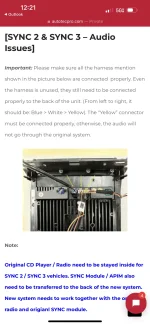
Yes I installed myself, I could put one in less than 20 mins at this point. One gotcha, everything is plug and play, there is one wire that has to be plugged in the back of the unit that comes from the sync system or no audio will play from the unit. I first installed it and forgot to plug it in, everything worked but no audio from the unit. I don't miss the knob now, im already used to using the steering wheel or touching the screen when I forget the steering wheel haha...

I don't miss the stock unit at all, so many possibilities with this.
I just installed mine and everything works except the audio from the head unit. Apple CarPlay boots right up but no sound from music etc. What was the wire that you are talking about that fixed this issue? Thanks in advance for any help.

Lou
 
I just installed mine and everything works except the audio from the head unit. Apple CarPlay boots right up but no sound from music etc. What was the wire that you are talking about that fixed this issue? Thanks in advance for any help.

Lou
You likely did what I did and missed a cable, be sure to connect these.
 

Attachments

  • 3174EA4E-F375-4C23-BBEC-3D142B772B15.webp
    3174EA4E-F375-4C23-BBEC-3D142B772B15.webp
    94.7 KB · Views: 224
This unit seems to get a thumbs up from several people here.
So I'm half way considering getting one.

I don't have the 360 system on my truck and I understand the ford one is hard to add.
I really would like a front camera and this would solve that problem.
Just curious if anyone got the HD front camera and how is it?
 
Pulled the trigger on this and so far I'm loving it. A HUGE upgrade over the 8 inch screen and audio quality is much improved.

Question for those that also have one installed: have you been able to map the steering wheel buttons to work with the tablet apps? My Sync console works fine with them, but Apple Music, SiriusXM, etc... don't work with the forward and backward track buttons. I found the settings menu to assign the buttons to specific functions, but it doesn't do anything when I attempt to set them. Anyone have success with this yet?
 
Back
Top Bottom