Forscan for 2022

what is configure my gauges feature found in the IPC module? It's disabled.
This is for other later model year vehicles that allow you to select from a list of parameters to display on certain cluster screens. Our Bronco has this and I think the 21 F150 does as well.
 
I cannot get the Global close to function properly.

It seems that prior to MY22, it was accomplished through "as-built'

MY22 is now through "plain english"
There is always an As-Built solution. The Plain English is just a simplified way to change the bits in the memory address. You never have to use Plain English, but you need to understand where the features are held and then the hexadecimal choices to turn on or off functions. I do recall seeing something for global close and can look it up when I am in front of my computer. Do you happen to know the As-Built for previous years?
 
  • Like
Reactions: ccw
Anyone has success changing the splash screen on a 22? I’ve tried plain english as well as as-built. All show correct changes, but there’s no change to the animation. Not sure why it’s not changing.
Yes, I have.

I changed it to the raptor screen but thought it just didn't fit my truck so I put it back to stock.

I did not really saw any others that apply to a King Ranch, TREMOR.
 
There is always an As-Built solution. The Plain English is just a simplified way to change the bits in the memory address. You never have to use Plain English, but you need to understand where the features are held and then the hexadecimal choices to turn on or off functions. I do recall seeing something for global close and can look it up when I am in front of my computer. Do you happen to know the As-Built for previous years?
Thank you.

I have seen the as-built for it and while it is lengthy but I will proceed with such.
 
That is the correct address. I only had to change a single character and it was XXXX XXAX XXXX. the A was my original and I changed it to 5.

Is E5 your original or what you changed it to?
I haven’t changed it yet, was just trying to confirm the correct, new value. The spreadsheets I’ve seen show the new value as E5 to avoid the camera issue message. The code supposedly changes based on whether you have the brake controller and/or turbos.
 
Spreadsheet link not working for me. Can someone repost the most current one? Thanks!
 
@Modman Any way to remove the AM radio as an audio source? I hate hitting the 'M' button on the steering wheel when I swap quickly between FM and XM lol but have to go through AM first, as there doesn't seem to be any way to change the audio source order.
 
  • Like
Reactions: ccw
@Tucsontremor FYI - That memory address controls a lot of other things as well... not just the temps. This is true for the other memory locations as well. Each character has a specific function.

For the temps above the gauges the "*" denotes the only important character:

720-07-01 xxxx xx*x xx--

8409: This is the same so I won't address it

0A00: Different than mine and @MiTremor906 because the highlighted character for us was originally set to "A" in our AS-Built. this means that the temps were available in the menu, but not permanently displayed. Regardless of your original setting, "5" is the only choice to have both displayed above the gauges.

08CE: The only important piece here are the first two characters "08" which are the same as yours. The "CE" is the checksum, and as @MiTremor906 said, when you made the change it didn't matter because the summation ends up being the same.

I stated this because in other scenarios you don't want to take the entire memory address from someone else's build and plug it into yours. I have used the term "surgical" before and that is what I mean - only change the characters that are important. Sometimes it may not matter, like in this case, but others you may end up turning something off that was unintended.

This is why I may ask people for their existing As-Built for reference in certain situations. We can't always answer the question without knowing the starting point.

Glad it worked out for you!
That is the correct address. I only had to change a single character and it was XXXX XXAX XXXX. the A was my original and I changed it to 5.

Is E5 your original or what you changed it to?

Still confused on the temp display.

I believe both of you changed only a single character in the central string. The 2017+ SuperDuty and 2021 F150 spreadsheets show two character changes that vary depending on your engine and whether you have a brake controller. I believe you both have 7.3 gassers...:confused:

2017+ SuperDuty:

Screen Shot 2022-02-14 at 7.09.52 AM.webp


2021 F150:

Screen Shot 2022-02-14 at 7.10.39 AM.webp
 
Still confused on the temp display.

I believe both of you changed only a single character in the central string. The 2017+ SuperDuty and 2021 F150 spreadsheets show two character changes that vary depending on your engine and whether you have a brake controller. I believe you both have 7.3 gassers...:confused:

2017+ SuperDuty:

View attachment 46617

2021 F150:

View attachment 46620
I was also confused by this. I did some digging as I thought someone with a desiel had done this but I couldn't find it.

Your original also is the 'with brake controller' recommended value.

I can try to do some more research tonight, unless @Modman already has the answer.
 
Still confused on the temp display.

I believe both of you changed only a single character in the central string. The 2017+ SuperDuty and 2021 F150 spreadsheets show two character changes that vary depending on your engine and whether you have a brake controller. I believe you both have 7.3 gassers...:confused:

2017+ SuperDuty:

View attachment 46617

2021 F150:

View attachment 46620
Based on the below linked thread, it appears that E5 is the correct value to get the temps with boost (A5, would remove the boost gauge). Are you sure your As Built is currently E5? Did you see that in Forscan or did you look it up on the motorcraft website?

 
I was also confused by this. I did some digging as I thought someone with a desiel had done this but I couldn't find it.

Your original also is the 'with brake controller' recommended value.

I can try to do some more research tonight, unless @Modman already has the answer.
7.3L is straightforward... It is a one character change to "5" to enable both gauges.
6.7L can be as straightforward, but it depends on what you want to achieve.

Here are the two memory addresses involved:

720-07-01 xxxx x*xx xx--
Trailer Brake Controller (TBC) • Turbo Boost (TB) •
Digital Gauge Interface (DGI) • Nav Speed Sign (NSS)

720-07-01 xxxx xx*x xx--
Eng Temp Dig (ETD) • Trans Temp Dig (TTD)

For 7.3L folks (like me), there will be a different value in the first "*" position depending on the presence of the factory brake controller. There is no need to change this value, however (most have an "A") We only change the second "*" to a "5" to enable both temp displays to "Always On"

For the 6.7L you have a couple choices and the first "*" potentially comes into play. Most will probably start off with an "E" to signify the presence of the brake controller and turbo boost. This is different between the engines since the 7.3L is naturally aspirated. If you want both temp gauges like on the 7.3L you can switch that first character to an "A" but you will lose the boost gauge and get the trans temp gauge in it's place.

Many will select "E5" to retain the boost gauge, but you can go to "A5" as well like the 7.3L...

Make sense?
 
7.3L is straightforward... It is a one character change to "5" to enable both gauges.
6.7L can be as straightforward, but it depends on what you want to achieve.

Here are the two memory addresses involved:

720-07-01 xxxx x*xx xx--
Trailer Brake Controller (TBC) • Turbo Boost (TB) •
Digital Gauge Interface (DGI) • Nav Speed Sign (NSS)

720-07-01 xxxx xx*x xx--
Eng Temp Dig (ETD) • Trans Temp Dig (TTD)

For 7.3L folks (like me), there will be a different value in the first "*" position depending on the presence of the factory brake controller. There is no need to change this value, however (most have an "A") We only change the second "*" to a "5" to enable both temp displays to "Always On"

For the 6.7L you have a couple choices and the first "*" potentially comes into play. Most will probably start off with an "E" to signify the presence of the brake controller and turbo boost. This is different between the engines since the 7.3L is naturally aspirated. If you want both temp gauges like on the 7.3L you can switch that first character to an "A" but you will lose the boost gauge and get the trans temp gauge in it's place.

Many will select "E5" to retain the boost gauge, but you can go to "A5" as well like the 7.3L...

Make sense?
This makes sense and was what I had in my head as well but @catastrofe said that E5 was his original value. I'm waiting for him to confirm where he got this value but if it is true, it throws all of this out the window.
 
7.3L is straightforward... It is a one character change to "5" to enable both gauges.
6.7L can be as straightforward, but it depends on what you want to achieve.

Here are the two memory addresses involved:

720-07-01 xxxx x*xx xx--
Trailer Brake Controller (TBC) • Turbo Boost (TB) •
Digital Gauge Interface (DGI) • Nav Speed Sign (NSS)

720-07-01 xxxx xx*x xx--
Eng Temp Dig (ETD) • Trans Temp Dig (TTD)

For 7.3L folks (like me), there will be a different value in the first "*" position depending on the presence of the factory brake controller. There is no need to change this value, however (most have an "A") We only change the second "*" to a "5" to enable both temp displays to "Always On"

For the 6.7L you have a couple choices and the first "*" potentially comes into play. Most will probably start off with an "E" to signify the presence of the brake controller and turbo boost. This is different between the engines since the 7.3L is naturally aspirated. If you want both temp gauges like on the 7.3L you can switch that first character to an "A" but you will lose the boost gauge and get the trans temp gauge in it's place.

Many will select "E5" to retain the boost gauge, but you can go to "A5" as well like the 7.3L...

Make sense?

This makes sense and was what I had in my head as well but @catastrofe said that E5 was his original value. I'm waiting for him to confirm where he got this value but if it is true, it throws all of this out the window.

Thanks guys. My as-built was "EA". I just changed the "A" to a "5" and it's working as intended. Thank you for the assistance!
 
@Modman Any way to remove the AM radio as an audio source? I hate hitting the 'M' button on the steering wheel when I swap quickly between FM and XM lol but have to go through AM first, as there doesn't seem to be any way to change the audio source order.

Take a look at the 2021 F150 spreadsheet for the APIM codes for this. It should work but I have tried it. I was the one that requested this change on the Sync 3 system as I did not want CD or Sirius as sources. I haven't bothered with the new truck as I just leave it on Apple Carplay all the time.
 
  • Useful
Reactions: ccw
@Modman Any way to remove the AM radio as an audio source? I hate hitting the 'M' button on the steering wheel when I swap quickly between FM and XM lol but have to go through AM first, as there doesn't seem to be any way to change the audio source order.
7D0-01-01 xxxx xxx* xx--

My AS-Built is set to "2" = AM Tuner Available • NMMPPP 5 Presets per Page • VRRT Disabled

Adding "8" in hexadecimal to any value would keep the same settings but change from AM Tuner Available to AM Tuner Not Available.

For mine, I would change "2" to "A"

Note: I have not tried this myself, but this was the only thing I found in the APIM (Sync Module) that seemed like it could work...
 
Last edited:
  • Useful
Reactions: ccw
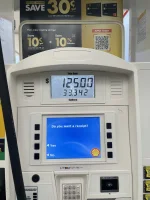
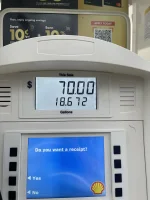
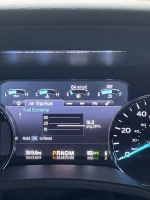
Update on my he forscan mod for the 60 gallon S&B. Did my first fill today after making the changes. I’m averaging 16 mpg. DTE showed 64 miles to go, so technically I should have 4 gallons of fuel in the tank. First run I put in 33 gallons, second run was 19 gallons, so a total of 52 gallons. Add the 4 in the tank I am at 56 gallons. So there is a 4 gallon discrepancy from the DTE and the actual amount of fuel in the tank. Or the 60 gallon tanks are actually 56 gallons.
 

Attachments

  • 919D0326-75DB-433C-B982-424B3B53DE7C.webp
    919D0326-75DB-433C-B982-424B3B53DE7C.webp
    124.4 KB · Views: 62
  • D79B9797-EF4A-469B-8F60-B2F204A5CF3D.webp
    D79B9797-EF4A-469B-8F60-B2F204A5CF3D.webp
    97 KB · Views: 62
  • 1FAAA8E2-63ED-4ADD-B755-BC757B66DC46.webp
    1FAAA8E2-63ED-4ADD-B755-BC757B66DC46.webp
    160.8 KB · Views: 64
My first fill on my S&B tank I put 5 gallons in at home measured exactly in a fuel can. Drove 3 miles to the gas station and put in an additional 55 gallons topped up. So I got a full 60 gallons in the tank. Subsequent fill ups I fill up around 50-80 miles to empty and typically put in 55 gallons on average. Average 19.5 mpg hand calculated so I suspect I really have at least another 30 miles in the tank beyond what the DTE says. Once I go under 100 miles DTE it is time to fill it up.
 
I am in! It is great being able to make these adjustments to some of the (in my opinion) stupid features!
 
@Avslash this is what I am going to try for battery voltage:

720-06-01 xx*x xxxx xx--

Mine is currently set to "0" and I will try changing to "2" to enable the Battery Voltage Display. No promises as this may only be functional in the newer displays (F150, Bronco, etc). I will try it in the next day or so.
Did you ever get the battery voltage to display?
 
  • Like
Reactions: ccw

Latest Discussions

Back
Top Bottom