Forscan for 2022

I finally ditched using VirtualBox on the Mac for Forscan and now use Boot camp. Alot better and smooth.
@BroncoHooves I was looking for feedback from Mac users to add to my "New User" post. I don't have any experience with this... Is it a free add-on or purchased software?
 
@BroncoHooves I was looking for feedback from Mac users to add to my "New User" post. I don't have any experience with this... Is it a free add-on or purchased software?
100% free. Just need a USB 2.0 (not 3.0) 32GB flash drive to do the install on a 2nd partition using the Boot Camp utility built into macOS.

Edit: USB 3.0 flash drives will work if your Mac is newer and uses UEFI, however USB 2.0 will work with all Macs and you won't have to think about it. Just will take longer to do the install.

Will NOT work with Apple Silicon based Macs. Intel only.
 
Last edited:
Yeah, for ours you only need to push it once... Thanks for the response - those were the obvious things that sometimes cause issues.

Ok, a couple more things I thought of:
1) If you plug the adapter into the laptop but not the obd port it should check for any driver updates. The OBD EX will turn it's led red if there are updates required. Just something else to rule out
2) I would try a different simple change in another module and see if that works
3) If #2 works try another one in the IPC module
4) If #2 doesn't work there is most likely something going on with your adapter
5) if #2 works and #3 doesn't work, the IPC may need to be reflashed which can be done in forscan.

Hopefully that makes sense.

Another solution is to pull the battery cable(s) which should act to reset the modules as well.

@MiTremor906 has a good list of plain English changes that would be good to try. Pick one of the BdyCM features and if that works try one of the other IPC features. Here is his list:

Post in thread 'Forscan for 2022' https://www.fordtremor.com/threads/forscan-for-2022.5886/post-165882
I just made a couple plain english changes successfully. I did get a message about the baud rate not being optimized as usual, this time I went in and checked the box in settings for automated baud rate increase. I did that before the plain english changes, should I try the others again perhaps?

thanks for you time I appreciate it!
 
I just made a couple plain english changes successfully. I did get a message about the baud rate not being optimized as usual, this time I went in and checked the box in settings for automated baud rate increase. I did that before the plain english changes, should I try the others again perhaps?

thanks for you time I appreciate it!
That's good! Were any of the changes you made in the IPC module? I would try one of these:

ModuleSettingOriginalNew
IPC – Plain EnglishChimes - Vehicle running with door openAutomatic TransmissionDisabled
IPC – Plain EnglishAverage Speed DisplayDisabledEnabled

If that works try the temps above gauges in the As-Built again. Hopefully the baud rate setting was the cause of the issue...
 
That's good! Were any of the changes you made in the IPC module? I would try one of these:

ModuleSettingOriginalNew
IPC – Plain EnglishChimes - Vehicle running with door openAutomatic TransmissionDisabled
IPC – Plain EnglishAverage Speed DisplayDisabledEnabled

If that works try the temps above gauges in the As-Built again. Hopefully the baud rate setting was the cause of the issue...
Yep, changed the Chimes - Vehicle running with door open
 
Yep, changed the Chimes - Vehicle running with door open
Great! That should confirm you have a good connection and there is nothing going on with the IPC module. Try the temps again and see what happens!
 
Great! That should confirm you have a good connection and there is nothing going on with the IPC module. Try the temps again and see what happens!
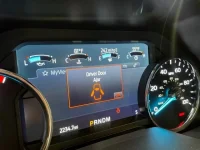
woohoo! Thanks again for all your help. It was the baud rate settings.
 

Attachments

  • gauges.webp
    gauges.webp
    41 KB · Views: 81
woohoo! Thanks again for all your help. It was the baud rate settings.
@torino420 that's awesome!!!! Glad it finally worked out. I'll add baud rate to my notes for other users if the same issue pops up again...
 
Hi. Modman, this is TThai, I was wonder is any chance you know where I can find the module to have the Powre mirror folding change to Lincoln mode? Thanks.
I haven't done that one but I think it is in the BdyCM
 
I also want to disable the triple ding at start up. I found this post, but it's different then mine. Any idea what I should change it to?

1641938117580.webp


Below is what shows in Forscan
1641938156848.webp
 
I also want to disable the triple ding at start up. I found this post, but it's different then mine. Any idea what I should change it to?

View attachment 43672


Below is what shows in Forscan
View attachment 43673
It is the same change for you for that character (the last two are the checksum and are a result of the other characters)

You would change "50A7" to "52A9"
 
Sorry, playing with FORScan now, which modules do I want to back up first? Watched a video and I am not finding the file I thought I was supposed to back up.
 
Sorry, playing with FORScan now, which modules do I want to back up first? Watched a video and I am not finding the file I thought I was supposed to back up.
You back up each module individually. Technically you could go through and back up all of them right away, but I just back up each module as I make the first change to it. If I don't remember if I've backed it up already, I go check, then make my change if I have.

You back it up by choosing to edit the module As-Built, then using the "Save" button at the bottom.
 
Sorry, playing with FORScan now, which modules do I want to back up first? Watched a video and I am not finding the file I thought I was supposed to back up.
I would backup BdyCM, APIM, and IPC. Those will have the majority of the changes.
 
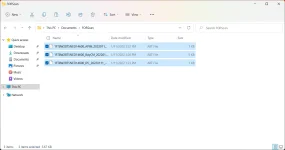
I have saved the files listed below...confirming these are the correct files?
 

Attachments

  • 1641943557294.webp
    1641943557294.webp
    32.7 KB · Views: 86
Back
Top Bottom