Forscan for 2022

Hmmm, mine changed right away, but it should update after a few ignition cycles. Pressures should show again after driving for ~2min at greater than 20mph using the guidance in the owners manual for a TPMS alert:

1638282352326.webp
 
Got my truck last night...LOVE it
made some changes with forscan
all went fine
except.......tire pressures were showing normal
then i changed the rear from 75 down to 60 in the BdyCm-BCM plain English
Then it stopped showing the pressure
Do i have to drive it for a bit now to show the pressure again?
yes it will need to pick it back up. mine picked up by time i got 1/4 mile down the road
 
The pressure changed right away.... from 75 to 60
But in the display it just showed --- for the pressures instead of the actual numbers like before
I'll take it for a drive and hopefully the numbers come back

I did notice that TPMS display placards are disabled in APIM and IPC in plain English
But I'm pretty sure they were like that to start with??
What does that do anyway?
I cycled it on....but then disabled it again as it didn't seem to do anything.
 
I did notice that TPMS display placards are disabled in APIM and IPC in plain English
But I'm pretty sure they were like that to start with??
What does that do anyway?

That is the issue with some plain english line items... best case is they may not be tied to any actual code, worst case is they may be tied to something resulting in an unintended event. I try to stay in the As-Built modules as much as possibly for that reason, but do what is comfortable for you.

From your comments it seems like a drive should fix your pressure readings. Let us know what happens!
 
Will do
Thanks for your help!!
I didn't know how to change the tpms in the as built...i don't see any numbers in the 2022 spreadsheet?
I added the temp over the gauges no problem
the nav while driving was different than yours 7D0-03-01 wasn't 5553.....but mines a Canadian truck.
it is 7D0-03-01 4341 0203 0367
 
I didn't know how to change the tpms in the as built...i don't see any numbers in the 2022 spreadsheet?
You should be able to do it without issue in plain english. As-built requires converting the PSI to hexadecimal but there is really no need to go this route.

the nav while driving was different than yours 7D0-03-01 wasn't 5553.....but mines a Canadian truck.
it is 7D0-03-01 4341 0203 0367

That makes sense:

7D0-03-01 **xx xxxx xx-- First Letter of Country Code (FLCC)
7D0-03-01 xx** xxxx xx-- Second Letter of Country Code (SLCC)

C = 43
A = 41

For mine (US truck):
U = 55
S = 53

53 = 1010011 in binary
57 = 1010111 in binary it seems like it is the data bit in red that controls the nav in motion. This is the change I made for mine...

41 = 1000001 in binary
45 = 1000101 in binary this is what I would try for a Canadian vehicle.

Your new string would be: 7D0-03-01 4345 0203 036B
 
Thanks very much for that!!
And yes my tire pressure started reading again before I made it 2 blocks.
All is well
I will do the navigation update later
Thanks again
 
Got my truck last night...LOVE it
made some changes with forscan
all went fine
except.......tire pressures were showing normal
then i changed the rear from 75 down to 60 in the BdyCm-BCM plain English
Then it stopped showing the pressure
Do i have to drive it for a bit now to show the pressure again?
Assume that when you say it stopped showing the pressures you mean it only showed “- -“ instead of the tire psi. Mine did the same. As soon as I drove the truck they all came back.
 
Is there anyone in the St. Louis, MO area willing to meet up sometime and help me with changing the tire pressure using forscan? Im having a hard time getting it right. Thanks
 
Yardbird
Yes you’re correct
They came back after 300-400 yards 👍🏻
 
@Joe_Lee I made several changes in FORscan last night for the first time on my 22 including Bambi mode. Some were made in the as-built module and other's like the DPF % and OCR were done in plain English. If the below doesn't help, send me a PM.

For Bambi mode specifically, go into the BdyCM As-Built module. Look for 726-39-02. To enable Bambi mode you will need to change the fourth digit in the first string to 0 (726-39-02 xxx0 xxxx xx--). The two dashed lines at the end are the auto sum and FORscan will recalculate those automatically so you don't need to worry about them. One of the spreadsheets I ran across had a Bambi mode that enabled the truck to recall the last setting when the ignition is switched on and off. It required changing a few other digits, but I didn't attempt that one (yet).

In total, I made the following changes:
1. Bambi Mode (BdyCM As-Built)
2. Double Horn Honk when exiting (BdyCM As-Built)
3. Digital Temps Above Oil and Trans (IPC As-Built)
4. Disable Driver and Front Passenger Seatbelt Chimes (IPC As-Built)
5. Adjusted Turn Signal Flashes, 3 to 5, (SCCM As-Built)
6. Tire Pressure Front and Rear (BdyCM plain English)
7. Diesel Exhaust Filter Load Percentage (IPC plain English)
8. Auto Regen Control, this is required to enable the check box, (IPC plain English)
9. DPF Manual Regen, "Operator Controlled Regen" (PCM plain English)

The only change I attempted that didn't seem to work was the Tire Pressure Placard on the TPMS page. Everything else worked great.
Thank you, I was successful with Bambi mode.

What does #8 and #9 do for your truck? I have the diesel exhaust filter % enabled in my maintenance monitor on dash.
 
In my 2020, I used Forscan to put the heated/cooled seat controls on the climate screen.

Can I do this on my 22?
 
That is the issue with some plain english line items... best case is they may not be tied to any actual code, worst case is they may be tied to something resulting in an unintended event. I try to stay in the As-Built modules as much as possibly for that reason, but do what is comfortable for you.

From your comments it seems like a drive should fix your pressure readings. Let us know what happens!

Joy, plain english is my speed, going into the as built is way beyond my comfort level, really do not want to brick the truck lol
 
Thank you, I was successful with Bambi mode.

What does #8 and #9 do for your truck? I have the diesel exhaust filter % enabled in my maintenance monitor on dash.
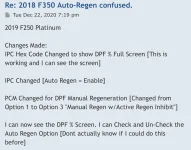
8 puts the check box in your advanced settings menu, but without 9 it’s always checked and you can’t uncheck it. I now have the ability to toggle Auto Regen off and on.

I don’t tow a lot and have a relatively short commute so I assume I’m not getting full regens while driving. I haven’t had one since I enabled my DPF % so it’s hard to say definitively. I anticipate turning auto regen off as I approach 10k miles and then activating an operator controlled regen. Everything I’ve read leads me to believe the OCR in the driveway does the best job of cleaning the DPF.

The attached image is from the Forscan forum and probably does a better job explaining what I did.
 

Attachments

  • AC8C6976-39EC-481A-A3D5-8CDEA73DEA99.webp
    AC8C6976-39EC-481A-A3D5-8CDEA73DEA99.webp
    64.2 KB · Views: 129
Modman
Thanks 🙏
I made the nav change for my Cdn truck and it works perfectly
Thanks again 👍🏻
 
Just finishing making some changes and took the truck for a drive to test out and everything seems to be working. At first the screen was overlaying audio buttons on nav but that went away after changing back and forth between screens. Here is what I changed:

1) disabled double honk on leaving with key
2) disabled triple honk on start up
3) disabled door chime
4) set TPM to 50f/60r (light came on when it got cold out)
5) bambi mode
6) Temps above gauges
7) allow navigation changes when moving
8) increased blinker count when turn signal bumped
9) added average speed to trip menu

Thanks to @Modman for a lot of these and everyone else that shared inputs.

Also learned some about the checksums and how to calculate then if you want to make changes without getting errors. Didn't check a few and just accepted accepted error, checksum automatically changed.
 
Also learned some about the checksums and how to calculate then if you want to make changes without getting errors

I have been overly anal about that... I like not seeing the error message even though I know it will end up auto-calculating anyway!

Once I understood what was happening, I made a macro in Excel so it spits it out for me quickly now.
 
How do you get rid the of the check the backseat for kids notice and ding when you shut your truck off??
 
Back
Top Bottom