2023+ ForScan Spreadsheet

Coming in late on this perticklar macrotopic...


B... b... but via FORScan we can use different lights as DRLs.

What's with the curvature factoid?
If the DRL has several curves, it's far harder to wrap it. I don't own the truck yet and would have to go back to the dealer to look at a headlight up close to see if it can be easily done.
 
If the DRL has several curves, it's far harder to wrap it. I don't own the truck yet and would have to go back to the dealer to look at a headlight up close to see if it can be easily done.
Just had clear PPF put on my truck. All forward facing light elements were covered along with body components. You should be good to go.
 
I'll have to find a yellow film on Amazon and do it myself then. Thanks for sharing guys! I did this to my 2023 Chevy Silverado ZR2 and it turned out great. Hopefully, the same will happen here :)
 
I'll have to find a yellow film on Amazon and do it myself then. Thanks for sharing guys! I did this to my 2023 Chevy Silverado ZR2 and it turned out great. Hopefully, the same will happen here :)
I didn't do it myself, the local shop did it for me. For me, paying for it was the hardest part.
 
If they would have just let Ambient Lighting work with Silent Mode it would have been perfect. Stupid programmers.

I hated it more when I had cab lights. While I have the slider feature enabled, I rarely use Silent Mode anymore.
After having dark mode for a few weeks, I’m thinking of going back. I love the no lights outside, but sucks getting into a pitch black truck, especially getting in the back doors to grab/find something and its pitch black.

There has to be some way to turn on ambiant interior and still have dark mode outside. Maybe not, I think the cons of dark mode outweigh the pros in my opinion.
 
With Silent Mode/ dark mode, do the interior dome lights still turn on when a door is opened if the overhead dome light switch is set to "door"?

Also, I believe you can toggle it on/off directly from the SYNC screen (Vehicle Settings → Silent Mode slider) after first enabling it using FORScan (APIM and BCM changes for Centerstack Settings + Silent Mode Control Function), according to Grok.

I may give this a try. It'll come in handy when camping so my truck doesn't light up the whole campsite like a Christmas tree 😁
I just added the silent switch and it works great. There’s a ton of disabled settings in that APIM but not sure what they would do.
 
I use my 2025 F-250 Tremor mostly to tow a travel trailer, that has a rearview camera powered by the running lights. Has anyone had any luck getting the trailer running lights to come on with the DRL's when the headlight switch is in Auto? Changing BCM 726-38-01 (Running Lights w/DRL) doesn't activate the trailer running lights, only the truck's. (On the F-150 I traded in for the F-250, the option to include parking lights with the DRL's did also activate the trailer running lights.)

So, I'm wondering if there's a different module that controls the trailer lights that needs to be programmed in a similar fashion to the BCM to get the trailer running lights to come on with the truck's DRL's...

I saw another thread where a Canadian F-250 owner had trailer running lights come on whenever the ignition was on, regardless of whether the transmission was in Park or Drive (and was seeking to disable it). Which, is actually how I'd rather have mine working if possible (so doing a diff of the as builts between an equally configured US F-250 and a Canadian F-250 might shed some clues -- but I'm guessing there would probably be a lot of differences that would need to be vetted).
Did you ever find a way to make this work? I just got my ‘26 and it is irritating that i used to have this functionality on my 17-20 super duty, as well as my ‘23 F150. Definitely looking to find a way to make the trailer running lights work with the DRL’s.
 
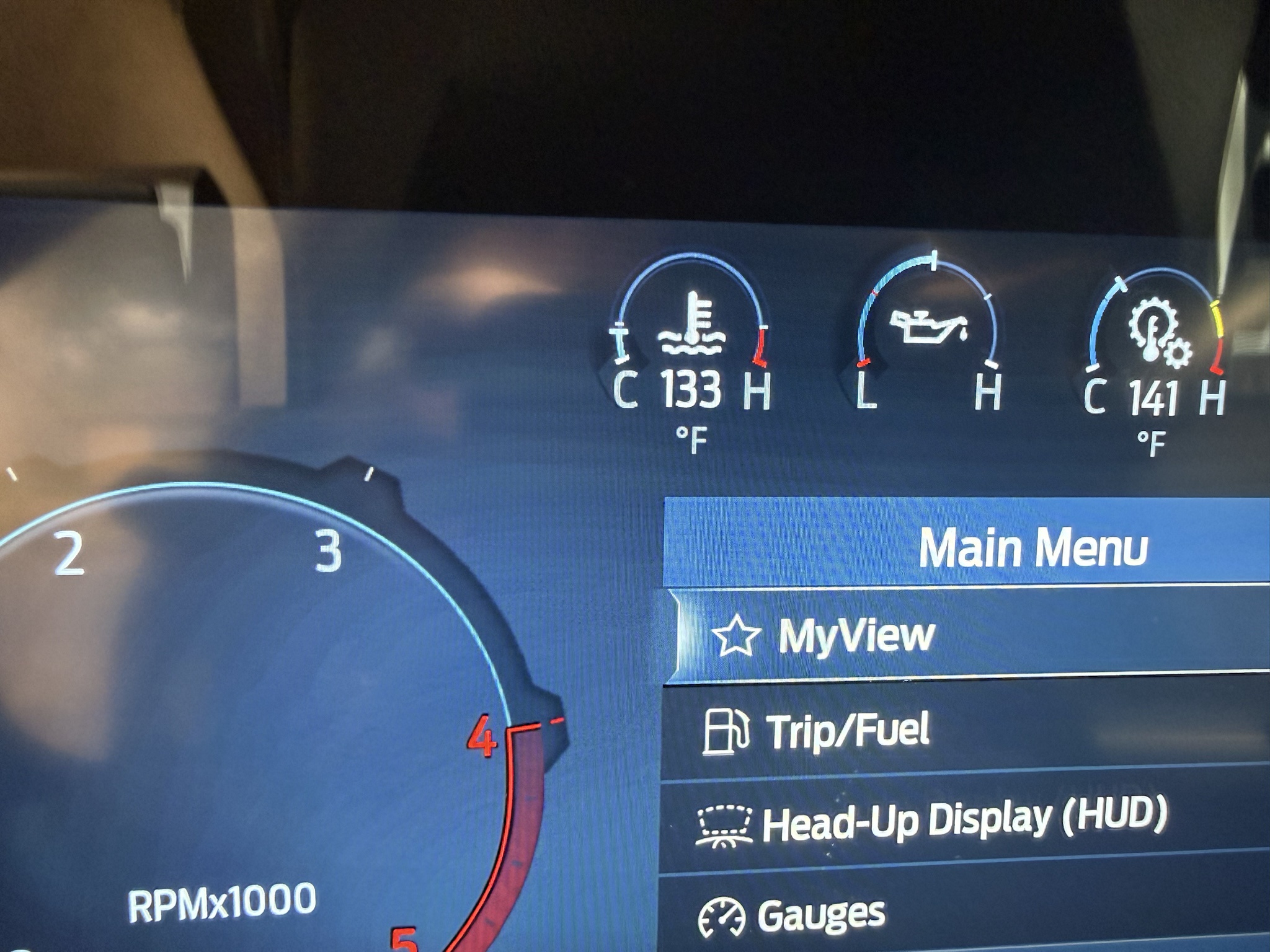
Question - my Tremor is being built so no first hand knowledge. Do the gauges that appear in the top of the gauge cluster show the actual temps/psi in the gauge or is that something that you must Forscan to initiate? I have seen folks posting the cluster with the actual numbers within the gauges so curious. Thanks!
 
Question - my Tremor is being built so no first hand knowledge. Do the gauges that appear in the top of the gauge cluster show the actual temps/psi in the gauge or is that something that you must Forscan to initiate? I have seen folks posting the cluster with the actual numbers within the gauges so curious. Thanks!

Selectable with buttons on the steering wheel. You can choose different gauges for certain positions on the top row, but not all will give a numerical number along with the gauge.
 
Do the gauges that appear in the top of the gauge cluster show the actual temps/psi in the gauge or is that something that you must Forscan to initiate?
I think some of the older years required Forscan but you can do it through the menu on the newer rigs. This is how I set it up on mine.

IMG_7629.webp
 
Did you ever find a way to make this work? I just got my ‘26 and it is irritating that i used to have this functionality on my 17-20 super duty, as well as my ‘23 F150. Definitely looking to find a way to make the trailer running lights work with the DRL’s.
There is a FORScan setting to turn on parking lights with DRLs. That might do the trick.
 
YHSI8tA.jpeg


2023, where do I go (module, steps, codes) to turn on the numerical readout for the oil temp gauge and the tach?
 
Hi

Did anybody ever figure out Wyatt to do about this?

Because it's causing me to use loud bad words towards my truck. :mad: :confused:
20260219_104719.webp
:LOL::ROFLMAO:
 
YHSI8tA.jpeg


2023, where do I go (module, steps, codes) to turn on the numerical readout for the oil temp gauge and the tach?

Not sure if it is the same for 2025. If it is go to:

Main Menu -> Settings -> Configure Gauges -> Temperature Gauge Option -> Detailed (stock default is standard)

Turning the detailed view on will enable the actual temperature for Oil, Coolant, and Transmission.
 
Not sure if it is the same for 2025. If it is go to:

Main Menu -> Settings -> Configure Gauges -> Temperature Gauge Option -> Detailed (stock default is standard)

Yea, I have that on, it still doesn't populate a number for the oil temp, so weird. Nothing for the tach even though it's been available on multiple models and even older year model SD's. Hoping someone here knows if and how it can be done.
 
Yea, I have that on, it still doesn't populate a number for the oil temp, so weird. Nothing for the tach even though it's been available on multiple models and even older year model SD's. Hoping someone here knows if and how it can be done.
Odd for sure. When I disable detailed view, all the temps go off for mine.

I have never seen the actual RPM digitally, until I added the banks idash units.
 
Odd for sure. When I disable detailed view, all the temps go off for mine.

I have never seen the actual RPM digitally, until I added the banks idash units.

Yea I actually went out and toggled the detailed off and on and it still leaves it off for oil temp. I have the iDash as well so I can see my tach on the a-pillar but I'd also like to see it in the gauges like it should be lol.
 
YHSI8tA.jpeg


2023, where do I go (module, steps, codes) to turn on the numerical readout for the oil temp gauge and the tach?
That’s oil pressure not temp. No numbers available for it.
I checked before for actual numbers for rpm. If I have some time this evening I will see if I can find it.

ZooDad
 
That’s oil pressure not temp. No numbers available for it.
I checked before for actual numbers for rpm. If I have some time this evening I will see if I can find it.

ZooDad

Yea, not sure why I was saying temp, meant pressure, good catch. Weird that they don't offer a digital number for it, lame.
 
Back
Top Bottom