Starlink about to get faster????

The antenna even works through the sun roof with the sunroof closed and with the shade closed, through the shade. I did a little coonass experimenting. Meaning, if one can build a mount from the clothes hangars, such as a clothes rod that goes across the back seat. Mount the antenna to it just below the shade. Something wider and more stable of course.

That way, so suction cup mounts and no need to keep the shade open.
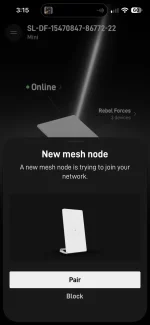
 
Lately every time I start the Starlink app on my phone or tablet I get a message saying that a new mesh node is trying to join my network. I only have my Starlink mini and no other device. My closest neighbors are a pair of bears in their den. I’m pretty sure that that don’t have any nodes. This is at my mountain property. Is anyone getting this message also?
IMG_3029.webp
 

Attachments

  • IMG_3029.webp
    IMG_3029.webp
    23.6 KB · Views: 3
That's good and fine when there is a cell signal and it's strong enough. Starlink works where there are no cellular services or it's a weak signal.
Out at the farm that's our case. We have to use radios or I put the SL mini on top of big john or the skidsteer.
 
Lately every time I start the Starlink app on my phone or tablet I get a message saying that a new mesh node is trying to join my network. I only have my Starlink mini and no other device. My closest neighbors are a pair of bears in their den. I’m pretty sure that that don’t have any nodes. This is at my mountain property. Is anyone getting this message also?
View attachment 270766
Had this happen at my father in laws property at the lake. Honestly thought it was something nefarious (could not be) but I blocked it and went on abouty day. I suggest you do the same especially if you are on a consumption model with SL.
 
Lately every time I start the Starlink app on my phone or tablet I get a message saying that a new mesh node is trying to join my network. I only have my Starlink mini and no other device. My closest neighbors are a pair of bears in their den. I’m pretty sure that that don’t have any nodes. This is at my mountain property. Is anyone getting this message also?
View attachment 270766
Good news—you can call off the cybersecurity team, the bears haven't learned how to hack yet! 🐻💻

This is actually a super common, known glitch happening in the Starlink app right now. The app is getting confused by a normal Wi-Fi signal (like your phone or a smart TV) and hallucinating that it's a mesh node trying to connect.

Here are the easiest ways to fix it:

Just hit 'Block'. Since there's no physical mesh node out there, blocking it won't break your internet or disconnect your actual devices.

Update or Reinstall. Check your app store to make sure you are on the latest version of the Starlink app. If you are, completely deleting and reinstalling the app usually clears the buggy cache that causes the pop-up.

The 3-Plug Reset. If it is being incredibly stubborn, you can factory reset the Mini by unplugging the power cable and plugging it back in 3 times in a row. You will just have to quickly re-enter your Wi-Fi network name and password.

Enjoy the mountain peace and quiet, and tell the bears to stick to stealing picnic baskets instead of Wi-Fi!
 
Had this happen at my father in laws property at the lake. Honestly thought it was something nefarious (could not be) but I blocked it and went on abouty day. I suggest you do the same especially if you are on a consumption model with SL.
That’s what I did. I blocked it.
 
I got mine a month ago.

Walmart had the mini on sale for $250.

I am on the 300 databits or whatever roaming for $80/ month.

100 databits was only $49/ month.
The good thing is you can upgrade it on the fly as needed. You can’t downgrade plans on the fly though. Basically I typically rock the 100 gb plan, and upgrade to the 300 if needed. The rest of that month is prorated, so 300 GBs typically only cost me $5-10 extra over the 100 gb plan, as I’m only running over the last few days of the month if at all. However if you drop plans you’re locked into the larger plan until the month ends, then will renew at the lower plan. I typically only go over 100 GBs every few months, so I just leave it on that plan then raise it if needed. Takes about 30 seconds tops to do from the app, and that includes the time it takes to open the app.
 
Verizon 165.00 month for 2 lines and home internet. 20.00 to turn on Hotspot when needed. As needed.
I use my Starlink where Verizon (or ATT) isn’t even remotely plausible. There’s plenty of good options for home internet. Starlink is king when all else fails.
 
Back
Top Bottom