-
Featured
- #401


- Jun 25, 2020
- 6,210
- 10,355
- >>US Army<<
- 2022 F350 CCLB (11/2022)
- 2015 F350 CCLB 225k // 2006 F350 CCLB 280k
For those wanting a bigger mobile unit or base unit : Gen 3 $175
Follow along with the video below to see how to install our site as a web app on your home screen.
Note: This feature may not be available in some browsers.


Great price. This is the going rate right now btw, including direct from StarlinkIts not a mini but that's a hell of a deal if anyone needs one

I guess they did the bait and switch. Im about to have to do standby modeGreat price. This is the going rate right now btw, including direct from Starlink


to anyone on the fenceIts not a mini but that's a hell of a deal if anyone needs one


How are you doing this? I've wanted to do this however i'm not intelligent enough.Starlink standard kits are going for $89 in some places right now from Starlink directly. I just ordered one to run in conjunction with our coax service at the house.
Nah, you just haven’t figured it out yetHow are you doing this? I've wanted to do this however i'm not intelligent enough.


The rattling on washboard was the inspiration. Lasted about 17 seconds before deciding I needed something different. Time will tell if this solution lasts.
Gosh, I need to look into this. My house is fully cat5e wired so I don’t need to rely on wireless backhaul for multiple AP, and I could run the Starlink mini as the failover from Google fiber.Nah, you just haven’t figured it out yet
You’ll probably need some new hardware and there is definitely some setup involved. For consumer-grade home network equipment that is relatively easy to configure and well documented, Ubiquiti is hard to beat.
You can configure either link aggregation for faster speeds or failover mode that switches to your secondary ISP if the primary fails. Link aggregation doesn’t care if one ISP goes down as long as one of the two is still active, so it’s inherently a type of failover setup. True failover is better if you have limited data on the secondary and only want to use it when the primary goes down.
Hope that helps. It’s really not too difficult if you have a basic understanding of network setup. There is a lot of good documentation and resources on Ubiquiti equipment if you want to give it a shot. There’s plenty of other equipment out there that is dual-WAN capable but most of it is going to be more difficult to configure.
Never mind you already postedFollow up on dash mount for those interested…
As previously stated I only have it for once I leave pavement and hit dirt looking for campsites or OnX pins. Super easy to pop in and out. Works exactly as I needed it. No more bouncing around. Visibility is affected and probably wouldn’t use it like this on the highway. I also don’t notice any reflection from the antenna. Pictures seem to pick it up way more.
One thing I need to work on is reliably connecting to it. CarPlay always wants to connect wirelessly then I have to fiddle with disconnecting, then using a wired connection.
View attachment 212461View attachment 212462
 I may try this out.
Been meaning to update this.How has this held up for you? I am debating between a few solutions because my pano mount can't handle the AZ sun.
Pretty common issue unfortunately. Always find out which material is used before buying 3D printed parts. A lot of places use PETG because it is easy to print and doesn’t require more than a simple open air printer. Problem is the glass transition temp is too low and it’ll warp even in a hot car, especially if there’s any weight on it. ASA, PC, or nylon all would have held up just fine.My mount warped in the sun over the summer. The warpage won’t allow the SL antenna to clip in anymore. So I wouldn’t go this route unless you remove it each time.

Just did this on my diamondback! Veritas vans mount and used some magnetic plates. Just did a 800 mile trip and had 150+ mbps the entire timeAnother option I’m playing with. Magnet mounts with 3m adhesive metal disks to the bed cover. Power ran to my bed power I did a few months ago.
Quicker faster bigger picker upper version when I don’t feel like dealing with sunroof and suction mounts.
View attachment 228908
that's awesome, I moved mine closer to the middle (front to back), in an attempt to not get any cab obstruction in the viewing angle.Just did this on my diamondback! Veritas vans mount and used some magnetic plates. Just did a 800 mile trip and had 150+ mbps the entire timeView attachment 228928

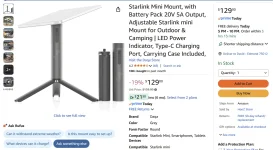
I also have a cheap Temu magnet mount I can use on my bed topper, but as @Wrathchild mentioned I have morphed more into mostly needing use in the wilderness for map/route downloads for onXoffroad or Gaia. I found this nice compact battery stand which gives me about 3 hours to do what I need to do and that is plenty sufficient for me. No cords or wires for power. I can vouch for the quality of this product, and it comes with its own case just matched to my antenna.Just did this on my diamondback! Veritas vans mount and used some magnetic plates. Just did a 800 mile trip and had 150+ mbps the entire timeView attachment 228928
I bought the plates from veritas when I bought the case. I can attest to not having to worry about obstruction if you put it closer to the cab though!that's awesome, I moved mine closer to the middle (front to back), in an attempt to not get any cab obstruction in the viewing angle.
Where did you get your plates from? Mine are just some metal plates with 3m backing off amazon.


![What did you do to your Tremor today? [2026 edition]](https://www.fordtremor.com/data/files/featured_images/featuredimages_thumb_3.webp?1788416195)