Show me your Starlink mounts (or ones you’ve seen)

Starlink shows me ~$600 for the mini, ships in 1-2 weeks.
Amazon and most others show ~$350 for the mini.
Best Buy shows that mini for $250 (in-store pickup).

Is there any difference in models?

I also was pretty sure not too long ago the Mini was $50/month, but it seems to be 100g for $140. Does it fluctuate that much or am I missing something?
Boy have these prices changed since I picked up ours. The only thing I regret is not having purchased it earlier.

Their monthly prices also keep changing; I jumped on the unlimited data for that reason.
 
Last edited:
Starlink shows me ~$600 for the mini, ships in 1-2 weeks.
Amazon and most others show ~$350 for the mini.
Best Buy shows that mini for $250 (in-store pickup).

Is there any difference in models?

I also was pretty sure not too long ago the Mini was $50/month, but it seems to be 100g for $140. Does it fluctuate that much or am I missing something?
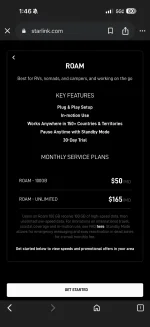
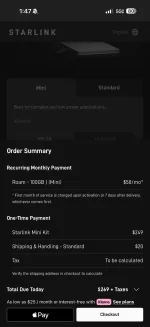
I currently have a Mini on the Roam $50 100gig plan.

When I just went to the Starlink page and am not logged in, I see the prices below. Make sure you are looking at the Roam offers.
 

Attachments

  • IMG_3052.webp
    IMG_3052.webp
    47.1 KB · Views: 9
  • IMG_3053.webp
    IMG_3053.webp
    42.6 KB · Views: 11
I currently have a Mini on the Roam $50 100gig plan.

When I just went to the Starlink page and am not logged in, I see the prices below. Make sure you are looking at the Roam offers.

Not sure what I did, but had a country selected I've never heard of (Dominica...). What you posted is now what I see under 'US'. :rolleyes:
 
Last edited:
Can anyone confirm that a magnet mount will work on the roof of a RSI Smartcap? I believe its 400 series SS, so should work, but deciding between mounting it on the cap or using the Savage UTV 3rd brake light mount.
 
Good morning tremor family

I have a starlink question for you SL gurus

Has anyone found a way to forward all cell call and texts to receive in WiFi via WhatsApp or google numbers
Or any work around to make the cell phone forward to internet WiFi calling applications?
I appriciate any fees back here thanks

(Too many clients text me or don’t use WhatsApp)
 
Good morning tremor family

I have a starlink question for you SL gurus

Has anyone found a way to forward all cell call and texts to receive in WiFi via WhatsApp or google numbers
Or any work around to make the cell phone forward to internet WiFi calling applications?
I appriciate any fees back here thanks

(Too many clients text me or don’t use WhatsApp)
You can force WiFi calling and texting by disconnecting from the cell networks (i.e., put your phone in airplane mode and leave Wi-Fi and Bluetooth on). One challenge is that you cannot connect to a vehicle through wireless Carplay or Android Auto as that uses the wifi connection and you won't be able to connect to the vehicle and Starlink at the same time.

You could probably forward all your texts and calls to a separate Google Voice number, but I don't think there's a way to do that to WhatsApp. Plus Whatsapp doesn't handle SMS messages, so wouldn't recieve those even if there was a way to forward.

Take a look at this article for ideas: Automatically Forward Text Messages to Another Phone | Quo (formerly OpenPhone) https://share.google/kjytVSi36OCtMoKGg
 
You can force WiFi calling and texting by disconnecting from the cell networks (i.e., put your phone in airplane mode and leave Wi-Fi and Bluetooth on). One challenge is that you cannot connect to a vehicle through wireless Carplay or Android Auto as that uses the wifi connection and you won't be able to connect to the vehicle and Starlink at the same time.

You could probably forward all your texts and calls to a separate Google Voice number, but I don't think there's a way to do that to WhatsApp. Plus Whatsapp doesn't handle SMS messages, so wouldn't recieve those even if there was a way to forward.

Take a look at this article for ideas: Automatically Forward Text Messages to Another Phone | Quo (formerly OpenPhone) https://share.google/kjytVSi36OCtMoKGg
You can force WiFi calling and texting by disconnecting from the cell networks (i.e., put your phone in airplane mode and leave Wi-Fi and Bluetooth on). One challenge is that you cannot connect to a vehicle through wireless Carplay or Android Auto as that uses the wifi connection and you won't be able to connect to the vehicle and Starlink at the same time.

You could probably forward all your texts and calls to a separate Google Voice number, but I don't think there's a way to do that to WhatsApp. Plus Whatsapp doesn't handle SMS messages, so wouldn't recieve those even if there was a way to forward.

Take a look at this article for ideas: Automatically Forward Text Messages to Another Phone | Quo (formerly OpenPhone) https://share.google/kjytVSi36OCtMoKGg
Awesome.
Thank you DTX
I will check it out
 
If you are still locking for a Starlink mount. Check out HSM (High Speed Mounts) I have used them for a couple of vehicles and they work great! they also have a 24 volt booster and battery backup for when the truck is off so you can run it at camp. The guy who owns HSM (Matt) also has an organization called Arizona Raptor Runners so he is very involved with F series trucks.
 
Awesome.
Thank you DTX
I will check it out
To touch on this; if you plug your phone into on of the USB ports in the console (down by the wireless charger), you’ll connect CarPlay//Android Auto via “wired connection”, and then can also have your phone wirelessly connected to the StarLink. I’ll sometimes go the extra and disconnect from Cellular Data//go onto Airplane Mode, but not always.

You also need to make sure your phone plan supports WiFi Calling to make voice calls via your number - texts, messages, and WhatsApp should be fine.
 
If you are still locking for a Starlink mount. Check out HSM (High Speed Mounts) I have used them for a couple of vehicles and they work great! they also have a 24 volt booster and battery backup for when the truck is off so you can run it at camp. The guy who owns HSM (Matt) also has an organization called Arizona Raptor Runners so he is very involved with F series trucks.
I am very interested in the HSM mini dashmount, however would like to purchase as a complete package to make sure I get everything I need. Can you provide the parts number for the booster , battery backup and any other wiring needed. Thanks
 
How does the HSM deal secure to the dash? Does it work for 2022 trucks?
 
Uses a universal Dash mount, Matt recommends the Built Right Pro.
 
I’ve got a new Starlink mini and I’ve been trying to figure out how to get the power cable from the interior to the hook up wires for the Upfitter switches under the hood. I’ve got a ‘24 and I’ve read the fuse box for the switches is on the passenger side and the wires will be right there with it. Having the power cable running from the Starlink to the plug in my dash is getting old real fast. I want to hook it up to either switch 5 or 6 so I can turn it on anytime. Any help would be greatly appreciated.
 
I’ve got a new Starlink mini and I’ve been trying to figure out how to get the power cable from the interior to the hook up wires for the Upfitter switches under the hood. I’ve got a ‘24 and I’ve read the fuse box for the switches is on the passenger side and the wires will be right there with it. Having the power cable running from the Starlink to the plug in my dash is getting old real fast. I want to hook it up to either switch 5 or 6 so I can turn it on anytime. Any help would be greatly appreciated.
Are you trying to run the Starlink mini on 12 volts? I can’t remember the diameter of the pass through wires, but they’re pretty thin. Double check since the mini can pull 5 amps at 12 volts at startup.

Otherwise the interior pass through wire bundle should be just behind the passenger footwell fuse box.

You’ll then have to locate the other end of the pass through wires bundle under the hood; it’s taped to a larger wiring harness just above/behind the upfitter fuse box. Connect an upfitter wire to the pass through wire of your choice, then pass through to the starlink mini inside the cab. You’ll also need a ground connection.
 
Are you trying to run the Starlink mini on 12 volts? I can’t remember the diameter of the pass through wires, but they’re pretty thin. Double check since the mini can pull 5 amps at 12 volts at startup.

Otherwise the interior pass through wire bundle should be just behind the passenger footwell fuse box.

You’ll then have to locate the other end of the pass through wires bundle under the hood; it’s taped to a larger wiring harness just above/behind the upfitter fuse box. Connect an upfitter wire to the pass through wire of your choice, then pass through to the starlink mini inside the cab. You’ll also need a ground connection.
I’m planning on running it on 12v. I’ve got the starlink mounted to the sunroof and I want to hide the wires. I’ve read on hear others are doing what I want to do. I’ve never had a truck with upfitter switches before and I want to put them to use.
 
I’ve got a new Starlink mini and I’ve been trying to figure out how to get the power cable from the interior to the hook up wires for the Upfitter switches under the hood. I’ve got a ‘24 and I’ve read the fuse box for the switches is on the passenger side and the wires will be right there with it. Having the power cable running from the Starlink to the plug in my dash is getting old real fast. I want to hook it up to either switch 5 or 6 so I can turn it on anytime. Any help would be greatly appreciated.

Get the harness from @NEOHIO that plugs in behind the glove box. It’s constant power, so you can add a switch if you want to turn it off. I got the 3’ 25amp / 13’ 25 amp. 3 footer to a fuse block for radios/usbs. 13 footer to back seat for starlink 30v power supply.

 
NEOHIO’s harness is awesome. Using it to power my radios behind the rear seats (have the longer ones).

IMG_1583.webp


I’ve basically got your setup, I have my Mini on the Swarfworks 3rd Brake Light, so my power cable comes into the cab that way for the unit. I run it down through the passenger sill channel to the passenger footwell. I have a 12V -> 36V upconverter tucked in there (Mini will pull up to 36V during boot up//heating cycles, so having it there prevents potential brownouts during those odd times), and with power coming from the passthru, and then it just grounded there.

There’s actually 2 different gauge wires there, I use the larger of the 4 for my Starlink, Chase Lights, and eventual compressor activation. It’s all below 5A, and the section is short. So far so good.

The interior passthru wires are in that passenger footwell, taped with another bundle. There’s a white label wrapping it, so you’ll know it from that. They’re not conventionally named as passthru 1-4, but instead just a random string that’s matched on the under hood end.

(Can’t find my photo. :-()

The Underhood end is taped on the big bundle of wires coming out by the upfitter box, down from the grey caps and covers to the computer there.

IMG_9452.webp


Link one end to your upfitter 6, and make sure you flip the fuse over if you want constant power.
 
Had a hot call, and my dudes got it a little to tight to the turret. This Savage UTV mini mount is great. Deploy to the roof for training and calls pull off and stick to the ceiling when not in use.
IMG_0683.webp
 
Back
Top Bottom