Oem screen conversion

Thanks, I am going to try mounting the APIM vertical this afternoon.

I actually just now got my reverse camera working via Forscan. Setting "Reverse Gear" to "Legacy" in APIM did the trick for me. Note: I don't have 360 cams. 2017 F-150 STX in case this helps anyone.

The balance/fade resetting itself every start up is really frustrating me...
The black option looks really nice in there. Wasnt quite sure about it at first when they posted it to the site.
 
The black option looks really nice in there. Wasnt quite sure about it at first when they posted it to the site.
Looks wise, it's pretty good. It is painted though, where as the original on my STX was not. Its a slight metallic black paint. It probably could scratch easy. I would have preferred it unpainted black ABS. The plastic is slightly thinner than OEM.
 
Progress photos they sent me of my dash pieces at the shop being done in real carbon fiber. Should hopefully get them back end of next week.

IMG_5972.webp

IMG_5973.webp
 
I received my new API and a new wiring harness that appears to be less intrusive by connecting into the HVAC controls. Unfortunately, I’m getting the same exact issue where the screen will not power on whatsoever. This is extremely frustrating. I’m approaching six months from the purchase date and I feel that Something is very wrong. Probably going to do a chargeback or ask for a refund.
 
I received my new API and a new wiring harness that appears to be less intrusive by connecting into the HVAC controls. Unfortunately, I’m getting the same exact issue where the screen will not power on whatsoever. This is extremely frustrating. I’m approaching six months from the purchase date and I feel that Something is very wrong. Probably going to do a chargeback or ask for a refund.
 
I received my new API and a new wiring harness that appears to be less intrusive by connecting into the HVAC controls. Unfortunately, I’m getting the same exact issue where the screen will not power on whatsoever. This is extremely frustrating. I’m approaching six months from the purchase date and I feel that Something is very wrong. Probably going to do a chargeback or ask for a refund.

That's unfortunate. Have you put a voltmeter to the red/black wires going to the screen to verify you're getting 12v. If so then bad screen? Should be an easy check
 
That's unfortunate. Have you put a voltmeter to the red/black wires going to the screen to verify you're getting 12v. If so then bad screen? Should be an easy check
Yes, there’s power to that wire, I also purchased a screen through Amazon and verified that the screen is not the issue. The only other issue I could think of is the pink and blue wire that’s connected behind the screen to the APIM. Unfortunately, I can’t find one that’s exactly The same online.
 
FS4 sent me a new APIM to correct the lack of full screen CarPlay. I’m in a pretty good place, except now when I nav no map loads. It just spins.
 
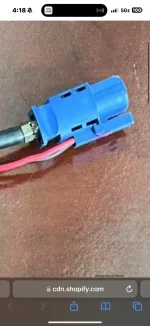
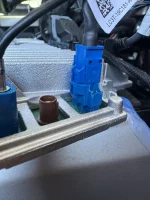
Does anyones screen cable that goes to your apim look like this? Mine does not have the two cables on the side. Second pic is with the cables on the side.
 

Attachments

  • IMG_0924.webp
    IMG_0924.webp
    257.1 KB · Views: 34
  • IMG_0926.webp
    IMG_0926.webp
    71.9 KB · Views: 44
Does anyones screen cable that goes to your apim look like this? Mine does not have the two cables on the side. Second pic is with the cables on the side.
My setup is like the pic on the right. I absolutely have coaxial cable that has to two small black and red wires along with it.
 
My setup is like the pic on the right. I absolutely have coaxial cable that has to two small black and red wires along with it.
These guys sent me everything new except that cable. New harness new APIM and hours of forscan. Kind of upsetting. It was such an easy fix.
 
Sent my Sync4 dash pieces to be done in carbon fiber, sent a few other items at the same time. Should definitely increase the strength of the cheap plastic.

IMG_6005.webp
 
So the new APIM I got from FS4 is on a much later version Ford Sync. I installed everything the same way, specifically with the GPS, and with the new unit my GPS is wandering big time. Oddly it's doing this over CarPlay Wireless. My initial observation is that it does not wander over CarPlay Wired. My APIM is installed vertically (not flat).

I did read on a different FS4 thread that you on the new APIMs you shouldn't plug the GPS cable in, as it's reading the location from a different module. This is one of three remaining issues I'm still trying to resolve:
  1. Wandering GPS
  2. Using Sync 4 Nav option (just the map, not turn-by-turn directions, and not via CarPlay), the map just sits and attempts to load. It never actually loads
  3. Twice the APIM has rebooted randomly on me while driving
I was able to fix the wandering GPS (which is already mounted vertically) by making a change in Forscan to the APIM. It's now fixed, but I lost location in Ford Pass. I'm thinking I can live with that for the moment.
 
Looks like the new wiring harness is pretty good. Did I have to do anything and my Ford app works perfectly fine with the truck. All controls for HVAC and radio work fine except I can’t do the vented or cooled seats. Everything’s good except the fact that I Can’t see my rear camera so not sure what to do about that.
 
Chippy45, did you by chance try the camera settings I posted like a week ago?

…

Ok, for those struggling to get the reverse camera going, I have settings you can update that will likely fix it…
Try this for your APIM As Built values:

APIM
7D0-01-01
XXXX-XXXX-88XX

APIM
7D0-01-02
F8XX-XXXX-X0XX
 
Chippy45, did you by chance try the camera settings I posted like a week ago?

…

Ok, for those struggling to get the reverse camera going, I have settings you can update that will likely fix it…
Try this for your APIM As Built values:

APIM
7D0-01-01
XXXX-XXXX-88XX

APIM
7D0-01-02
F8XX-XXXX-X0XX
No, not yet I have to find time to do that. I am hoping the upcoming weekend
 
Chippy45, did you by chance try the camera settings I posted like a week ago?

…

Ok, for those struggling to get the reverse camera going, I have settings you can update that will likely fix it…
Try this for your APIM As Built values:

APIM
7D0-01-01
XXXX-XXXX-88XX

APIM
7D0-01-02
F8XX-XXXX-X0XX
only thing I can't seem to get going in the camera button as a toggle to get through the different camera views. Sync4 remoted in months ago and couldn't get it to work. When I put it into reverse it works for reverse camera and 360 but I can't change views. They're saying the on screen icons won't work because it's digital vs analog so I have to use the camera button to cycle through views. Anyone else's work?
 
only thing I can't seem to get going in the camera button as a toggle to get through the different camera views. Sync4 remoted in months ago and couldn't get it to work. When I put it into reverse it works for reverse camera and 360 but I can't change views. They're saying the on screen icons won't work because it's digital vs analog so I have to use the camera button to cycle through views. Anyone else's work?
My camera button works and toggles between different views. What doesn’t work is the + icon to zoom into the hitch area.
 
Back
Top Bottom