-
Featured
- #401
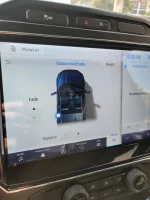
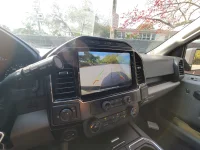
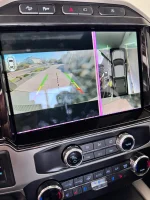
When I toggle the button, I don't get a dedicated rear view. I do see the rear in the 360 though. Going into reverse, I only get proximity display, no black screen.
Follow along with the video below to see how to install our site as a web app on your home screen.
Note: This feature may not be available in some browsers.
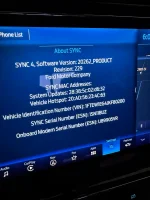
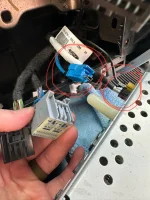
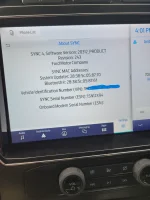
How about you?What version do you have? Also I believe the gps is the left blue plug.

They have to program this to work.When I toggle the button, I don't get a dedicated rear view. I do see the rear in the 360 though. Going into reverse, I only get proximity display, no black screen.
FordSync4 is saying the same. That they need to do an upgrade to get it to work. I will be very interested to see how they plan to install an upgrade if its beyond something that can be done via Forscan.They have to program this to work.
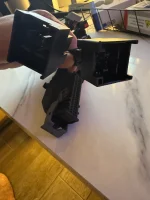
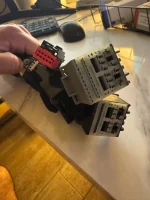
Nice!New wiring harness came in today. Looks like this version actually plugs into the audio receiver box compared to the other wiring harness did not at all. New APIM also has navigation which looks like they just upgraded me for whatever reason.
Trucks at the dealership right now for warranty, but I should have this all installed hopefully early next week
This is the harness I’m waiting on. Seems like we ran into the same issue. I was right at installing everything back when I noticed. Had to return everything back. They sent a new harness but sounds like my package got swapped with someone’s APIM going to Montana. If that’s anyone in here , I’m sending it out today with their label.New wiring harness came in today. Looks like this version actually plugs into the audio receiver box compared to the other wiring harness did not at all. New APIM also has navigation which looks like they just upgraded me for whatever reason.
Trucks at the dealership right now for warranty, but I should have this all installed hopefully early next week
Just waiting on my truck to get out of the dealership for a warranty issue, hopefully early next week. If your truck’s a 2020 this new harness will solve the issue of extending The receiver box.This is the harness I’m waiting on. Seems like we ran into the same issue. I was right at installing everything back when I noticed. Had to return everything back. They sent a new harness but sounds like my package got swapped with someone’s APIM going to Montana. If that’s anyone in here , I’m sending it out today with their label.
Yes, the original harness they sent had the longer flat connectors for the older unit connections. I’m just curious to see how the remaining connections will connect as they seem short.Just waiting on my truck to get out of the dealership for a warranty issue, hopefully early next week. If your truck’s a 2020 this new harness will solve the issue of extending The receiver box.
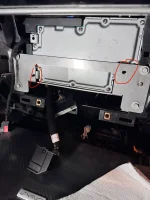
You can fix the wandering GPS by remounting your APIM vertically vs mounting it flat. This is how I did mine.I installed the Fordsync4 kit yesterday on my '17 F-150 STX. Installation went pretty smooth, but here is the list of what's not working for me:
The apim they sent me was from a F-250 and had navigation, which is nice, but I was really hoping to use full screen Android Auto.
- No backup camera
- GPS wanders
- The balance and fade settings revert to only the driver side rear speaker every time I start the truck (very annoying)
- My auto start-stop switch is not working
- No full screen Android Auto
- Airbag light is on
- Radio presets don't work
- Volume value doesn't display on the screen
I know a little bit about Forscan. I wish they would publish some info about what needs to be changed. Scheduling a remote session seems like a pain, but obviously I'm going to have to do it. As of now, these issues are a deal breaker.
I'm getting this DTC in the body control module. Not sure if this normal after the swap.
Code: U0253 - Lost Communication With Accessory Protocol Interface Module
Thanks, I am going to try mounting the APIM vertical this afternoon.You can fix the wandering GPS by remounting your APIM vertically vs mounting it flat. This is how I did mine.
The remote programming will fix the majority of the remaining issues, though I do think they have a major issue with the reverse cameras on F150s. Nearly everyone is having issues, me included. They’re working on a solution.
Yeah that would be super annoying, I’m not dealing with that. It was only on one speaker initially, but it saved after changing. However, my radio does defaults to Satellite at every start up. I also do not have full screen CarPlay. Lastly, no reverse camera. FS4 is sending me a new module to fix these things.Thanks, I am going to try mounting the APIM vertical this afternoon.
I actually just now got my reverse camera working via Forscan. Setting "Reverse Gear" to "Legacy" in APIM did the trick for me. Note: I don't have 360 cams. 2017 F-150 STX in case this helps anyone.
The balance/fade resetting itself every start up is really frustrating me...
Thank you so much for your help. I mounted the APIM vertically and GPS works great now.Yeah that would be super annoying, I’m not dealing with that. It was only on one speaker initially, but it saved after changing. However, my radio does defaults to Satellite at every start up. I also do not have full screen CarPlay. Lastly, no reverse camera. FS4 is sending me a new module to fix these things.
That’s just below the screen? Used self tapping screws?You can fix the wandering GPS by remounting your APIM vertically vs mounting it flat. This is how I did mine.
The remote programming will fix the majority of the remaining issues, though I do think they have a major issue with the reverse cameras on F150s. Nearly everyone is having issues, me included. They’re working on a solution.
I predrilled the holes and then used a very slightly larger screw (the larger black ones that kit comes with). My mounting bracket was stainless steel and even drilling it was a bit difficult, so self-tapping didn’t work for me.That’s just below the screen? Used self tapping screws?