Auto hold Braking on 23/24 Super Duty

45 minutes later...

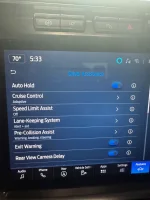
I tried unsuccessfully to find any Settings toggle for any brakes' Auto Hold feature software through my dashboard readout/menu/displays either in the tach/speedo cluster or in the center stack.

I'm digging through the digital Owners Manual now, though, and have discovered perhaps another name for this vehicle driving feature: Hill Start Assist.

Is Hill Start Assist different in execution as any brakes' Auto Hold?

Here's the description for Hill Start Assist:

"HOW DOES HILL STARTASSIST WORK

When the system activates, your vehicle remains stationary for a few seconds after you release the brake pedal. This gives you time to move your foot from the brake pedal to the accelerator pedal. The brakes release when you apply the accelerator pedal and the vehicle begins to move forward, or the system exceeds the time allowed for automatically applying the brakes.

The system activates when your vehicle is in any forward gear and facing uphill, or when your vehicle is in reverse (R) and facing downhill."


I do understand how all of this stuff works mechanically, so I'm not entirely without hope...

😝
 
Just completed the Auto Hold in my 26 :)


What. Did you add an Auto Hold button? What do you mean you "completed" the Auto Hold.

You do have an Auto Hold on/off button in your truck? being a Platinum.

My '25 XLT does not.


And, one more:

Google AI says:

While both features prevent your truck from rolling, Hill Start Assist is a temporary anti-rollback feature only for inclines, whereas Auto Hold is a convenience feature that keeps the truck braked indefinitely on any surface until you press the gas pedal.


Key Differences at a Glance -

Feature - Auto Hold Hill - - - - - - - - - - - - Start Assist
Duration - Indefinite - - - - - - - - - - - - - - - - - - - - - - Temporary (~2 to 3 seconds)
Location - Works on any surface - - - - - - - - - - - - - - Works only on inclines
Activation -
Must be manually turned on via a button | Turns on automatically
Release -
Releases when you press the accelerator - - - -Releases automatically or when the timer expires
Brake Lights -
Tail lights remain illuminated while stopped - Tail lights may turn off once your foot leaves the pedal


1. Auto Hold
  • What it does: Once you come to a complete stop, Auto Hold keeps the brakes applied so you can take your foot completely off the pedal.
  • Best used for: Stop-and-go traffic in Los Angeles, long traffic lights, or navigating intersections on hills.
  • Important: Auto Hold usually requires your seatbelt to be fastened and the driver's door to be closed to function. Many owners prefer to disable this feature when hooking up a trailer or backing into a tight spot.

2. Hill Start Assist
  • What it does: When you are stopped on an incline and move your foot from the brake to the gas pedal, this feature maintains brake pressure to stop gravity from rolling the truck backward.
  • Best used for: Starting from a dead stop on a steep hill—especially when carrying heavy payloads.
  • Important: It is a passive, automatic safety backup. You don't need to push a button for it to engage, but it will only hold the truck in place for a few seconds before letting off the brakes.
 
Last edited:
What. Did you add an Auto Hold button? What do you mean you "completed" the Auto Hold.

You do have an Auto Hold on/off button in your truck? being a Platinum.

My '25 XLT does not.


And, one more:

Google AI says:

While both features prevent your truck from rolling, Hill Start Assist is a temporary anti-rollback feature only for inclines, whereas Auto Hold is a convenience feature that keeps the truck braked indefinitely on any surface until you press the gas pedal.


Key Differences at a Glance -

Feature - Auto Hold Hill - - - - - - - - - - - - Start Assist
Duration - Indefinite - - - - - - - - - - - - - - - - - - - - - - Temporary (~2 to 3 seconds)
Location - Works on any surface - - - - - - - - - - - - - - Works only on inclines
Activation -
Must be manually turned on via a button | Turns on automatically
Release -
Releases when you press the accelerator - - - -Releases automatically or when the timer expires
Brake Lights -
Tail lights remain illuminated while stopped - Tail lights may turn off once your foot leaves the pedal


1. Auto Hold
  • What it does: Once you come to a complete stop, Auto Hold keeps the brakes applied so you can take your foot completely off the pedal.
  • Best used for: Stop-and-go traffic in Los Angeles, long traffic lights, or navigating intersections on hills.
  • Important: Auto Hold usually requires your seatbelt to be fastened and the driver's door to be closed to function. Many owners prefer to disable this feature when hooking up a trailer or backing into a tight spot.

2. Hill Start Assist
  • What it does: When you are stopped on an incline and move your foot from the brake to the gas pedal, this feature maintains brake pressure to stop gravity from rolling the truck backward.
  • Best used for: Starting from a dead stop on a steep hill—especially when carrying heavy payloads.
  • Important: It is a passive, automatic safety backup. You don't need to push a button for it to engage, but it will only hold the truck in place for a few seconds before letting off the brakes.
Used Forscan and completed the three required changes. Once completed, the button shows up now in my vehicle settings on the SYNC screen.
 
Once enabled with forscan select features on the main screen. Go to driver’s assistance and toggle over. IMG_0792.webp
 
Used Forscan and completed the three required changes. Once completed, the button shows up now in my vehicle settings on the SYNC screen.


Aaahhhh HAH!

I just spent some time out there in the driveway, doors open, ocean breeeeze blowin' through... and went through all the menus to no avail.

Thanks to your input (thanks BOTH OF YOU!) I realize that I MAY be able to accomplish this using FORScan, providing: my truck was built with this software feature.

Cheers.
 
I believe my FORScan subscription may be expired. I'm in no rush to do this but do have other things to do re pending road trip so this may have to wait until after that, but...

Thanks again for your fellers' input! Again, cheers.
 
I can say I managed to disengage the hill start yesterday by accident (put the truck in park to check the scales coming out of Lowe’s) Startled me a bit when I shifted back to drive and lifted my foot from brake to accelerator. Truck rolled back and I realized how much I had got used to the feature.


I don’t care for the autohold in my girlfriends car. I just keep it off, but I have used it a few times in traffic, so I can see enabling the feature to at least have the option.
 
I believe my FORScan subscription may be expired. I'm in no rush to do this but do have other things to do re pending road trip so this may have to wait until after that, but...

Thanks again for your fellers' input! Again, cheers.
Travel safe!
I can say I managed to disengage the hill start yesterday by accident (put the truck in park to check the scales coming out of Lowe’s) Startled me a bit when I shifted back to drive and lifted my foot from brake to accelerator. Truck rolled back and I realized how much I had got used to the feature.


I don’t care for the autohold in my girlfriends car. I just keep it off, but I have used it a few times in traffic, so I can see enabling the feature to at least have the option.
100%. I'll play with it, but don't intend to use it most of the time. Who knows, maybe I'll fall in love :love:
 
With a little safety bypassing and mods this may be a great substitute for installing a line lock for winching.
 
My only concern is if it would work like a line lock in Park? That’s how I winched with my second gen, full brake pedal, line lock, shift to park.
 
My only concern is if it would work like a line lock in Park? That’s how I winched with my second gen, full brake pedal, line lock, shift to park.
That's what I mean. The drive gear position, seat belt belted and foot off the accelerator should all be reasonably straight forward bypasses. The accelerator may be the only one that could be a little tricky but since there is already a trigger for it, should be simple, if not, nothing wrong with winching at idle.
If I had a 23'+ I would be tinkering with it already after seeing this thread. :sneaky:
 
If I am looking to make the SD an anchor to winch someone else out
  • Transfer case in 4 lo
  • Trans in Neutral
  • parking brake set
  • optional -- motor on and foot on the brake
 
If I am looking to make the SD an anchor to winch someone else out
  • Transfer case in 4 lo
  • Trans in Neutral
  • parking brake set
  • optional -- motor on and foot on the brake
My suggestion would be neutral, engine on and foot on the brakes, parking brake on. 4 lo optional. Looking forward to learning from more experienced replies.
Edit: This auto brake thing may allow you to do this from outside the truck :LOL:
 
Last edited:
This already works on my 22', is this something that just recently was disabled in newer model trucks?

It's great when you have to come to a stop in traffic on a steep hill and don't have to worry about rolling backwards into the car behind when releasing the brake.
How did you get it to work on your 22? The same way?
 
I tried this, and must have done something wrong. At first followed another post and changed settings all modules. That gave me a pre-collision fault, then I went back and changed those values. Then change English text and the pre-collision fault went away but still does not work.

I don’t see it in my setting menu either to turn on.

First time user long time mistake maker
 
I tried this, and must have done something wrong. At first followed another post and changed settings all modules. That gave me a pre-collision fault, then I went back and changed those values. Then change English text and the pre-collision fault went away but still does not work.

I don’t see it in my setting menu either to turn on.

First time user long time mistake maker
I drove around, went back home. Logged back in and checked all the plain text English, and I just enabled everything in auto hold in all three of the modules.

I verified all the original numbers are correct.

I went back to each module and tried to enable, but it already wasn’t enabled and said able no action.

Then I powered cycle the truck again cutting it off and then back on. Then boom there it was.
IMG_4350.webp
IMG_4349.webp
 
Congratulations. I did the same. Welcome to my world. :ROFLMAO: But I love that I have it now.
 
Must be a Louisiana thing……lol it was hard to believe how excited I was once I got it to work.
 
Back
Top Bottom