🛠️ What did you do to your Tremor today? [2025 edition]

Status
Not open for further replies.
Installed a new detector with custom mirror mount and wiring. Nice and discrete!

View attachment 223344
View attachment 223345
My R8 has saved my ass more times than I can count. I wish I bought one sooner.
How do these do against lidar? I haven’t used a radar detector in years because they only alerted you to moving radar. When the lidar alarm went off, it was just to tell you you got a ticket.

Also, how is the false alert sensitivity against blind spot systems these days?
 
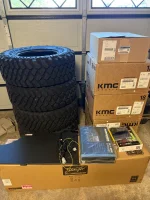
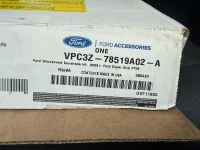
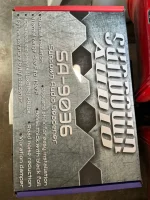
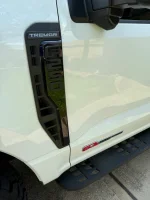
Added a few more items to the parts pile…. 35s were sent back and doing my research on which 37s I’m rolling with. Still waiting on my TPMS sensors. But purchased a sun shade, some sound deadener, and some replacement fender vent badges that I had to throw on.
 

Attachments

  • IMG_1341.webp
    IMG_1341.webp
    246.8 KB · Views: 54
  • IMG_1361.webp
    IMG_1361.webp
    231.2 KB · Views: 44
  • IMG_1398.webp
    IMG_1398.webp
    194.4 KB · Views: 47
  • IMG_1389.webp
    IMG_1389.webp
    105.2 KB · Views: 54
Will you take a picture of where your rear door meets the tailgate when shut.mainly the corners. I have water intrusion in that area with my ARE and am just wondering how smart cap seals. TIA
got over to the shop today below is picture of tailgate down, cap closed corner gasket area
1756227812195.webp

With tailgate closed the gaskets are compressed and there is no gap, waiting to get truck back and then test running through brushless car wash.
BSD springs and Bilsteins are being installed today - tires have arrived wheels should be in tomorrow then mounting road force balancing
1756228048697.webp
 
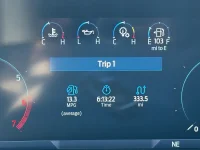
Spent the weekend cabin camping at Geronimo Creek with the family. So finally got to take the SD on a long stretch of highway. First time seeing the mpg over 11.
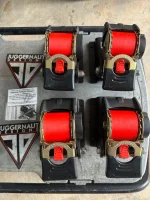
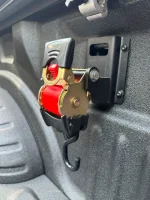
And when I got back, installed Juggernaut Designs ratchet straps. They just happened to come a day early :cool: .
 

Attachments

  • IMG_8196 Large.webp
    IMG_8196 Large.webp
    470.4 KB · Views: 62
  • IMG_8201 Large.webp
    IMG_8201 Large.webp
    52.7 KB · Views: 69
  • IMG_8198 Large.webp
    IMG_8198 Large.webp
    175.2 KB · Views: 58
  • IMG_8199 Large.webp
    IMG_8199 Large.webp
    296.9 KB · Views: 62
  • IMG_8200 Large.webp
    IMG_8200 Large.webp
    238.9 KB · Views: 61
Spent the weekend cabin camping at Geronimo Creek with the family. So finally got to take the SD on a long stretch of highway. First time seeing the mpg over 11.
And when I got back, installed Juggernaut Designs ratchet straps. They just happened to come a day early :cool: .
Awesome my friend! Looks great, hope they work out for you.
 
I had puddle lights custom made to match the other decals by Ali of Custom Puddle Lights. What you see pictured below is when I have the cab lights turned on from the button within the bed:

1000023329.webp

1000023327.webp

1000023328.webp


The lights are very well made and the design is bright. Two things to consider if you decide to purchase these: your design of choosing will be just a tad bigger/brighter since most trucks are closer to the ground and, my running boards light up - casting amber light with the design. For those who have running board lights or a strip of light that lights them up, the logo still appears quite well. See below:

1000023333.webp

1000023334.webp


Another cool thing about these is that the logo can be rotated to your liking. Your design can be faced as you approach the vehicle or faced as you get out. You take the enclosed clip and insert it (yes, insert it into the two tiny holes and rotate!).

1000023300.webp


I want to thank Ali for creating these very quickly. I'm hoping we can get a group buy as he's agreed to a discount if there's a good amount of interest. You can choose a pre designed logo for $199 or create your own for $239.


And of course someone had to have the Longhorns logo. Hope some of y'all Texans like it. Gig 'em! Oh wait that's....🤪.

1000023338.webp


Edited for clarification, from Ali:

"Just to let you know, as your truck has a 9 inch lift, the lights are further away from the truck than they usually would be with a regular height truck. Just in case people ask as why its so far away. They are shooting far as they are made to project at an angle away from the body to clear all running boards and wheel arches (stock or otherwise)."
 
Last edited:
Took a gamble last night and decided to allow an OTA update to occur even though Im on a diet.
Ive been having issues with the truck wifi dropping after ~15 minutes of constant use (like when im on a teams call on my laptop) and the only way to get service back is to restart the entire head unit.

Hoping the OTA update from feb that just installed will correct that.

Good news is the update did not mess up the tune as far as i can tell
Many times dropped calls can be attributed to poor signal quality, not necessarily a FW update. If you find that your calls still drop, you may need an amplifier for your connection, particularly in the case of Teams meetings because of the bandwidth required. Wi-Fi uses the same signals as your phone and subject to the same loss of signals, which could even be location to the tower or buildings in the vicinity.

Calls can drop simply because the quality is so bad that you exceed any buffers in the communication and the communication is then indiscernible by the phone or the other party's connection.

The code for cellular are extremely complex and there is a lot of handshaking going on with the towers, the phone, the interference paths, etc. In reality, the signals may have always been bad and only works after the initial connection because it renews the sync pattern. This was more prevalent in older phones but can still happen even with all the advancements. Transmission paths are vulnerable to many different causes.

If the FW update doesn't do the job for you, and if it were me, (and I do use this next suggestion) I would install a WeBoost antenna to boost your quality of the signal. Or, if you have the room and want to pay the subscription, a Starlink communication.

Cell dropouts can also be caused by the phone itself. Perhaps try a different phone to see if you have the same issues. :unsure:
I appreciate the response. My specific issue occurs even when stationary and does not matter what device (or how many) are connected to the trucks built in Wifi. It seems like every time I use a "chunk" of data (I think the # is about 5gb but dont quote me on that today) I will lose all service from the wifi for all devices connected but all devices will still show as connected to a network. This is a reliable and repeatable pattern I have tested a few times in several locations. forgetting and rejoining the wifi network does not rectify the issue. The only fix is to press the power and fastforward button until the headunit restarts, just like rebooting your wifi router at home.

FWIW I do have the ATT unlimited vehicle data package

If you happen to know where in the truck I need to go digging to find the actual wifi modem - that would be hugely helpful as it is possible I may have a poor physical connection somewhere on the modem itself
 
I appreciate the response. My specific issue occurs even when stationary and does not matter what device (or how many) are connected to the trucks built in Wifi. It seems like every time I use a "chunk" of data (I think the # is about 5gb but dont quote me on that today) I will lose all service from the wifi for all devices connected but all devices will still show as connected to a network. This is a reliable and repeatable pattern I have tested a few times in several locations. forgetting and rejoining the wifi network does not rectify the issue. The only fix is to press the power and fastforward button until the headunit restarts, just like rebooting your wifi router at home.

FWIW I do have the ATT unlimited vehicle data package

If you happen to know where in the truck I need to go digging to find the actual wifi modem - that would be hugely helpful as it is possible I may have a poor physical connection somewhere on the modem itself
I found this link.


Hopefully the update will widen your bandwidth but from what I understand, you can have as many as 10 users hooked up at a time. And if it drops routinely, you may be running into a bandwidth issue but that seems a little strange. It sounds more like the signal degrades over time. The sync pattern is based on several factors, any of which could change after running for a period. Any degradation can cause a drop, even one phone if it is the hot spot.

Sitting still doesn't necessarily mean that the signal won't fade. Other factors can cause that. It certainly doesn't sound like the usual issue, perhaps the connection is a good thing to look at, the next would be to possibly have the modem replaced. (Warranty?) I don't have a lot of experience in car modems, but any modem relies on a signal quality factor, not just signal strength and can be tested, but that's about the only way you could tell if it was the source of the issue. Hopefully the update will resolve your issue.
 
Dusted and vacuumed the inside of the truck.

Fiddled with my Sentry CT to get it straighter.

Ran LVJ’s Super Duty harness and the SW Starlink Power harness (extended to reach the passenger footwell) in preparation for the swap-over to my Swarfworks 3rd Brake Light w/ Starlink mount (put 2x wide cornering ambers S2 Sports for chase, and a white work/scene S2 Pro for cargo light//high beam deterrent)…

…then proceeded to spend the rest of my afternoon hunting for GD pass-thru wires. Found 2x multi-wire dead ended bundles, but no 4-pack yet. 😡
 
Took a gamble last night and decided to allow an OTA update to occur even though Im on a diet.
Ive been having issues with the truck wifi dropping after ~15 minutes of constant use (like when im on a teams call on my laptop) and the only way to get service back is to restart the entire head unit.

Hoping the OTA update from feb that just installed will correct that.

Good news is the update did not mess up the tune as far as i can tell

OTA updates haven't shown to do anything to the PCM/TCM. I doubt the OTA stuff would ever be used to change PCM/TCM files.

😎 😎 🇺🇲 🇺🇲 🇺🇲 🇺🇲
 
^ ^ ^ I nearly pissed myself just now, seeing this BAP Lariat Ultimate or Platinum/whichever-it-is Tremor w/ these wah-heelz-N-tahrzes on it! Boy, howdy. It is stunning!


What'd I do? to my truck today before lunch?

I find myself now in the lap! of luxury simply having my new, OEM leather-wrapped steering wheel installed. It was fairly straightforward once I learned an experienced technique to the airbag removal and replacement.

IMG_7331.webp


IMG_7332.webp


IMG_7333.webp


All I ever wanted from my Tremor besides the drivetrain hardware! was carpeting, power windows and air conditioning, AND a factory leather-wrapped steerin' wheel.

The rest of it, the 7.3, the 10R140, the 4.30 locking rear/limited slip front and the rest of the Tremor Package make this truck a dream truck come true. Never really wante a Raptor (unless Ford had fitted a naturally-aspirated 5.0 Coyote, that is), but always wanted a Super Duty. Go figure.
 
Status
Not open for further replies.
Back
Top Bottom