Full Screen CarPlay is here for Sync4 in my SD!

Do you have nav in motion enabled? If so turn it off that seems to be fixing the KIP issue for people. Also If you have it enabled, I wouldn’t look for ford to give you a nav extension. They can see the changes we make with forscan now.
Does anyone know if enabling 75th Anniversary Screen and Unreal Engine with FORSCAN prior to the update will affect the ability to receive the update? I did this last week wondering if I had received the update and learned that I hadn't yet. Now, I'm wondering if leaving those items enabled, while they have no effect on my current version Sync 4 functionality, will prevent receipt of the Ford pushed update.
 
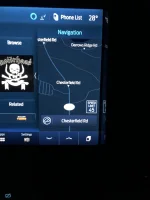
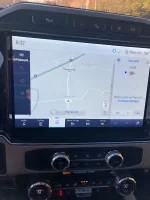
Well something happened today for me, on my way to work the Kip connection went away and got a cloud with a line through it next to the street name. If I made the nav screen my large screen the Kip connection was still on the menu option but….

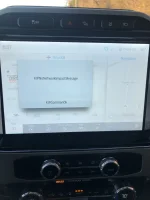
Then on the way home I got the pop up message:

I do have the nav in motion set up still, I no longer have a nav subscription and was driving on same roads I drive nearly everyday. Forgot to check what version I have but have had the full screen CarPlay update for a little while now.
 

Attachments

  • CF1DD9D4-FAC2-42FD-A7EE-4E089ED99A19.webp
    CF1DD9D4-FAC2-42FD-A7EE-4E089ED99A19.webp
    85.7 KB · Views: 136
  • A48F1917-B389-477C-B066-BCE5927F7456.webp
    A48F1917-B389-477C-B066-BCE5927F7456.webp
    100.1 KB · Views: 133
  • 3C765D13-A85A-4C1A-9798-5B6840DC0B54.webp
    3C765D13-A85A-4C1A-9798-5B6840DC0B54.webp
    92.5 KB · Views: 136
Well something happened today for me, on my way to work the Kip connection went away and got a cloud with a line through it next to the street name. If I made the nav screen my large screen the Kip connection was still on the menu option but….

Then on the way home I got the pop up message:

I do have the nav in motion set up still, I no longer have a nav subscription and was driving on same roads I drive nearly everyday. Forgot to check what version I have but have had the full screen CarPlay update for a little while now.
the no cloud connection means the map isnt connected or something like that. turn off your nav in motion and all will be well.
 
Found another glitch in the update. When I use either Google or Waze navigation, Ford has decided to take away my speed limit information that sits next to the digital speedometer. If I stop navigation, the speed limit info returns. That's incredibly annoying because Google doesn't always have the correct speed, if at all. Waze doesn't go full screen yet so I don't use it for navigation. I have an app on my phone that also has the speed limit which is often correct.

The end result it I used to have three sources for speed limit information and I could make an informed decision until I rolled pas the next speed limit sign. Now I only have two sources to use.

All this info is making me sort of glad that I haven’t got the update yet. A map update would nice though. My 6 year old road still says “unnamed road” so I am unable to save a home address in the Ford Nav.
 
All this info is making me sort of glad that I haven’t got the update yet. A map update would nice though. My 6 year old road still says “unnamed road” so I am unable to save a home address in the Ford Nav.
Thats odd, I just traveled 1500 miles and used Waze full screen the entire trip. My update came through a couple weeks ago.
 
Still waiting on my update to come through. But i have started the truck a few times now and seen the update available icon in the top right of the touch screen. If i click it sometimes it shows the update and sometimes its a blank scroll screen. Nowhere can i force the update though it just says that its pending. THen a few times when i start my truck a little spinning circle comes up and says "please wait", there is also a close button below the spinning cirlce. I get really excited that maybe the update is installing but i literally kept that please wait screen there for 15 minutes before finally closing it and still no update. Ugh!
 
Yes I do. I will disable it and see it that makes a difference.
Finally got a chance to disable NAV in motion today. I can report that disabling NAV motion has corrected the KIP issue. My NAV is now working normally. If Ford knows that that is the cause, you think they would have just turned it off to fix the issue. Instead they coming out with a software fix.
 
Finally got a chance to disable NAV in motion today. I can report that disabling NAV motion has corrected the KIP issue. My NAV is now working normally. If Ford knows that that is the cause, you think they would have just turned it off to fix the issue. Instead they coming out with a software fix.
How did you do this? Forscan?
 
Still waiting on my update to come through. But i have started the truck a few times now and seen the update available icon in the top right of the touch screen. If i click it sometimes it shows the update and sometimes its a blank scroll screen. Nowhere can i force the update though it just says that its pending. THen a few times when i start my truck a little spinning circle comes up and says "please wait", there is also a close button below the spinning cirlce. I get really excited that maybe the update is installing but i literally kept that please wait screen there for 15 minutes before finally closing it and still no update. Ugh!
Sounds exactly like what I've been dealing with for the past several weeks. If I hard reset using Power-FF it usually reboots with the download available icon, but when I select it or go through the Update Details menu I get a blank screen. Yesterday I restored my APIM AsBuilt configuration to see if that was the reason. This morning the Update Details displayed 3.5.3 again, but after an APIM reset the download available icon was back and Update Details was blank again. It really makes no sense how this whole Ford OTA process works.
 
Sounds exactly like what I've been dealing with for the past several weeks. If I hard reset using Power-FF it usually reboots with the download available icon, but when I select it or go through the Update Details menu I get a blank screen. Yesterday I restored my APIM AsBuilt configuration to see if that was the reason. This morning the Update Details displayed 3.5.3 again, but after an APIM reset the download available icon was back and Update Details was blank again. It really makes no sense how this whole Ford OTA process works.
I have the same issue with the blank details when I tap on the update. Notably, I have not touched anything with my computer or forscan, and yet I still have this blank update.
 
Still waiting on my update to come through. But i have started the truck a few times now and seen the update available icon in the top right of the touch screen. If i click it sometimes it shows the update and sometimes its a blank scroll screen. Nowhere can i force the update though it just says that its pending. THen a few times when i start my truck a little spinning circle comes up and says "please wait", there is also a close button below the spinning cirlce. I get really excited that maybe the update is installing but i literally kept that please wait screen there for 15 minutes before finally closing it and still no update. Ugh!
Mine was doing this for awhile. One day my truck just randomly lost GPS signal, so I rebooted using the usual method. Now I have had no sign of the update or spinning circle. However the other day that spinning screen popped up said Ford saved and closed, nothing new or updated.
 
Has anyone figured out how to turn off the Driver Login? It pops up every time I start the truck and it’s annoying.
 
Has anyone figured out how to turn off the Driver Login? It pops up every time I start the truck and it’s annoying.
I think I covered this somewhere, turn off all connectivity and then back on I think that’s the fix
 
I’ve had the update icon showing for about a month and a half now and update still hasn’t installed. At this point I think the truck is just having an issue with the update and it probably won’t resolve itself.
 
I’ve had the update icon showing for about a month and a half now and update still hasn’t installed. At this point I think the truck is just having an issue with the update and it probably won’t resolve itself.
Mine is the same way. Using Wi-Fi or cellular.
 
Mine is the same way. Using Wi-Fi or cellular.
Same. I’ve tried tried just about everything. Wifi, cellular, scheduled updates, resetting the sync system and still no changes. I’ll probably just have to get it done at the dealership next time I’m due for service.
 
Back
Top Bottom