Yes. I believe I posted instructions a few months ago. It works well on my 22.Can this be done on a 2022 with Sync 4?
Navigation
Install the app
How to install the app on iOS
Follow along with the video below to see how to install our site as a web app on your home screen.
Note: This feature may not be available in some browsers.
More options
Style variation
You are using an out of date browser. It may not display this or other websites correctly.
You should upgrade or use an alternative browser.
You should upgrade or use an alternative browser.
Favorite Forscan Mod?
- OP 🔹 Modman
- Start date



I don't know about the GPS, but the dings at start-up can all be silenced, and also the honking when you leave the truck running, and you have the key in your pocket.not even sure if its possible.
activate GPS after the 90 day trial period.
and all the beeping and honking
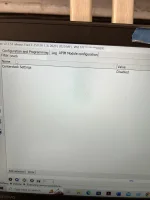
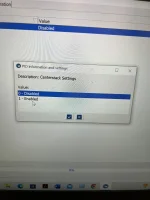
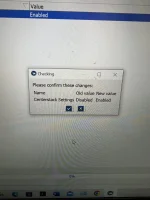
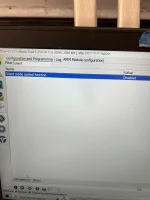
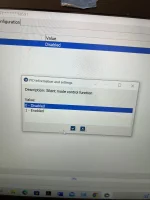
I’m sorry. I wouldn’t know. But I think you can figure it out in forscan pretty easily. You have to change two settings. Both in the APIM module. So far I have only made Forscan changes in the “plain english” module versions. First, In the APIM module find “center stack settings”. I did a search for “stack”. Change the setting from “disabled” to enable”. Second in the APIM find “silent mode control function”. I searched for “silent”. Change it from “disabled” to “enabled”. Then “silent mode” will appear as a selectable function in the vehicle settings menu on the sync screen. My sync version is 3.4.Can this be done on a 2022 with Sync 4?
I took pictures of both operations before and after I changed them.
I believe I had to cycle my truck on an off an extra time beyond what forscan requires to write to get the silent mode button to appear in the sync menus.
I am very much a novice using forscan so use this info at your own risk.
Attachments

Glad you are enjoying it! I felt the same way you do about the lights in the country.Silent mode is my favorite! I found out what it is and figured out how to do it from your post. Thank you! I hated how the truck lit up like a small city when the door was opened when I’m out hunting. That you can turn silent mode on and off from the screen is so awesome. Lights when you want them or off when you don’t with a simple change in the vehicle settings menu. It’s brilliant!
Ed

I experienced the “joy” of the lights and the motion sensor for the alarm.
At a multi-day SAR mission and have a chance to grab a couple hours sleep in the middle of the night. There’s an area a bit away from command where folks sleeping could get some dark and quiet.
Pull in with only my parking lights on. But get out to switch to the passenger seat for more space and of course the truck lights up the world. Once I’m in the passenger seat I lock the truck and as I go to settle in…set off the alarm as I move around.
Hopeful everyone was so tired they slept through it lol. But definitely felt like a dummy in that moment.
Strongly considering that Forscan mod now. And pulling the plug on the motion sensor like @BroncoHooves has done.
At a multi-day SAR mission and have a chance to grab a couple hours sleep in the middle of the night. There’s an area a bit away from command where folks sleeping could get some dark and quiet.
Pull in with only my parking lights on. But get out to switch to the passenger seat for more space and of course the truck lights up the world. Once I’m in the passenger seat I lock the truck and as I go to settle in…set off the alarm as I move around.
Hopeful everyone was so tired they slept through it lol. But definitely felt like a dummy in that moment.
Strongly considering that Forscan mod now. And pulling the plug on the motion sensor like @BroncoHooves has done.

I have used Forscan on my 21 XLT and am really happy with the changes. Being able to turn off some of the annoying bells and whistles was great. I do hope I can get this stuff turned off on the incoming 23. I am too old for the annoying bells and whistles and don't want them. Silent mode is exactly what I want. My wife's 23 explorer lights up like a Christmas tree. She likes it but then she is not getting out of the truck at 0 dark thirty to walk to a deer stand and wanting to be stealthy.
And please oh please let's figure out how to stop the annoying alarm that sounds when you activate the cruise control with the lane assist turned off. It is so annoying that cruise control has to be turned on every time the engine is turned off and restarted then to have that annoying alarm because you don't have the lane assist turned off. WTF?
And please oh please let's figure out how to stop the annoying alarm that sounds when you activate the cruise control with the lane assist turned off. It is so annoying that cruise control has to be turned on every time the engine is turned off and restarted then to have that annoying alarm because you don't have the lane assist turned off. WTF?

I’m sorry. I wouldn’t know. But I think you can figure it out in forscan pretty easily. You have to change two settings. Both in the APIM module. So far I have only made Forscan changes in the “plain english” module versions. First, In the APIM module find “center stack settings”. I did a search for “stack”. Change the setting from “disabled” to enable”. Second in the APIM find “silent mode control function”. I searched for “silent”. Change it from “disabled” to “enabled”. Then “silent mode” will appear as a selectable function in the vehicle settings menu on the sync screen. My sync version is 3.4.
I took pictures of both operations before and after I changed them.
I believe I had to cycle my truck on an off an extra time beyond what forscan requires to write to get the silent mode button to appear in the sync menus.
I am very much a novice using forscan so use this info at your own risk.
It took a couple extra engine cycles but Silent Mode works in my truck now. Thanks for posting!
Last edited:

How to get the extra torque?I like the 100 extra lb ft of torque setting. And, the Bambi mode.
I was able to enable Silent Mode on my '22 XLT 8" screen Sync3.4 today, using the info provided here and an additional step.
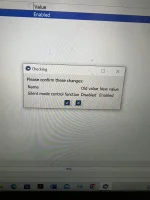
Using Forscan v2.3.55, I went to APIM plain english (first time ever using plain english, always used as-built before), and found the below settings and set them to 'Enabled' [and saved backup of the module - ALWAYS backup your changes]
Centerstack Settings => Enabled
Silent mode control function => Enabled
Wrote the changes, cycled key on/off several times, opened/closed door, cycled key again, but the setting was not showing up in Settings => Vehicle in Sync3
I looked in BCM plain english and found the below setting.

As a test, I set it to Enabled, and cycled key on/off as propmted.

Aftet this step, Silent Mode showed up in Settings -> Vehicle in Sync3 and the slider bar was "on".
I then changed Silent (Dark) Mode back to 'Disabled' in BCM, and cycled key on/off, to put that setting back like it was.
Silent Mode in Sync3 was still there, but now the slider was "off".
I went thru several more key on/off cycles and Silent Mode remained in Sync3. Don't know why the change in BCM seemed to "bump it", but thought I'd share my experience in case it could help someone else.
Using Forscan v2.3.55, I went to APIM plain english (first time ever using plain english, always used as-built before), and found the below settings and set them to 'Enabled' [and saved backup of the module - ALWAYS backup your changes]
Centerstack Settings => Enabled
Silent mode control function => Enabled
Wrote the changes, cycled key on/off several times, opened/closed door, cycled key again, but the setting was not showing up in Settings => Vehicle in Sync3
I looked in BCM plain english and found the below setting.
As a test, I set it to Enabled, and cycled key on/off as propmted.
Aftet this step, Silent Mode showed up in Settings -> Vehicle in Sync3 and the slider bar was "on".
I then changed Silent (Dark) Mode back to 'Disabled' in BCM, and cycled key on/off, to put that setting back like it was.
Silent Mode in Sync3 was still there, but now the slider was "off".
I went thru several more key on/off cycles and Silent Mode remained in Sync3. Don't know why the change in BCM seemed to "bump it", but thought I'd share my experience in case it could help someone else.
I also looked into removing the speed limiter. Going off comments from JKCustoms (page 7), I looked at the PCM plain english and found the below setting 'Speed Limiting Features'. I don't know if this is the lines he was talking about, as he's not been active on the forum since Dec '22, but I am going to set this one to value 1 and test it out. It's storming here today or I'd have already tested it. Will report back on after I test it.


- Feb 8, 2023
- 1,432
- 2,590
- 2024 F350 SRW Lariat 4x4 6.7L 3.55
- 2022 F350 SRW Lariat 4x4 7.3L 4.30 (RIP)
Just to confirm, you were able to get a slider UI to manually change silent mode via the touchscreen? Did you test changing the slider with the screen and restarting the truck? If this works it would be hugely useful.I went thru several more key on/off cycles and Silent Mode remained in Sync3. Don't know why the change in BCM seemed to "bump it", but thought I'd share my experience in case it could help someone else.
- Feb 8, 2023
- 1,432
- 2,590
- 2024 F350 SRW Lariat 4x4 6.7L 3.55
- 2022 F350 SRW Lariat 4x4 7.3L 4.30 (RIP)
Hot damn it works! The key was enabling Centerstack settings. Now you can easily turn Silent mode on and off whenever you want! Unfortunately it didn’t fix Ambient Lighting not being sticky.
Yes, end result is I have the Silent Mode setting in Sync3. I can touch the screen to turn the slider on/off.Just to confirm, you were able to get a slider UI to manually change silent mode via the touchscreen? Did you test changing the slider with the screen and restarting the truck? If this works it would be hugely useful.
I turned Silent Mode on in Sync3, turned key off, opened door and confirmed interior lights were off, closed door (sitting in the truck) and waited a few seconds and pressed Lock on the fob twice and confirmed no horn honk.
I then pressed Unlock on the fob, opened the door and closed it, put key in ignition and cycled key on, turned Silent Mode off in Sync3, turned key off and removed from ignition, opened door and confirmed interior lights were on, closed door, waited few seconds and pressed Lock on the fob twice and confirmed horn honked.


My 22 doesn’t honk when I lock it, unless I press lock on the FOB twice in relatively quick succession. I don’t recall doing anything in forescan to deal with this, so maybe it’s in a vehicle setting somewhere?Anyone know how to remove the honk when locking on MY22? I had done this on my old F150 but can’t find it on the superduty.
I also looked into removing the speed limiter. Going off comments from JKCustoms (page 7), I looked at the PCM plain english and found the below setting 'Speed Limiting Features'. I don't know if this is the lines he was talking about, as he's not been active on the forum since Dec '22, but I am going to set this one to value 1 and test it out. It's storming here today or I'd have already tested it. Will report back on after I test it.
View attachment 125390
Tested the setting above today (1-Less ASL, Less ISA). It didn't work, truck still shutdown. Still on the hunt, I've seen several people say they've been able to remove it, so it IS possible............ somehow apparently. I did change it back to what it was originally (0-Not Configured). I did cycle the truck and confirm they didn't come back.
Interestingly, the setting caused two DTC's. I cleared them before thinking about grabbing the details screenshot, but they were still in the log below.
Last edited:
Questions for the group, trying to limit the amount of messages that pop up on the cluster, does anyone know how to disable the pop up message whenever someone removes their seat belt? Sometimes the kids or the wife will pop off their seat belt for a various reason and then the message pops up, I get why its there but not needed as a full screen message / alert.
Also I will be swapping out the steering wheel for a raptor one and the right side buttons are different on the f150 wheel including a heated steering wheel. I saw there was an option in forscan (from the thread of people adding adaptive cruise) to set what type of module is in this location per left or right side in the SCCM I believe. Does anyone know if this needs to be changed if I keep the f150 buttons in place of the default ones of the 250
Also I will be swapping out the steering wheel for a raptor one and the right side buttons are different on the f150 wheel including a heated steering wheel. I saw there was an option in forscan (from the thread of people adding adaptive cruise) to set what type of module is in this location per left or right side in the SCCM I believe. Does anyone know if this needs to be changed if I keep the f150 buttons in place of the default ones of the 250


Swap your 250 bezel over.Questions for the group, trying to limit the amount of messages that pop up on the cluster, does anyone know how to disable the pop up message whenever someone removes their seat belt? Sometimes the kids or the wife will pop off their seat belt for a various reason and then the message pops up, I get why its there but not needed as a full screen message / alert.
Also I will be swapping out the steering wheel for a raptor one and the right side buttons are different on the f150 wheel including a heated steering wheel. I saw there was an option in forscan (from the thread of people adding adaptive cruise) to set what type of module is in this location per left or right side in the SCCM I believe. Does anyone know if this needs to be changed if I keep the f150 buttons in place of the default ones of the 250
Thanks I know that would work but having the f150 control module with the heated steering wheel button would be a great if all needed to do was change the module option in forscan.Swap your 250 bezel over.
Not sure I follow, I have a f250 I put a Raptor wheel on. My 250 wheel was heated, the Raptor wheel is heated, moved the f250 bezel to the Raptor wheel all works.