Disabling the modem (pulling the fuse)

Found these Forscan settings in APIM. Didn't change anything yet.

View attachment 130380

View attachment 130381

Also this one. According to manual and Forscan, the only thing that runs on HS-CAN4 is the TCU. Not sure I'd be comfortable jacking with this setting, would probably Disable the TCU and leave this one alone.

View attachment 130382

Didn't see anything in the Plain English regarding bluetooth, microphone, or gps, but they gotta be in the As-Built settings.
Well that's neat. Ya I also wouldn't mess with the HS4 Network one, but if the TCU one works it would be slick.
 
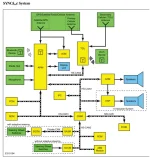
From the schematic, pulling the fuse (top left of diagram) seems to remove power from the TCU. I pulled fuse 8 soon after purchase and I do not see a need to remove the antennas.
1694609530346.webp


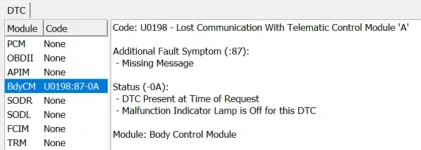
When use forscan to check for codes it shows:

===APIM DTC U0198:00-0B===
Code: U0198 - Lost Communication With Telematic Control Module A

Status:
- DTC Present at Time of Request
- Malfunction Indicator Lamp is Off for this DTC

Module: Accessory Protocol Interface Module

===END APIM DTC U0198:00-0B===

...

===DSP DTC U0198:00-0A===
Code: U0198 - Lost Communication With Telematic Control Module A

Status:
- DTC Present at Time of Request
- Malfunction Indicator Lamp is Off for this DTC

Module: (Audio) Digital Signal Processing Module

===END DSP DTC U0198:00-0A===

...

===GWM DTC U2402:92-0A===
Code: U2402 - Ethernet Failure With Telematic Control Unit Module (TCU)

Additional Fault Symptom:
- Performance Or Incorrect Operation

Status:
- DTC Present at Time of Request
- Malfunction Indicator Lamp is Off for this DTC

Module: Gateway Module A

===END GWM DTC U2402:92-0A===

===GWM DTC U2402:00-0A===
Code: U2402 - Ethernet Failure With Telematic Control Unit Module (TCU)

Status:
- DTC Present at Time of Request
- Malfunction Indicator Lamp is Off for this DTC

Module: Gateway Module A

===END GWM DTC U2402:00-0A===
 
Pulling the fuse / killing the TCU doesn't stop all comms.

The GPS / Sat / Primary Cell antenna is dual homed to the TCU and APIM

1694635120718.png


Thread below details what still works with power to TCU killed

https://www.ford-trucks.com/forums/1606964-vehicle-cellular-modem-wiring-diagram-2.html

Originally Posted by AZFordLover

Validation:

  • Truck no longer displays modem information when accessing vehicle info
  • Truck cannot enable cellular data network for WiFi (hotspot service)
  • Truck cannot be locked, unlocked, or remote started via FordPass app
  • Truck details (tire pressure, location, oil life, etc.) cannot be retrieved via FordPass app
Seems like we're off the cellular network just by unplugging the TCU (telematics control unit).


Caveat:

  • Sirius satellite data unaffected
  • GPS location unaffected
  • WiFi unaffected
Even though we may disable WiFi in the menu, it is theoretically possible that the truck will find an open WiFi network, connect to it, and send stored data.

A more comprehensive solution would disable the WiFi also - that's probably much more invasive as the WiFi connection may be built into the head unit.
 

Attachments

  • 1694634454553.webp
    1694634454553.webp
    37 KB · Views: 57
ahh. Yes. I missed that there was a A/B on C9021. Thanks
 
I swapped fuses today, just to get something done toward cutting the cord. I'd still like to find how to disable everything via Forscan. I'd like to drop the overhead console down and unplug the microphone too.

I took this screenshot of the Modules tab yesterday while cruising around Forscan.
1694658640853.png


After pulling the fuse, HSCAN4 and TCU are gone from the list of Modules
1694658710182.png
 

Attachments

  • 1694658457182.webp
    1694658457182.webp
    23.7 KB · Views: 59
Last edited:
To unplug the microphone just remove the overhead console and the plug is at the front, toward the windshield. Watch videos on Utube of how to remove it so you don’t break it, it’s not hard tho.

Red is Microphone, (3) yellow are motion sensors, the 4th dot is a dummy plug, at least in my truck.

C276D057-CF1C-4A62-86E3-373F69AEB640.webp


Gray plug is microphone. Once you get the console clips popped free and it’s hanging by the wires, you could probably reach in there and unplug the microphone without disconnecting any other connectors.

4DD45EEA-8E42-4A2E-829B-88CE28D78443.webp
 
I finally got around to cutting the cord on my 2022 Lariat F250, at least as much as any of us can with these trucks. I swapped the modem fuse for the 2-prong version, and then I got curious about the TCU. So I dug into that and disconnected all of the inputs/outputs to and from that thing (probably not needed, since it doesn’t have power with the fuse pulled, but I was there anyway, so…). That takes care of the cell tower comms.

I also dug into the antenna system for the GPS. At first, I thought I would put a disconnect/cutout switch in-line near the driver’s side antenna on the roof (top of the C pillar). But that would kill the Sat radio also. After looking at the schematics, I wanted to see if I could place the disconnect setup closer to the GPS input to the APIM. It’s pretty easy to access it- pull the speaker cover and the top center dash tray, and it is right there near the top. I used two 12” universal fakra cables, connecting 1 to the input on the APIM, and one to the antenna wire. I then fished the other two ends through the vent area in back of the dash tray (I had to cut a little bit with the dremel).

IMG_0398.jpg

IMG_0400.jpg


By doing this, I have a quick and easy way to connect the GPS antenna if I want the truck to get the GPS feed and disconnect it when I don’t want the GPS feed coming into the system (vast majority of the time). That should prevent the truck from geotagging any of the data it does collect, at least through use of the truck’s GPS system. Connecting your phone to the truck would probably negate that though. I'm not sure what data is skimmed from Apple CarPlay or Android Auto...
 
Last edited:
Has anyone figured out how to disable the cellular modem in a 2023 or 2024 truck? In looking at my 2024 owners manual I do not see a fuse called "Embedded modem" like the 2022 had. The fuse box looks completely different. I see a fuse for "
Radio transceiver module, Four-wheel drive switch, Enhanced central gateway" but that will kill kill 4WD and other things. I still want Sat radio, Bluetooth, and even WiFi to work, just not Cellular.
 
Has anyone figured out how to disable the cellular modem in a 2023 or 2024 truck? In looking at my 2024 owners manual I do not see a fuse called "Embedded modem" like the 2022 had. The fuse box looks completely different. I see a fuse for "
Radio transceiver module, Four-wheel drive switch, Enhanced central gateway" but that will kill kill 4WD and other things. I still want Sat radio, Bluetooth, and even WiFi to work, just not Cellular.
I would think you could simply disconnect the cellular antennas from the TCU. That would prevent any comms via cell towers, but keep all of the rest. This assumes your TCU has the same set up as my '22.
 
I finally got around to cutting the cord on my 2022 Lariat F250, at least as much as any of us can with these trucks. I swapped the modem fuse for the 2-prong version, and then I got curious about the TCU. So I dug into that and disconnected all of the inputs/outputs to and from that thing (probably not needed, since it doesn’t have power with the fuse pulled, but I was there anyway, so…). That takes care of the cell tower comms.

I also dug into the antenna system for the GPS. At first, I thought I would put a disconnect/cutout switch in-line near the driver’s side antenna on the roof (top of the C pillar). But that would kill the Sat radio also. After looking at the schematics, I wanted to see if I could place the disconnect setup closer to the GPS input to the APIM. It’s pretty easy to access it- pull the speaker cover and the top center dash tray, and it is right there near the top. I used two 12” universal fakra cables, connecting 1 to the input on the APIM, and one to the antenna wire. I then fished the other two ends through the vent area in back of the dash tray (I had to cut a little bit with the dremel).

View attachment 132477
View attachment 132478

By doing this, I have a quick and easy way to connect the GPS antenna if I want the truck to get the GPS feed and disconnect it when I don’t want the GPS feed coming into the system (vast majority of the time). That should prevent the truck from geotagging any of the data it does collect, at least through use of the truck’s GPS system. Connecting your phone to the truck would probably negate that though. I'm not sure what data is skimmed from Apple CarPlay or Android Auto...
Are the cables visible when you put the speaker cover / dash tray back on?
 
Are the cables visible when you put the speaker cover / dash tray back on?
They are visible if you lean way forward and stick your nugget right over the back edge of the tray. But just sitting in a normal seating position, they are not. If you want quick access to connect/disconnect, you really can't do much to hide them, at least in this particular spot. I'm sure you could route the disconnect to some other place below the dash, near one of the footwells.
 
Thanks for the insight wondering if anything has changed for 2024 regarding fuses or telematics unit location on the F150 models. All I see in the manual is “cell phone passport module”. Does this sound like the one? It needs to be replaced with a 2 prong and not just removed?
 
Thanks for the insight wondering if anything has changed for 2024 regarding fuses or telematics unit location on the F150 models. All I see in the manual is “cell phone passport module”. Does this sound like the one? It needs to be replaced with a 2 prong and not just removed?
Couple of things.

First, this forum is focused on the Super Duty Tremors. Still lots of great info and knowledgeable folks here, but you may have better luck on the sister site https://www.f150tremor.com/.

Second, I'm not familiar with the F150 personally nor the module you call out in case it was shared between F150 and Super Duty. I only investigated my 22MY truck. That module sounds probable, though? You can try what I did originally which is pulling the fuse and seeing what breaks. With the name of the circuit I strongly doubt it would impact anything related to safety or driving the truck.

Lastly, with regards to replacing with a 2 prong vs full removal, it all depends what the other circuit is. The reason the fuse has 3 prongs is the center prong feeds power to the two outer prongs - each outer prong a different circuit. Removing the fuse entirely disables both circuits.

The most targeted change is to replace with a two-prong, leaving the other circuit powered; however, if you're comfortable disabling the other circuit as well, then full removal is an option.
 
I just picked up a used 23 F250 Tremor with 12,000 miles. The modem, GPS, and wifi are offline and the Ford Pass app will not connect. I considered taking the truck to a dealer to have these things addressed but after reading all of these informative posts, I don’t think I will. I wonder if the previous owner disconnected these features (fine by me). Sirius radio does work (a plus).
I didn’t have Ford Pass on my last F250 (2017). So, I don’t really mind not being able to use the app.
I love the forum and am grateful to be a member. You guys are great!
 
I’m looking through the 2024 manual (PDF), and perusing the fuse list I see these:

Under hood:


IMG_4608.webp


Inside the cab:

IMG_4608.webp
IMG_4609.webp
IMG_4610.webp


“Enhanced Central Gateway” according to a search:

IMG_4611.webp
 
Too much aggravation for conspiracy theories. If Your tracked everywhere. Stopping one thing isn’t going to help. The one thing I don’t agree with is the driving tracker for insurance discounts. Not worth saving $50 a year.
Data collection and sale is a reality. Texas is suing GM over it’s deceptive practices designed to leverage buyers into GM app and online services which then track buyer behavior. GM sells data on behavior to insurance companies and others. Apparently, some people are fine with that, but many others aren’t. Either way, the practice is very real and lucrative.
 
Last edited:
Can someone please give me info on what I loose if I disconnect the tracking unit ? And any other info would help also.
 
Last edited:
wow nobody bit on this one OK I will carry on, as I was
 
wow nobody bit on this one OK I will carry on, as I was
Sorry, just saw this.

Assuming you’re talking about the factory Telematics Control Unit (TCU) / FordPass cellular modem, here is the breakdown for a 2024 Super Duty:

What you lose:

FordPass app features: Remote start, lock/unlock, vehicle locator, tire pressure/fuel status, and vehicle health alerts from your phone.

Factory built-in GPS / Navigation: On the 2023–2024 Super Duty, the TCU handles the truck's GPS signal, so unplugging it or pulling the fuse will disable the built-in factory navigation.

Built-in Wi-Fi hotspot and connected services (like live traffic/weather on factory nav).

Cellular Over-the-Air (OTA) software updates.

Modem-based data reporting and connected emergency/crash notification features.

What still works normally:

Key fob remote start, lock, and unlock.
SYNC 4 screen, radio, SiriusXM, Bluetooth, Apple CarPlay, and Android Auto. (Navigation through CarPlay or Android Auto still works fine since it uses your phone's GPS.)

Everything mechanical and safety-related: The truck starts and drives completely normally with no Check Engine Light or warning messages on the dash.

Other helpful info to know before doing it:

Software toggle vs. physical disconnect: If you don't want to pull parts, you can turn off connectivity and data sharing in the screen under Settings / Connectivity / Connected Vehicle Features. That makes it easy to temporarily turn back on if you ever want to pull software updates.

How to physically disconnect it: You can either pull the Telematics Control Unit fuse in the interior fuse box (passenger-side footwell—double-check your owner's manual diagram, as it's commonly fuse 38 on the '23–'24 models) or unplug the TCU module itself, which is mounted behind the passenger-side rear seat back on Crew Cabs.

How to confirm it's off: Once disconnected, the FordPass app will show the truck as offline/unreachable, and the Vehicle Hotspot setting in SYNC will stop loading or appear disabled.

Silent fault codes: Even though no dash lights come on, disconnecting the TCU logs a background "lost communication" code (DTC) that a dealer or FORScan will see if scanned. If you ever take it in for electrical or SYNC warranty work, it's smart to reconnect it first.

Claim your points first: If you bought the truck new and haven't claimed your FordPass Rewards purchase points yet, grab those before cutting power to the modem.

Quick note on aftermarket trackers: If you're actually referring to a dealer-installed GPS tracker (usually plugged into the OBD-II port under the steering wheel or tapped into wiring under the dash), removing that won't cause you to lose any factory truck features—just check your financing or lease paperwork first to make sure the lender doesn't require it.
 
Sorry, just saw this.

Assuming you’re talking about the factory Telematics Control Unit (TCU) / FordPass cellular modem, here is the breakdown for a 2024 Super Duty:

What you lose:

FordPass app features: Remote start, lock/unlock, vehicle locator, tire pressure/fuel status, and vehicle health alerts from your phone.

Factory built-in GPS / Navigation: On the 2023–2024 Super Duty, the TCU handles the truck's GPS signal, so unplugging it or pulling the fuse will disable the built-in factory navigation.

Built-in Wi-Fi hotspot and connected services (like live traffic/weather on factory nav).

Cellular Over-the-Air (OTA) software updates.

Modem-based data reporting and connected emergency/crash notification features.

What still works normally:

Key fob remote start, lock, and unlock.
SYNC 4 screen, radio, SiriusXM, Bluetooth, Apple CarPlay, and Android Auto. (Navigation through CarPlay or Android Auto still works fine since it uses your phone's GPS.)

Everything mechanical and safety-related: The truck starts and drives completely normally with no Check Engine Light or warning messages on the dash.

Other helpful info to know before doing it:

Software toggle vs. physical disconnect: If you don't want to pull parts, you can turn off connectivity and data sharing in the screen under Settings / Connectivity / Connected Vehicle Features. That makes it easy to temporarily turn back on if you ever want to pull software updates.

How to physically disconnect it: You can either pull the Telematics Control Unit fuse in the interior fuse box (passenger-side footwell—double-check your owner's manual diagram, as it's commonly fuse 38 on the '23–'24 models) or unplug the TCU module itself, which is mounted behind the passenger-side rear seat back on Crew Cabs.

How to confirm it's off: Once disconnected, the FordPass app will show the truck as offline/unreachable, and the Vehicle Hotspot setting in SYNC will stop loading or appear disabled.

Silent fault codes: Even though no dash lights come on, disconnecting the TCU logs a background "lost communication" code (DTC) that a dealer or FORScan will see if scanned. If you ever take it in for electrical or SYNC warranty work, it's smart to reconnect it first.

Claim your points first: If you bought the truck new and haven't claimed your FordPass Rewards purchase points yet, grab those before cutting power to the modem.

Quick note on aftermarket trackers: If you're actually referring to a dealer-installed GPS tracker (usually plugged into the OBD-II port under the steering wheel or tapped into wiring under the dash), removing that won't cause you to lose any factory truck features—just check your financing or lease paperwork first to make sure the lender doesn't require it.

thank you sir you are a wealth of information
 
Back
Top Bottom