Navigation
Install the app
How to install the app on iOS
Follow along with the video below to see how to install our site as a web app on your home screen.
Note: This feature may not be available in some browsers.
More options
Style variation
You are using an out of date browser. It may not display this or other websites correctly.
You should upgrade or use an alternative browser.
You should upgrade or use an alternative browser.
Disabling the modem (pulling the fuse)
- OP 🔹 ccw
- Start date
Nope, mine came in a couple weeks too, and I spent it asap and then turned off all comms from the truck to FordPass. I need to start working on actually cutting the cord to the extent that is able.Interesting I got my 40k ford reward poiunts and I have only had the truck for 3 weeks. I thought the modem had to be activated for 6 months?

Has anyone thought of putting in a relay in series with the fuse and connected to an upfitter switch? The switch could be left off most of the time and just turned on for some special occasion where the data connection was needed.
- OP 🔹
- #84

I swear that had been brought up before, but not in this thread! It's a good idea if you need the functionality periodically, and should be fairly easy to implement with a fuse tap of some form.Has anyone thought of putting in a relay in series with the fuse and connected to an upfitter switch? The switch could be left off most of the time and just turned on for some special occasion where the data connection was needed.

Anyone who is cutting the cord wanna pull their box out and send it to me?  Mine crapped out.
- OP 🔹
- #86
Unfortunately I want the ability to periodically put the fuse in for updates and such. Hopefully you can get one, though!Anyone who is cutting the cord wanna pull their box out and send it to me?
Has anyone thought of putting in a relay in series with the fuse and connected to an upfitter switch? The switch could be left off most of the time and just turned on for some special occasion where the data connection was needed.
I know, old thread. But you should not even need a relay right? Upfitter already have relays. Seems to me you could just pull the fuse as instructed by this thread and power the modem directly with upfitter power, either by splicing wire or fuse tap. You'll want to add an inline fuse as the box fuses for upfitter don't seem to be available below 15amp. Lastly unless you use upfitter 5 or 6 your modem will be killed every time you turn off the truck, even if upfitter is on. As built the modem is always hot.
Last edited:

So do you know which packages include cameras in the cab at this point? Or do they all have recording capability?I will give you a story - buddy owns a shop - buys new M5 - he went out joyriding - warped a rotor - he said it was not from him so he tried a warranty service - BMW printed a page that his car recorded. It had snapped a pic of his face and sent all the data on speed, location, etc every bit of data you can think of to the dealer and his insurance company. He sold the car. That was years ago. Ask any custom tuner today if they can touch a 22 BMW. Nope. It will disable the car if you try and get into the CPU to tune it. This is where the industry is heading.
More - take a look at todays push for ESG scores which will be tied to climate initiatives - your data will be analyzed and used and sold. Location, contacts, speed, mileage, and frankly all of it. When its free... you are the product. Sounds benign.....but just remember that this ability to track and collect your data can and will eventually be used against you. Read about stingray devices. Read about TikTok being nothing more than Chinese data harvesting (download the app you give full access to China to your phone and all of tis data. Metadata is how govts target terrorists folks. Your metadata that is recorded on these devices is literally overreach. Iphones take an infrared picture of your face every 5 seconds and have blood pressure monitoring capability so they can tell what emotions you are feeling. Data is a means of production - and your personal data is being sold out. This is modern protection from thieves and good old NUNYA to the BIG Tech oligarchy in bed with China and mega monopoly guys. fact check me
I’m calling bs on that story. Btw I investigate crashes at work everyday.So do you know which packages include cameras in the cab at this point? Or do they all have recording capability?
Some information for folks...
I anticipate I will leave the modem off most of the time unless I am traveling and have to park in a sketchy location.
Here is the location of the 2280C plug on the BCM.

- fuse 9 is the intrusion sensor per my wiring diagram
- Here is wiring diagram for trucks with 8" screen
- Here is wiring diagram for trucks with 12" screen
I anticipate I will leave the modem off most of the time unless I am traveling and have to park in a sketchy location.
Here is the location of the 2280C plug on the BCM.
Last edited:
- OP 🔹
- #92
Ohh that makes sense! Basically the security system. Thanks for that!fuse 9 is the intrusion sensor per my wiring diagram
What am I missing? I don’t see fuse 9 on the wiring diagrams?Some information for folks...
My plan is to cut the yellow red wire (or just remove pin 16 from the 2280C, for a "cleaner" approach) and power directly off upfitter switch 6. Upfitter switch 6 can always be hot which is how this system is intended to function. I will add an inline 5amp fuse since upfitter fuses do not go below 15amp.
- fuse 9 is the intrusion sensor per my wiring diagram
- Here is wiring diagram for trucks with 8" screen View attachment 111751
- Here is wiring diagram for trucks with 12" screenView attachment 111752
I anticipate I will leave the modem off most of the time unless I am traveling and have to park in a sketchy location.
Here is the location of the 2280C plug on the BCM.View attachment 111753
Also, what is the reasoning behind turning the modem on if traveling to a sketchy area?
OP was not sure what fuse 9 did. I was able to clarify what fuse 9 did. You are correct for the purposes of this mod all we are concerned with is fuse 8.What am I missing? I don’t see fuse 9 on the wiring diagrams?
Also, what is the reasoning behind turning the modem on if traveling to a sketchy area?
Turn the modem on in sketchy areas so if the truck was stolen it could be tracked atleast until the thieves disabled the modem. It would also validate that the truck was indeed stolen to police and insurance. Additionally I would receive Fordpass notifications if the alarm went off, etc.
Edit: for clarity, I don't mind technology when it benefits me. That said, Ford knowing how I am using the vehicle on a daily basis does not benefit me. So that's why I would like to have this modem on switched power.
Last edited:
Thanks for the clarification on fuse 9.OP was not sure what fuse 9 did. I was able to clarify what fuse 9 did. You are correct for the purposes of this mod all we are concerned with is fuse 8.
Turn the modem on in sketchy areas so if the truck was stolen it could be tracked atleast until the thieves disabled the modem. It would also validate that the truck was indeed stolen to police and insurance. Additionally I would receive Fordpass notifications if the alarm went off, etc.
Edit: for clarity, I don't mind technology when it benefits me. That said, Ford knowing how I am using the vehicle on a daily basis does not benefit me. So that's why I would like to have this modem on switched power.
Yeah, I’m with ya. Been meaning to disable the modem since before I got my truck, I need to get on that.
I borrowed the pics below from this thread about disconnecting the modem (TCU).
https://www.ford-trucks.com/forums/1606964-vehicle-cellular-modem-wiring-diagram-2.html


The poster of the pics said…..
This leaves me with questions
1) The wiring diagram a few posts up shows yellow/red wire sending power to the TCU, and a ground wire. What are the other 2 wires in the pics?
2) How to explain the bold lines above? That the satellite, GPS, and Wi-Fi connections still worked?
2a) Does some other device connected to the TCU provide it with secondary power?
2b) Are the antennas connect to other devices in addition to the TCU?
https://www.ford-trucks.com/forums/1606964-vehicle-cellular-modem-wiring-diagram-2.html
The poster of the pics said…..
Originally Posted by AZFordLover
Validation:
Seems like we're off the cellular network just by unplugging the TCU (telematics control unit).
- Truck no longer displays modem information when accessing vehicle info
- Truck cannot enable cellular data network for WiFi (hotspot service)
- Truck cannot be locked, unlocked, or remote started via FordPass app
- Truck details (tire pressure, location, oil life, etc.) cannot be retrieved via FordPass app
Caveat:
Even though we may disable WiFi in the menu, it is theoretically possible that the truck will find an open WiFi network, connect to it, and send stored data.
- Sirius satellite data unaffected
- GPS location unaffected
- WiFi unaffected
A more comprehensive solution would disable the WiFi also - that's probably much more invasive as the WiFi connection may be built into the head unit.
This leaves me with questions
1) The wiring diagram a few posts up shows yellow/red wire sending power to the TCU, and a ground wire. What are the other 2 wires in the pics?
2) How to explain the bold lines above? That the satellite, GPS, and Wi-Fi connections still worked?
2a) Does some other device connected to the TCU provide it with secondary power?
2b) Are the antennas connect to other devices in addition to the TCU?
(Connector) C40803A has 4 wires on it per the wiring diagram for 8" sync trucks above. Power, ground, and 2 canbus wires. This image reflects that.I borrowed the pics below from this thread about disconnecting the modem (TCU).
https://www.ford-trucks.com/forums/1606964-vehicle-cellular-modem-wiring-diagram-2.html
View attachment 111845
View attachment 111846
View attachment 111847
The poster of the pics said…..
This leaves me with questions
1) The wiring diagram a few posts up shows yellow/red wire sending power to the TCU, and a ground wire. What are the other 2 wires in the pics?
Good catch. It looks like the sync module and ACM have dedicated lines to the gps antenna too.2) How to explain the bold lines above? That the satellite, GPS, and Wi-Fi connections still worked?
No, see answer 2.2a) Does some other device connected to the TCU provide it with secondary power?
Bingo. See attached. Schematics showing dedicated coax lines to GPS antenna depending if you have satellite radio or basic radio.2b) Are the antennas connect to other devices in addition to the TCU?
Edit: by pulling the plug on the TCU and the GPS antenna after the splitter from sync unit. This solves the first two bullet points. The last one, regarding WIFI may be solveable (completely disabled) with a Forscan change to the wifi configuration within the APIM.
Attachments
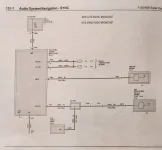
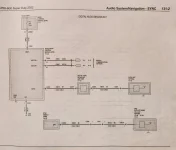
Last edited:
This got me thinking. Manually switched coax splitters can be had on Amazon for fairly cheap. If one was daring enough they could cut the coax line going to the gps antenna from Sync 3/4 (after the OEM splitter) add RG6 connectors and strategically place a manually switched coax splitter. This, along with killing power to the TCU would allow the user to easily kill connection each antenna on-and-off at will.
I can look tomorrow and see if I can find where the plugs are located after the coax splitter.
I can look tomorrow and see if I can find where the plugs are located after the coax splitter.
Last edited:
Yup. Different visual, but same info you showed.
Killing power to / unplugging the TCU stops comms on the Cell antennas but GPS and WiFi still work (orange arrows)
Looks fairly easy, 1) Unplug it or 2) Cut power via upfitter switch.
Running wires to kill it with upfitter switch would be a lot of work, but instant on/off ability.
GPS / Sat / Cell Antenna (driver side roof) would be easiest to just unplug under the headliner. If you go in for that, may as well unplug the other antenna while you're there. Could even just leave the TCU alone if you unplug the antenna's. (think I'd rather still have the TCU not doing anything tho).
Ideally, I'd like to unplug the three devices indicated with purple diamonds. Guessing that may result in DTCs of "open circuit" or whatever.
As long as unplugging them didn't result in some adverse behavior of the radio or truck in general.
Wouldn't be a "quick fix" to undo before a dealer visit tho, but I'm sure there's maybe logs where they'd see the devices lose connection 6 months ago, and then reestablish connection days before you brought it in.

Killing power to / unplugging the TCU stops comms on the Cell antennas but GPS and WiFi still work (orange arrows)
Looks fairly easy, 1) Unplug it or 2) Cut power via upfitter switch.
Running wires to kill it with upfitter switch would be a lot of work, but instant on/off ability.
GPS / Sat / Cell Antenna (driver side roof) would be easiest to just unplug under the headliner. If you go in for that, may as well unplug the other antenna while you're there. Could even just leave the TCU alone if you unplug the antenna's. (think I'd rather still have the TCU not doing anything tho).
Ideally, I'd like to unplug the three devices indicated with purple diamonds. Guessing that may result in DTCs of "open circuit" or whatever.
As long as unplugging them didn't result in some adverse behavior of the radio or truck in general.
Wouldn't be a "quick fix" to undo before a dealer visit tho, but I'm sure there's maybe logs where they'd see the devices lose connection 6 months ago, and then reestablish connection days before you brought it in.
Ohh..... maybe there's another way
Looks like there's a connector for the GPS / Sat / Cell antenna cable under the seat / console maybe........
ETA - just went and looked in my truck. I've got the center jump seat and looks like the connector is somewhere under it, as in not easily accessible.

Looks like there's a connector for the GPS / Sat / Cell antenna cable under the seat / console maybe........
ETA - just went and looked in my truck. I've got the center jump seat and looks like the connector is somewhere under it, as in not easily accessible.
Last edited:
Tremor Forum Fav 👍



Tremor Forum Photos
Latest Discussions
-

-

-
 What's your top 5 modifications you have done/plan to do?
- Latest: thetremorbuild

