-
Featured
- #1


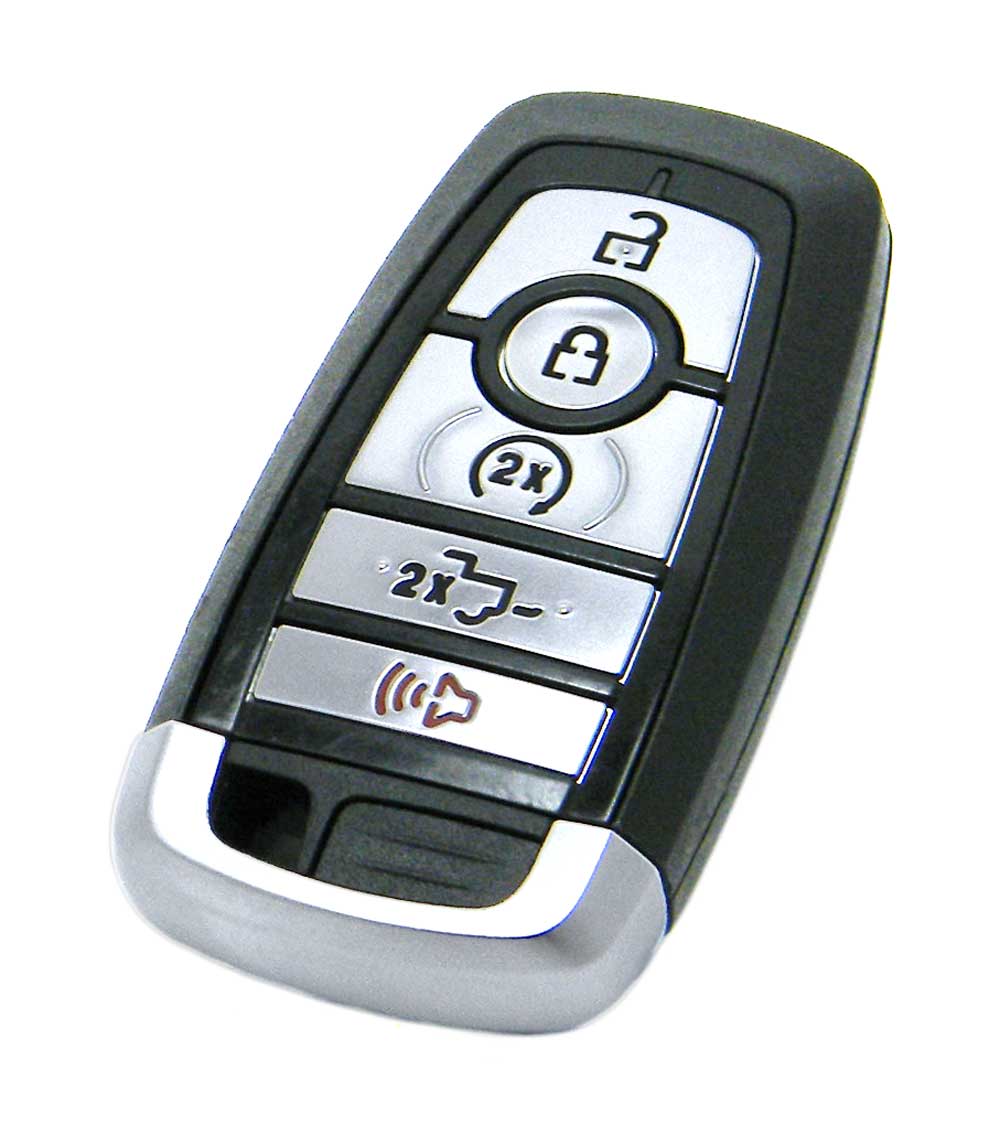
I am considering getting a 3rd key fob. From what I read, if you lose one, you cannot program a new one yourself. I found a few folks selling OEM fobs for under $70 so I thought I would get one to have a backup, since I seem to lose, drown, smash or somehow ruin things in my pockets.
Has anyone actually programmed a new, blank fob? I found the following instructions on one of the vendor's sites and wondering if I was going to have success with the process.
Thanks in advance!
Ed
PROXIMITY SMART KEY FOB REMOTE
Step-By-Step How To Programming Instructions
Confirm First Programmed Smart Key – Step 1
PLACE the first programmed smart key in the backup slot in the center console.
The key ring MUST be at the top with the buttons facing toward the rear of the vehicle.
Confirm First Programmed Smart Key – Step 2
PRESS the START/STOP button on the vehicle.
Confirm First Programmed Smart Key – Step 3
WAIT 5 seconds and PRESS the START/STOP button on the vehicle AGAIN.
Confirm First Programmed Smart Key – Step 4
REMOVE the first programmed key from the center console.
Confirm Second Programmed Smart Key – Step 1
Within 10 seconds, PLACE the second programmed smart key in the backup slot in the center console.
Confirm Second Programmed Smart Key – Step 2
PRESS the START/STOP button on the vehicle.
Confirm Second Programmed Smart Key – Step 3
WAIT 5 seconds and PRESS the START/STOP button on the vehicle AGAIN.
Confirm Second Programmed Smart Key – Step 4
REMOVE the second programmed key from the center console.
Program New Smart Key – Step 1
WAIT 5 seconds and PLACE the NEW un-programmed smart key in the backup slot in the center console.
Program New Smart Key – Step 2
PRESS the START/STOP button on the vehicle.
Program New Smart Key – Step 3
WAIT 5 seconds and PRESS the START/STOP button on the vehicle AGAIN.
Test Remotes
TEST all remotes. Programming is complete.
Share
If these programming instructions helped save you time and money, please consider sharing our website with friends and family so they can do the same.
Important:
Verify the following prior to following these instructions:
Your vehicle is equipped with keyless entry, and
You have a key fob remote that is compatible with your vehicle.
You MUST have 2 working smart keys (keys that start your vehicle) in order to perform this programming procedure without the assistance of a professional.
A MAXIMUM of 4 smart keys can be programmed to your vehicle. If you’ve had 4 programmed in the past, seek the assistance of a professional programmer.
Ensure that the vehicle is OFF prior to beginning this procedure. CLOSE all doors prior to beginning this procedure.
You MUST perform ALL steps within 30 seconds of starting the programming procedure.
You MUST wait 60 seconds before repeating the procedure after an unsuccessful attempt.
Note: If your vehicle cannot enter programming mode, then you cannot program any remote. This indicates either no keyless entry installed on the vehicle or a defective keyless entry receiver module.
Has anyone actually programmed a new, blank fob? I found the following instructions on one of the vendor's sites and wondering if I was going to have success with the process.
Thanks in advance!
Ed
PROXIMITY SMART KEY FOB REMOTE
Step-By-Step How To Programming Instructions
Confirm First Programmed Smart Key – Step 1
PLACE the first programmed smart key in the backup slot in the center console.
The key ring MUST be at the top with the buttons facing toward the rear of the vehicle.
Confirm First Programmed Smart Key – Step 2
PRESS the START/STOP button on the vehicle.
Confirm First Programmed Smart Key – Step 3
WAIT 5 seconds and PRESS the START/STOP button on the vehicle AGAIN.
Confirm First Programmed Smart Key – Step 4
REMOVE the first programmed key from the center console.
Confirm Second Programmed Smart Key – Step 1
Within 10 seconds, PLACE the second programmed smart key in the backup slot in the center console.
Confirm Second Programmed Smart Key – Step 2
PRESS the START/STOP button on the vehicle.
Confirm Second Programmed Smart Key – Step 3
WAIT 5 seconds and PRESS the START/STOP button on the vehicle AGAIN.
Confirm Second Programmed Smart Key – Step 4
REMOVE the second programmed key from the center console.
Program New Smart Key – Step 1
WAIT 5 seconds and PLACE the NEW un-programmed smart key in the backup slot in the center console.
Program New Smart Key – Step 2
PRESS the START/STOP button on the vehicle.
Program New Smart Key – Step 3
WAIT 5 seconds and PRESS the START/STOP button on the vehicle AGAIN.
Test Remotes
TEST all remotes. Programming is complete.
Share
If these programming instructions helped save you time and money, please consider sharing our website with friends and family so they can do the same.
Important:
Verify the following prior to following these instructions:
Your vehicle is equipped with keyless entry, and
You have a key fob remote that is compatible with your vehicle.
You MUST have 2 working smart keys (keys that start your vehicle) in order to perform this programming procedure without the assistance of a professional.
A MAXIMUM of 4 smart keys can be programmed to your vehicle. If you’ve had 4 programmed in the past, seek the assistance of a professional programmer.
Ensure that the vehicle is OFF prior to beginning this procedure. CLOSE all doors prior to beginning this procedure.
You MUST perform ALL steps within 30 seconds of starting the programming procedure.
You MUST wait 60 seconds before repeating the procedure after an unsuccessful attempt.
Note: If your vehicle cannot enter programming mode, then you cannot program any remote. This indicates either no keyless entry installed on the vehicle or a defective keyless entry receiver module.




![What did you do to your Tremor today? [2019-2024]](https://www.fordtremor.com/data/files/featured_images/featuredimages_thumb_4.webp?1790443288)