Navigation
Install the app
How to install the app on iOS
Follow along with the video below to see how to install our site as a web app on your home screen.
Note: This feature may not be available in some browsers.
More options
Style variation
You are using an out of date browser. It may not display this or other websites correctly.
You should upgrade or use an alternative browser.
You should upgrade or use an alternative browser.
2023+ ForScan Spreadsheet
- OP 🔹 ZooDad
- Start date




Well, it worked!
Did a ride height recalibration and now the headlights are at the normal height at all times!
Did a ride height recalibration and now the headlights are at the normal height at all times!
Running into a small problem with Forscan. I had to do a high side fuel adaptivea reset to clear a code after installing my KC Turbo and it looks like my fuel tank size reverted back to stock. However when I go into forscan it already says in PCM that I have 48 gallons set. Any ideas what I should do. I tried changing the value and re-writing it and no change.

Why do you think it reverted backRunning into a small problem with Forscan. I had to do a high side fuel adaptivea reset to clear a code after installing my KC Turbo and it looks like my fuel tank size reverted back to stock. However when I go into forscan it already says in PCM that I have 48 gallons set. Any ideas what I should do. I tried changing the value and re-writing it and no change.
To stock? DTE?
Not entirely sure. I had to flash the stock tune file (emissions on) back on the truck to get the FRDS reader to run the fuel adaptive reset. Then I flashed back the emissions off tube and no CEL. But I noticed that my DTE reading went from like 843 to 540 after I had flashed it back. Hooked up forscan (after having to get a new extended license) and tried to change it but already had 48 gallons written in PCM (not the as built setting). What else should I be doing?Why do you think it reverted back
To stock? DTE?
That is normal after a PCM reflash. Other software updates with “reset” the DTE as well. Drive it and it will increment back up to what you were normally seeing. @ShockGobbleNot entirely sure. I had to flash the stock tune file (emissions on) back on the truck to get the FRDS reader to run the fuel adaptive reset. Then I flashed back the emissions off tube and no CEL. But I noticed that my DTE reading went from like 843 to 540 after I had flashed it back. Hooked up forscan (after having to get a new extended license) and tried to change it but already had 48 gallons written in PCM (not the as built setting). What else should I be doing?
Thanks. I’ll drive it around for a few days and report back.That is normal after a PCM reflash. Other software updates with “reset” the DTE as well. Drive it and it will increment back up to what you were normally seeing.
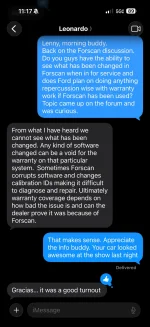
I have used Forscan quite a bit on my last few Tremors. My buddy is a national trainer for Ford Service. He is based in Phoenix, but travels all over. I mentioned to him that I had made several changes in Forscan and was a fan. His direct text reply is below:
“I have seen a ton of cases lately with vehicles with computer software issues that I assist FSEs with, and are all tied back to Forscan. It has been almost 100% of the cases that have had the software issues, have used Forscan.”
I didn’t ask him if they (Ford) plans on doing anything warranty wise about Forscan users, but I thought it was an interesting comment. I will see him this weekend and ask for more details. Will report back what I find out.
“I have seen a ton of cases lately with vehicles with computer software issues that I assist FSEs with, and are all tied back to Forscan. It has been almost 100% of the cases that have had the software issues, have used Forscan.”
I didn’t ask him if they (Ford) plans on doing anything warranty wise about Forscan users, but I thought it was an interesting comment. I will see him this weekend and ask for more details. Will report back what I find out.

Not entirely sure. I had to flash the stock tune file (emissions on) back on the truck to get the FRDS reader to run the fuel adaptive reset. Then I flashed back the emissions off tube and no CEL. But I noticed that my DTE reading went from like 843 to 540 after I had flashed it back. Hooked up forscan (after having to get a new extended license) and tried to change it but already had 48 gallons written in PCM (not the as built setting). What else should I be doing?
My DTE was funky for a bit after a couple recall updates. The DTE went down, but didn’t decrease over the next couple drives. DTE was almost back to normal by the next fill up.

Same here. I was actually watching the DTE increase as I drove on the first full tank after a bunch of updates. It started at around 500 miles and went up to 560 before dropping.My DTE was funky for a bit after a couple recall updates. The DTE went down, but didn’t decrease over the next couple drives. DTE was almost back to normal by the next fill up.
Additional context from a friend who is a national service trainer for Ford.
I consider it good that they cannot specifically see what has been changed with Forscan. Alot of this will boil down to the competency of our dealers if issues arise related to software or anything changed by Forscan. I will continue to use Forscan until it causes issues for me.
I consider it good that they cannot specifically see what has been changed with Forscan. Alot of this will boil down to the competency of our dealers if issues arise related to software or anything changed by Forscan. I will continue to use Forscan until it causes issues for me.
Attachments
I think one thing people don’t realize is that when changes are made, the “As Built” is changed. When the modules check in so to speak with Ford aka the mothership, they are now not the same as it was factory. This is why saving your legit factory settings/modules before making any changes is important.
Was going to refresh myself on tire calculations since my truck should come back from getting it's lift installed tomorrow and get this message when I follow the link on page 1 for the spreadsheet. I went ahead and made a copy but then the tire calculator is also now a dead link.
Is there any spreadsheet link I should be using?

Is there any spreadsheet link I should be using?
What is the process for saving and loading factory settings?I think one thing people don’t realize is that when changes are made, the “As Built” is changed. When the modules check in so to speak with Ford aka the mothership, they are now not the same as it was factory. This is why saving your legit factory settings/modules before making any changes is important.
Is that under the "Vehicle and interface information" tab: Export/Import profiles ??
I was wondering this same thing... I have a copy of this saved to my Drive, but wondering if there is a newer version being maintained that we should reference instead.Was going to refresh myself on tire calculations since my truck should come back from getting it's lift installed tomorrow and get this message when I follow the link on page 1 for the spreadsheet. I went ahead and made a copy but then the tire calculator is also now a dead link.
Is there any spreadsheet link I should be using?
View attachment 258669
Amazing resource put together as it current stands!
You read the configuration in each module in the as built(not plain English)and it gives you the option to save it.What is the process for saving and loading factory settings?
Is that under the "Vehicle and interface information" tab: Export/Import profiles ??

Any idea how long it takes to install the original as built file back onto the module?
With this change can you force a regen? Or only turn off auto regen?Just a heads up. If you have your vehicle in for service for the 26E01 Emissions recall where the PCM is updated, it will reset your ability to manually regen.
I have confirmed that you can re enable it after the recall has been completed.
cc @ZooDad

Very FAST!Any idea how long it takes to install the original as built file back onto the module?


- Feb 8, 2023
- 1,298
- 2,335
- 2024 F350 SRW Lariat 4x4 6.7L 3.55
- 2022 F350 SRW Lariat 4x4 7.3L 4.30 (RIP)
It even goes one step further. When you change settings via the menus in the instrument cluster and infotainment, the AsBuilt settings also change behind the scenes. This is what makes the settings persist across a power cycle.I think one thing people don’t realize is that when changes are made, the “As Built” is changed.
Don’t worry if you didn’t save a copy, though, you can download your original factory configuration from the Ford website.
Tremor Forum Fav 👍


Tremor Forum Photos


![What did you do to your Tremor today? [2019-2024]](https://www.fordtremor.com/data/files/featured_images/featuredimages_thumb_4.webp?1788417826)
![What did you do to your Tremor today? [2026 edition]](https://www.fordtremor.com/data/files/featured_images/featuredimages_thumb_5.webp?1788417826)
Tremor Forum Photos


