2023+ ForScan Spreadsheet

I am totally new to Forscan and at this moment a bit technically challenged. I have the software and the OBD plug but am really looking for a good step by step instruction document so that I don’t inadvertently screw something up? Does anyone know of a good reference document?
 
Cannot get the IPC module to take the write command to disable the damn seatbelt chime 🤬 it stops the service procedure and reverts back to the original as-built!!! Any suggestions?
Its not a forscan fix but i watched a youtube of someone that showed how to disable the chime by a few steps. it worked on my 23. " 2023 super duty seat belt chime disable"
 
I am totally new to Forscan and at this moment a bit technically challenged. I have the software and the OBD plug but am really looking for a good step by step instruction document so that I don’t inadvertently screw something up? Does anyone know of a good reference document?
As someone who is not tech savvy, I just played with the English side so far. Got most of what I want done in about 30 minutes. Next time I am going to play with the "coded" side. That is where the stress will commence for me 😉
 
As someone who is not tech savvy, I just played with the English side so far. Got most of what I want done in about 30 minutes. Next time I am going to play with the "coded" side. That is where the stress will commence for me 😉
@Blade420Play
Make sure you back up your modules !!!
Ask me how I know !!!!!

ZooDad
 
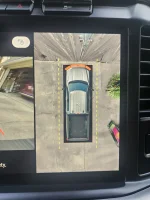
I have used Forscan to try to remove the black box from around the truck on the reverse camera screen. I went to the APIM module, location 7D0-02-02, and added 1 to the current value (of 0) in the last character of the first group of characters.

It did not work. Did I miss something?

I have a 2024 F-350 Lariat Crew Cab with the 7.3l gas engine. Sync version 24058 rev 1197

Thanks in advance.
 
Last edited:
I have used Forscan to try to remove the black box from around the truck on the reverse camera screen. I went to the APIM module, location 7D0-02-02, and added 1 to the current value (of 0) in the last character of the first group of characters.

It did not work. Did I miss something?

I have a 2024 F-350 Lariat Crew Cab with the 7.3l gas engine. Sync version 24058 rev 1197

Thanks in advance.
Can you post a photo of the black box you have on the screen ?

ZooDad
 

Attachments

  • 20240713_081049.webp
    20240713_081049.webp
    179.9 KB · Views: 239
The black box that it’s removed is the rear view “full view not available” when you’re going down the road. The black box you show is there because it’s where the camera’s view is cropped.
 
Your black box does not appear to be in the middle of the screen.

ZooDad
 
OK. Thanks. I never saw THAT black box. I had only seen the shadow around the truck.
 
OK. I have restored it to its original value. Thank you all.
 
Last edited:
So if I understand this right, I can just enable the TPMS trailer function without getting the option from the factory?
 
@Cglenn
What MY ?
What adapter ?
What version of ForScan?

ZooDad
I’ve just attempted to execute same procedure for the seat belts and when writing mid point I was kicked out of sesion
2024 f 350 platinum tremor
Using Bluetooth connection OBD LINK MAX
I was able to modify the tire pressure values do
 
I’ve just attempted to execute same procedure for the seat belts and when writing mid point I was kicked out of sesion
2024 f 350 platinum tremor
Using Bluetooth connection OBD LINK MAX
I was able to modify the tire pressure values do
That sort of thing is why Bluetooth adapters are not recommended for writing modifications. The best (and Forscan recommended) USB unit I've found is the OBD Link EX.

https://www.amazon.com/gp/product/B081VQVD3F
 
A couple things.

How do you access the code side and not use Plain English? I'm sure it is obvious, but I am overlooking it somehow.

Also, I have made a few changes to my truck, none pertaining to my mirrors. Either it is a coincidence, or something went wrong, my passenger mirror will not fold either direction. It clicks like it wants to but then stops right way. I've tried to assist it, but it still stops before moving. I've tried the re-sync technique seen in other threads. I haven't lubed them with silicon yet, as I don't have any with me atm.

As far as I can remember, it worked before I started making changes.
 
A couple things.

How do you access the code side and not use Plain English? I'm sure it is obvious, but I am overlooking it somehow.

Also, I have made a few changes to my truck, none pertaining to my mirrors. Either it is a coincidence, or something went wrong, my passenger mirror will not fold either direction. It clicks like it wants to but then stops right way. I've tried to assist it, but it still stops before moving. I've tried the re-sync technique seen in other threads. I haven't lubed them with silicon yet, as I don't have any with me atm.

As far as I can remember, it worked before I started making changes.
Not that I know much, but I would say it is mechanical issues you are having. Especially if you didn't do any adjustments to the mirrors in the computer, and you can hear the motor trying to move it 🤷
 
Can I help test DTE settings? I have Forscan, 23' F250 Tremor with Titan 55 gallon tank I'm putting in on Sat.
 
I must be doing something wrong.... I am trying to get rid of the stupid black box when the rear view camera is on while moving. I have read where to get rid of it you have to get into the "APIM" module and make some changes, the only issue is that when I plug in my Forscan and read the module I do not even see this APIM module. I see all of the others like BCM, TCM ect, but no APIM. What am I missing or what do I need to do in order to delete the black box?

2024 F350 KR
Latest version of Forscan
I have managed to successfully change my tire size, correct speedo, bambi mode and change TPMS pressures but no bueno on the black box of frustration
 
Back
Top Bottom