Navigation
Install the app
How to install the app on iOS
Follow along with the video below to see how to install our site as a web app on your home screen.
Note: This feature may not be available in some browsers.
More options
Style variation
You are using an out of date browser. It may not display this or other websites correctly.
You should upgrade or use an alternative browser.
You should upgrade or use an alternative browser.
Getting rid of My View?
- OP 🔹 Borg
- Start date

I have the exact same issue with my 23 F350



Strange...mine always comes up with the diesel gauges. Have you had it set to them and then saved it into memory setting 1?

On 2023 and early 24's I believe there is a software update that takes care of that issue.

DTX2023Tremor
Bourbon & Tremor Enthusiast
Tremor of the Month 🏆
Founding Member 📜
Meetup Organizer 🚧
GB Coordinator 📢
Trail Captain 🧭
 Moab Trail Run 2026
 Kentucky Ford Plant Tour 2026
 Flagstaff Trail Run 2026
 Big Bend Trail Run 2025
+5
Big Bend Trail Run 2025
+5

My 23 seems to default to the last screen I used and at the bottom of the list is an option to add remove screens that I don't use. I have removed the calm view and trip 2.
when I shut mine off with diesel gauges displayed that's what it restarts with.
Well crap. This means I need to make an appointment with the dealer to get this fixed.


i set my-view up with the displays i wanted in it (handy).
restarts with whatever screen was up when it was shutdown.
2020 gasser????
maybe I'm not quite understanding y'all's dilemma?????
restarts with whatever screen was up when it was shutdown.
2020 gasser????
maybe I'm not quite understanding y'all's dilemma?????

everytime I start the truck it defaults to myviewi set my-view up with the displays i wanted in it (handy).
restarts with whatever screen was up when it was shutdown.
2020 gasser????
maybe I'm not quite understanding y'all's dilemma?????
wild a$$ shot in the dark
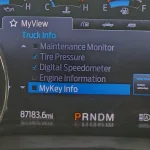
you may be already passed this, but under the "MyView" settings is the "MyKey Info" checked?
mine isn't
i just ran through a few screens & they came back up where i left them except for when i turned the truck off in "settings"
MyView
configure MyView screens [ok] [ok]
add/remove screens [ok]
truck info screens [ok]
gets you to "MyKey info"
[ok] to toggle check or not

you may be already passed this, but under the "MyView" settings is the "MyKey Info" checked?
mine isn't
i just ran through a few screens & they came back up where i left them except for when i turned the truck off in "settings"
MyView
configure MyView screens [ok] [ok]
add/remove screens [ok]
truck info screens [ok]
gets you to "MyKey info"
[ok] to toggle check or not
Attachments


Issue is for '23+ trucks only.wild a$$ shot in the dark
you may be already passed this, but under the "MyView" settings is the "MyKey Info" checked?
mine isn't
i just ran through a few screens & they came back up where i left them except for when i turned the truck off in "settings"
MyView
configure MyView screens [ok] [ok]
add/remove screens [ok]
truck info screens [ok]
gets you to "MyKey info"
[ok] to toggle check or not
checkIssue is for '23+ trucks only.
just though there's a chance the key is saved to that startup screen
- OP 🔹
- #14
Well, it appears that my build will come up with the stupid "My screen" when I restart my truck. My sc4een requires 2 options so I hav3 to select my screen, then it goes to my fist option (tire pressure) then to my 2nd option, diesel gauges. This is frigging stupid. Don't intend to go to the dealership to pay for an upgrade before I have other possible warranty work. I was hoping this could be adjusted with forscan.
Thanks for pondering my issue
Peter
Thanks for pondering my issue
Peter

Sounds like no solution yet, lame.

I’ll have to pay attention in mine, I only notice the seatbelt screen hanging out forever until I back out of it so I am guessing I cycle through this in zombie mode to get to where I like it to be.
Tremor Forum Fav 👍



Tremor Forum Photos
Latest Discussions
-

-
 📍 Meet-Up Meetup and Trail Run - Arizona - Saturday, November 14th
- Latest: Godzilla/Tremornator
-

