Full Screen CarPlay is here for Sync4 in my SD!

SOMETHING FAILED TO HAPPEN.

Holy crap I’m counting this as progress. Not success, obviously, but progress over nothing.

Still have no update icon. Also nothing shown in “Update Details” other than I’m up to date. But an error is better than literally nothing.

Here’s to hoping this is a sign the GWM update the dealer did actually worked.

IMG_0334.webp
 
SOMETHING FAILED TO HAPPEN.

Holy crap I’m counting this as progress. Not success, obviously, but progress over nothing.

Still have no update icon. Also nothing shown in “Update Details” other than I’m up to date. But an error is better than literally nothing.

Here’s to hoping this is a sign the GWM update the dealer did actually worked.

View attachment 120179
I posted this on the last page 😅

 
I posted this on the last page 😅

Oh ya I know. I’m just stoked my truck finally did anything at all lol.
 
I really feel challenged here. I cannot figure out this dual phone thing. I connected both but can’t get both to work. I’ve deleted and reconnected it again and still only one connects at a time.
I tried the same thing today. It allowed both phones allowed me to chose which one to use CarPlay with. When you click over to the settings screen there is a little frayed out icon and a delete icon. The grated out one does nothing. My work phone rang in my pocket after I hooked it up but it did not go through the system like it says it will. Looked everywhere for help on it and there is no info. It’s almost like the option is half installed.
 
My update finally came in. I’ve had the download symbol off and on for the last few months. Tried Wi-Fi and all the other tricks. I finally shut Wi-Fi off and just let it ride. Did my first oil change tonight and when started to check for leaks it showed the update had been installed.

Have not had time to play with things yet. Will do forscan changes when I get time.
 
maybe being off wifi is the better way? it seems more people are getting it without wifi than with.
 
It's almost as if the system isn't incrementally saving the download file as it should be. No way it should take months on WiFi, or even just 4G cellular.

Would be interesting to see how much data throttling ATT does to Ford, and I still need to figure out how to see the amount of data my truck downloads over WiFi in one day to pinpoint a root cause.
That was my thought as well, after weeks of getting the update checkbox and yet seeing a blank update screen. I would think there'd be a tmp folder/container where the download incrementally takes place and once fully downloaded, the update would be applied.

Rather, it seems like the download process starts over from scratch if the update file(s) aren't fully downloaded.

I even looked at the devices connected to my router to see if I could ID the truck, and any network traffic flowing in/out, but to to no avail. (It'd probably be easier to pinpoint if I didn't have about 100 devices connected :D)
 
  • Like
Reactions: ccw
It's almost as if the system isn't incrementally saving the download file as it should be. No way it should take months on WiFi, or even just 4G cellular.

Would be interesting to see how much data throttling ATT does to Ford, and I still need to figure out how to see the amount of data my truck downloads over WiFi in one day to pinpoint a root cause.

If you are using pfsense you can install the "bandwidthd" package, from system/package manager/available, to monitor data usage by ip.
 
If you are using pfsense you can install the "bandwidthd" package, from system/package manager/available, to monitor data usage by ip.
I was doing literally that a few minutes ago. Just configuring everything at the moment.
 
  • Like
Reactions: ccw
Has anyone tried going into their settings under General, and sending Ford the listed reply that you're not getting Sync 4 updates? Although I have received updates in the past I haven't gotten the new full screen ones. Consequently I tried doing this today and found that the system wouldn't let me send my notice until I opened and allowed my truck to report on all their listed analytic data, which I found interesting. Anyway I'll see if this gets my new update.
 
I tried doing that and it said the report will be sent once connected to wifi.
 
I tried doing that and it said the report will be sent once connected to wifi.
Interesting. When I was messing around with the truck today I can't get my router to show the truck as a connected consumer. I tried removing the wifi from the truck and then reconnecting but still not showing up, but the truck has the wifi.
 
Interesting. When I was messing around with the truck today I can't get my router to show the truck as a connected consumer. I tried removing the wifi from the truck and then reconnecting but still not showing up, but the truck has the wifi.
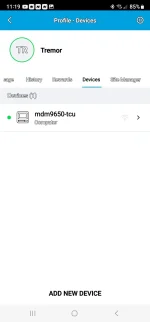
Look for a connected device with a prefix of mdm. Ford of course couldn't name it something intuitive. You can confirm it's the correct device using the mac address.

This is what mine looks like. I've since renamed it in my router.

IMG_0476.webp
 
Look for a connected device with a prefix of mdm. Ford of course couldn't name it something intuitive. You can confirm it's the correct device using the mac address.

This is what mine looks like. I've since renamed it in my router.

View attachment 120345
There is also a 'SYNC' device that will show up in your router seldomly.

TrINGD8.png
 
Interesting. When I was messing around with the truck today I can't get my router to show the truck as a connected consumer. I tried removing the wifi from the truck and then reconnecting but still not showing up, but the truck has the wifi.
The truck does not stay constantly connected to your router…it only connects intermittently/randomly.

If you have the ability to see the devices connected to your router, open that screen and then update your vehicle’s status in FordPass. You should see the truck pop up as a connected device. It will then disappear once you close FordPass.
Interesting. I did that and you're absolutely right, it showed up as mdm9650-tcu. Are all Ford sync units identically numbered?
 

Attachments

  • Screenshot_20230514_231939_Orbi.webp
    Screenshot_20230514_231939_Orbi.webp
    28 KB · Views: 38
I tried the same thing today. It allowed both phones allowed me to chose which one to use CarPlay with. When you click over to the settings screen there is a little frayed out icon and a delete icon. The grated out one does nothing. My work phone rang in my pocket after I hooked it up but it did not go through the system like it says it will. Looked everywhere for help on it and there is no info. It’s almost like the option is half installed.
I got it to work, but not while one phone is connected to CarPlay. When both phones are not connect to the CarPlay. You can go to the phone list and highlight the phone icon on each one. But once you hit the CarPlay connection, that phone disconnects. I haven’t tried it with one connected wired yet, just wireless.
 
Back
Top Bottom