Full Screen CarPlay is here for Sync4 in my SD!

I can only speak to my experience. I got the small "power up" while parked at the airport and then got the big update while camping in the middle of the desert outside Tucson. Haven't gotten any updates via wifi and in fact have it disabled.
Hmmmmmm 👍
 
What Sync 4 version number indicates that the update for 75th Anniversary, Unreal engine, and Climate controls are available? Or, maybe asked another way, how do you know that you can execute the FORSCAN actions to enable these?

I have Sync 4 software version: 22026_PRODUCT and Revision: 354.
I’m on version 22293
Revision 610
 
I tried searching, can someone tell me what the small truck icon (top right of display) is that is on the 360 display after the update? It is in the way.
 
So I have the latest update
And did the unreal engine and climate controls and everything seems to work great

My question is with this latest revision has anyone figured out how to access all the cameras at any speed and maybe even get rid of that annoying message on the rear camera
 
I tried searching, can someone tell me what the small truck icon (top right of display) is that is on the 360 display after the update? It is in the way.
I don’t have that. Can you take a picture. Do you mean the truck icon never goes away after you turn off the 360 camera?
 
What is the unreal engine?
 
I don’t have that. Can you take a picture. Do you mean the truck icon never goes away after you turn off the 360 camera?
In the red circle. Sorry for the mess around in the garage.


2A24994F-EAD4-49AD-8BFE-1A41FD7FD9EA.jpeg
 
What is the unreal engine?

I had a 2018 F150 eco boost that piped in a fake engine sound. When I first saw mentions of unreal engine, I thought that was it, but I think it is just an enhanced graphics engine for the display.
 
In the red circle. Sorry for the mess around in the garage.


View attachment 116185
I thought someone else here had that issue. Can’t remember which thread it was. Have you tried to forced reset yet? Hold down the power and the fast forward button at the same time
 
What is the unreal engine?

I had a 2018 F150 eco boost that piped in a fake engine sound. When I first saw mentions of unreal engine, I thought that was it, but I think it is just an enhanced graphics engine for the display.
Unreal Engine is a graphics engine. Powers many, many games across all platforms (e.g. Xbox, PlayStation, PC, etc). Generally allows for animation and physics to power that animation.
 
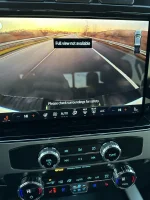
So this is a pic of mine after the update
I now have the small truck and says full screen not available but it did move the warning down to the bottom lol
I tried resetting and it’s still the same
Tried touching the truck it doesn’t do anything
Watched it when cars passed me and didn’t light up or anything
Don’t know how to get rid of it
 

Attachments

  • 4F7C6879-87BA-48D4-8995-1A54BE805187.webp
    4F7C6879-87BA-48D4-8995-1A54BE805187.webp
    151.5 KB · Views: 153
See any difference over 3.5.3?
I switched to the Unreal style display so I can’t really tell. I might switch back because the controls are confusing to find.
 
Mine updated OTA while I was out of town. I've done nothing to force anything. I do have the annoying little truck icon as well though. I also can't figure out what it's for.
 
We’re going to be traveling next month so I renewed or activated my Navigation. A few hours later I went to my truck and found that the new Carplay fullscreen update and Navigation was downloaded/activated. Problem is the Navigation has the KIP problem in front of all the text. Has anyone had this corrected? I think I will just cancel Nav for now until its corrected. I cant deal with looking at that while trying to use it. I’ll use Google Maps or Waze, which I’ve heard works well. Anyone asked to have the Nav disabled and get a refund?
 
Still waiting on mine. I check about once a week but nothing so far. :(
 
We’re going to be traveling next month so I renewed or activated my Navigation. A few hours later I went to my truck and found that the new Carplay fullscreen update and Navigation was downloaded/activated. Problem is the Navigation has the KIP problem in front of all the text. Has anyone had this corrected? I think I will just cancel Nav for now until its corrected. I cant deal with looking at that while trying to use it. I’ll use Google Maps or Waze, which I’ve heard works well. Anyone asked to have the Nav disabled and get a refund?
According to Ford, it’s non-refundable. So, you would need to pursue other means with bank for refund.
 
Just finished a chat with Ford and there’s another update that is pending on my truck so hopefully it will resolve the KIPcommon issue. If you go to https://www.ford.com/support/sync-maps-updates/ and enter your VIN, it will let you know if updates are available.
All I get is the message below. I have automatic updates enabled, and I’m connected to WiFi. I’m still on the factory version from January of last year.

0FC67A8A-38FE-4373-9EB0-6E2B3A0A1208.webp
 
Back
Top Bottom