3D Printers and CAD Software - looking for advice

Great thread!

I’ve been using Shapr3D, and the learning curve hasn't been too bad. It offers support for both Mac and iPad, which makes it easy to sketch out ideas on the iPad and refine them later on the desktop.

As for printing, I’ve been using a Creality K1 Max, and it’s been reliable and capable of handling everything I’ve thrown at it so far. That said, I’ll be handing it down to my son soon and plan to upgrade to a Bambu Labs H2D next.
Seconded on Shapr3D! I use it a lot on my iPad Pro, and I have found it to be fantastic! I love being able to model something while sitting anywhere. I also really enjoy the touch + pencil experience when designing.
 
You can always use more than one printer :ROFLMAO:

7343.webp
 
I am having a great experience with a formlabs form 4. I am very happy with the parts it makes. It’s expensive, but the parts a so much more accurate and exhibit better mechanical qualities and surface finish. We pick watermelons with our SLA printed gripper. There is no way we could do that with filament prints. There is a learning curve to supporting parts during a print to improve dimensional accuracy.

As far as CAD, I like CATIA, but it is definitely overkill for most recreational users. We use solidworks, and it is super frustrating with the way it fails to update parts or handle transitions to zero thickness. But it is so widely used that you will almost always be able to find someone that has developed a work around. Autodesk Inventor has different headaches. Either solidworks or autodesk inventor/fusion would likely suit you well.
 
I am having a great experience with a formlabs form 4. I am very happy with the parts it makes. It’s expensive, but the parts a so much more accurate and exhibit better mechanical qualities and surface finish. We pick watermelons with our SLA printed gripper. There is no way we could do that with filament prints. There is a learning curve to supporting parts during a print to improve dimensional accuracy.

As far as CAD, I like CATIA, but it is definitely overkill for most recreational users. We use solidworks, and it is super frustrating with the way it fails to update parts or handle transitions to zero thickness. But it is so widely used that you will almost always be able to find someone that has developed a work around. Autodesk Inventor has different headaches. Either solidworks or autodesk inventor/fusion would likely suit you well.
As a formlabs user, I agree that dimensionally it is very accurate, but we don’t find the juice worth the squeeze otherwise. The toughest resins are also much weaker than anything available for filaments, especially if you anneal the prints.
 
Okay I’m kinda tired about reading how some of you guys get these great creative ideas and quickly turn them into prototypes! I want to join in the fun but with so many options out there I’d like to get input from experienced users as to what units would help me accomplish the following goals:

I want a unit that will give me a build size of at least 24” for brackets and full size modeling.
I want to be able to make components out of both plastic and metallic media.
Quality and Capability are far more important to me than minimizing cost.
I don’t want to buy a starter unit only to realize I want more capability as I become more proficient in using it and design.

As for the CAD software question:

I’ve been around design engineers all my work life but never myself used CAD software. I’m an old school draftsman designer and can design in 2D all day but that doesn’t create the digital model that a 3D printer needs. I want a logical balance between software capability and ease of use/learning.

Any thoughts and advice is very much appreciated!
Azoth3D in Ann Arbor Michigan is one of the biggest 3D printing outfits out there. If you can think it, it can be printed. They can do PLA and they are set up to 3D print metal, including stainless. They just did some stuff for Ring Brothers car builders. So If you dont want to buy all the stuff this is an option.
 
Last edited:
Also was a mechanical engineer, learned Pro E, Solidworks and NX. Went with Fusion360 for home use.

Started with an Ender but sold it for a Bambu X1C and it was a game changer. I didn’t need something to constantly mess with I needed a printer that just prints and Bambu does that.
 
Azoth3D in Ann Arbor Michigan is one of the biggest 3D printing outfits out there. If you can think it, it can be printed. They can do PLA and they are set up to 3D print metal, including stainless. They just did some stuff for Ring Brothers car builders. So I you dont want to buy all the stuff this is an option.
Awesome Thanks!
 
Also was a mechanical engineer, learned Pro E, Solidworks and NX. Went with Fusion360 for home use.

Started with an Ender but sold it for a Bambu X1C and it was a game changer. I didn’t need something to constantly mess with I needed a printer that just prints and Bambu does that.
I know most of the High School Robotics teams use the Bambu's, our team being one of them and its for sure one of the best.
 
I am also a Solidworks user with Creality and Bambu machines. I started with an Ender 3 and now have a K2+. I also have an X1C at work. To start out I think you could give TinkerCAD or Onshape a try. If you're already proficient in 2D CAD you should have a leg up. Even 3D models are generally drawn with 2d sketches. You just would need to learn the basic functions like extrude, revolve, ect and those are similar across the different programs.

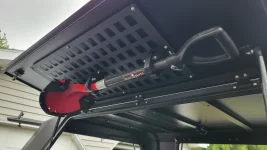
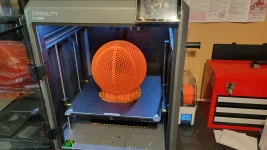
As mentioned already, consumer level machines don't do metal printing. But the plastics that you can print now with a consumer level printer have come a long way. If you are looking to print functional parts, I would recommend an enclosed printer that can go to 300C for printing nylon, ASA, etc. You can do a lot with plastic. They have variants that have small pieces of glass or carbon added that increase the strength. They have even come out with a printable filament that you can use to 3d print a full size basketball. My shovel mounting brackets were printed from Polymaker PA6-12GF. I would definitely recommend the X1C or H2S, the Bambu machines are very newbie friendly. Learning the slicer program is anther step that is required, but the bambu slicer and filament profiles makes it easy. It is incredible what the machines and materials are capable of now.
 

Attachments

  • 20250626_184430.webp
    20250626_184430.webp
    88.1 KB · Views: 22
  • 20250602_173737.webp
    20250602_173737.webp
    208.2 KB · Views: 24
Thanks for the input!
 
Back
Top Bottom