Wolfbox dash cam

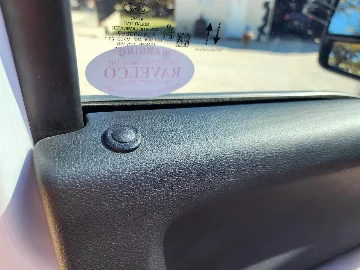
Here are a few pics; one's a close up of the front facing sensor. My understanding is that the rear facing sensor is just for the auto-dimming feature of the OEM mirror. The front facing sensor is (maybe) for dash illumination etc. Sounds like some folks do OK without transplanting this board to their new WB mirror, but I had issues. YMMV
thanks a lot for the reply!
interesting I am concerned over the dimming of the side rear view mirrors, as far I my research tell they are synced and the sensors controlling the dimming is in the interior mirror, do yours dim with your current setup?
 
You’re welcome.
Regarding the side view mirrors: I don’t know if they dim. I don't even recall that being a feature!
In any event, I have not found headlights in the side view mirrors be an issue since doing this little mod
 
thanks a lot for the reply!
interesting I am concerned over the dimming of the side rear view mirrors, as far I my research tell they are synced and the sensors controlling the dimming is in the interior mirror, do yours dim with your current setup?
The F150 may have auto dimming mirrors on the driver's side as part of certain trims or options. It does appear that they are synchronized using the rear-view mirror sensors to dim both mirrors. The 2017-2026 F250 and 350, do not have dimming side mirrors but do have interior dimming mirrors.

How it works:
Interior Rear View Mirror - Auto-Dimming
The auto-dimming rear view mirror has 2 photoelectric sensors, one on the front of the mirror (facing the windshield) and one on the rear of the mirror (at the top of the mirror glass). Based on inputs from these sensors, the automatic dimming feature adjusts the reflectance level of the interior rear view mirror glass to eliminate unwanted glare. The reflectance level of the mirror glass is variable and depends on the amount of rear glare in relation to ambient light conditions in front of the interior mirror.
 
To tie this into an Upfitter is very simple. All dash cams that have the ability for PARKING MODE have a BATTERY - IGNITION - GROUND connection. The ground is obvious. Connect the BATTERY wire to your Upfitter switch and leave it ON all of the time. Connect the IGNITION wire to your fuse panel. When you want to turn OFF PARKING MODE, turn the Upfitter switch OFF to remove battery power to the camera. You will want to have your OEM upfitter box have switches 5-6 enabled for constant power so use 5 or 6 and configure the fuse in the OEM upfitter box accordingly.
 
Last edited:
Just finished installing the Wolfbox yesterday.

I wired my Wolfbox a little differently than the typical way. I used an upfitter I call "dash power" on Upfitter 4 to trigger the display on instead of using the ACC to trigger it on. My upfitters are all hot at all times; I have a different way set up to remind me to turn them off when I leave the truck. I don't worry too much about the camera taking pictures in the background when the ignition (or upfitter) is off (parking mode) since it draws so little current when the display is off. I also keep a maintainer on the truck at all times; keeps the batteries topped off and healthy.

I use the upfitter instead of the ignition to trigger the Wolfbox on so I can control when it is lit and when I don't want it lit. When I turn the upfitter off, the display goes away and the Wolfbox is then like a reduced visual mirror. (Like turning the night mode on in the OEM mirror.) It's shiny enough to act like a non-powered mirror.

I also used the reverse wire attached to the reverse camera to be triggered when I turn the Baja Designs back lights on. Ordinarily, I don't need this camera when backing since the OEM camera also comes on in reverse. And you can switch to the rear camera on at any time with the display if you want to turn it on without being in reverse or with the backup lights on. The Wolfbox will also remain lit if I go over 5 MPH when changing to Drive mode. Might be handy somewhere down the line.

Hope this helps anyone.
 
Back
Top Bottom