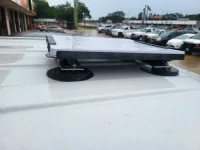
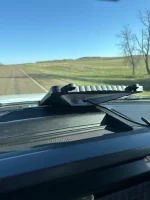
@NEOHIO : As my Standard Gen 3 antenna is mounted flat it receives SL just fine with good speeds. Lying the Mini flat isn't the bestest position as the SL path for sats might "miss" some signals. Once you get the Mini in hand and play around with it you will see how the unit works.
The app will guide you to point the Mini antenna North, let the rest happen. There is a process it uses to "map" any obstructions in the antenna view. It's just doing it's thing, don't think too much about it.
Key points : Clear view of the sky, point the antenna North. Otherwise driving around with the Mini mounted flat doesn't really hurt the receive signal a huge amount. What's the worst for signal is blocking it with physical barriers : trees, tunnels, camper, etc etc etc.
I've driven around PLENTY with my Gen 3 mounted flat...never had any issues. Plenty of signal for the phone or any other device to link through to the internet.
Install guide shows using a table mount. Or is that only if using as a supplemental wifi router?
Edit, your attachment is for a mini router. That is where my confusion comes from.
Yea, SL doesn't really do an awesome job with names. It's Router Mini....not to be confused with the Mini antenna. I wanted you to see the other (smaller) option for a router (wifi port so to speak) that you can use. SL wants any of their antennas to face North....don't sweat this too much.
I found an app called Night Sky that will even allow you to "see" the SL sats paths in the night sky. Not that I use it for that just a note if you start digging into the whole SL network of things.