I need help!

Terryw123

Tremoraholic
Joined
Nov 17, 2020
Messages
552
Reaction Points
938
Location
San Diego
Military
Marine Corps
Current Ride #1
2020 F350 platinum
Hey guys,

I want to run a usb-c from my sliding console connection behind the display up to my phone mount. What is the best way to accomplish this. I tried pulling all the trim in front of the display but, I couldn’t get it past the sliding tray. Thank you for your advice!

Oh the truck is a 2020 platinum if that’s important.
It really is dependent on what you want to happen with the cable. There are options.

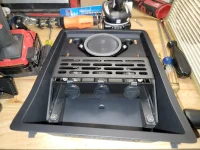
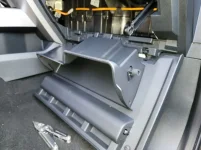
If you are talking about how to route an extension to the top where your phone sits, it may be easier to access it from the side by lowering the glove box. You can reach in behind and route the cable up to the top and get access by removing the tray in the top dash. (Remove the speaker cover first, undo the screws and pop the tray out.)

Built Right Industries makes a panel you can mount in the tray for mounting accessories. Some install a socket in the tray for power. So, if you just need a charging port and want to run wireless, use any DC source from the fuse panel and mount a socket in a convenient place with a USB C port or 12V port with a USB adapter. Instructions show you how to remove the top tray.

If it is to interface non-wireless, then perhaps running an extension from the existing USB socket (I assume you have a USB-C in the sliding cubby on the 2020) and mount a socket in the top tray. Access as described above.


A word of caution, extension cables can limit the bandwidth in some cases.
Hope this helps.
 

Attachments

  • 20220116_171805.webp
    20220116_171805.webp
    257.7 KB · Views: 416
  • 20220116_151928a.webp
    20220116_151928a.webp
    30.8 KB · Views: 30
It really is dependent on what you want to happen with the cable. There are options.

If you are talking about how to route an extension to the top where your phone sits, it may be easier to access it from the side by lowering the glove box. You can reach in behind and route the cable up to the top and get access by removing the tray in the top dash. (Remove the speaker cover first, undo the screws and pop the tray out.)

Built Right Industries makes a panel you can mount in the tray for mounting accessories. Some install a socket in the tray for power. So, if you just need a charging port and want to run wireless, use any DC source from the fuse panel and mount a socket in a convenient place with a USB C port or 12V port with a USB adapter. Instructions show you how to remove the top tray.

If it is to interface non-wireless, then perhaps running an extension from the existing USB socket (I assume you have a USB-C in the sliding cubby on the 2020) and mount a socket in the top tray. Access as described above.


A word of caution, extension cables can limit the bandwidth in some cases.
Hope this helps.
You have the idea correct. I want CarPlay but I can also use the same cable for wireless charging. I just can’t breach the cubby to run the cable. I recognize that it would be much easier to use a fuse tap.

Thank you for your reply.
 
Back
Top Bottom