Full Screen CarPlay is here for Sync4 in my SD!

My truck is at the dealership for windshield wiper motor fix. While there I asked them to update sync and navigation. They said they’ve tried 6 times and it won’t “take” whatever that means and they’ve submitted a tech support claim to Ford. 🤦🏼‍♂️
 
Mine has been showing the update symbol off and on for the last couple of days. I figured it was slowing completing the download when it was able. When I would check the recent update info screen, it would load it, but the message was blank. Clicking "check for updates" wouldn't help, either. Finally, it finished this morning while I was waiting my turn at the local waste transfer station to unload a dump trailer full of trash.
Pulled into the garage tonight and noticed my wifi logo appeared for the first time in weeks. Went to Update Details and the screen was blank. Hope this means I’m on the home stretch.
 
I believe this is the download symbol on the screen just left of the clock. It was on when I started the truck today. Maybe it’s an old school inbox symbol. Lol


469F073C-E8CF-4E29-9545-A0649817B6B9.webp
 
I believe this is the download symbol on the screen just left of the clock. It was on when I started the truck today. Maybe it’s an old school inbox symbol. Lol


View attachment 114833

Yeah, I've had that for about a week. If you touch it then select the update, my screen is just blank as others have said. Hopefully coming soon.
 
Yeah, I've had that for about a week. If you touch it then select the update, my screen is just blank as others have said. Hopefully coming soon.
Gotcha. I went into settings and updates - and I have an "update now" button, but have not touched it. I do have auto updates turned on, so we will see.
 
Gotcha. I went into settings and updates - and I have an "update now" button, but have not touched it. I do have auto updates turned on, so we will see.

I tried the update now button & it just said that "there currently is no update that requires vehicle downtime" or something to that effect.
 
I tried the update now button & it just said that "there currently is no update that requires vehicle downtime" or something to that effect.
I guess it will happen when it happens.
 
My truck is at the dealership for windshield wiper motor fix. While there I asked them to update sync and navigation. They said they’ve tried 6 times and it won’t “take” whatever that means and they’ve submitted a tech support claim to Ford. 🤦🏼‍♂️
Sounds like there are issues. My dealer didn't even want to try.
 
I tried the update now button & it just said that "there currently is no update that requires vehicle downtime" or something to that effect.
Same here. I am still running with maps dated April 2021 even though a Platinum is supposed to get quarterly updates.
 
Last edited:
Another report of KIP update over at Ford-trucks.com

 
Is the issue with the 3.5.3 or 3.5.4? 3.5.3 is working fine with full screen for me. Still waiting for the last update
 
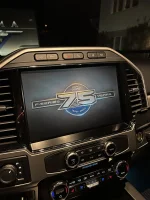
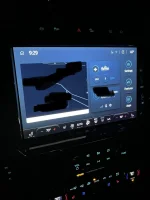
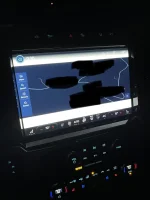
I received the update today and went ahead and made some forscan changes to enable the unreal engine, 75th anniversary splash screen and climate control buttons on the screen. Everything seems to be great aside from an annoyingly bright white stripe across the bottom of the navigation when in the "home" screen. Even worse yet there's a white bar across the top and bottom of the nav when in full navigation mode. It also shows up with a white bar across the bottom of the screen when navigation is pulled up on the pages on the right side (Not Pictured).

has anyone else experienced this? it is super annoying when it is dark, plus it obstructs the view of the time and stuff at the top of the screen.
 

Attachments

  • IMG_2600.webp
    IMG_2600.webp
    163.9 KB · Views: 170
  • IMG_2601.webp
    IMG_2601.webp
    69.9 KB · Views: 175
  • IMG_2602.webp
    IMG_2602.webp
    74.3 KB · Views: 169
Last edited:
I received the update today and went ahead and made some forscan changes to enable the unreal engine, 75th anniversary splash screen and climate control buttons on the screen. Everything seems to be great aside from an annoyingly bright white stripe across the bottom of the navigation when in the "home" screen. Even worse yet there's a white bar across the top and bottom of the nav when in full navigation mode. It also shows up with a white bar across the bottom of the screen when navigation is pulled up on the pages on the right side (Not Pictured).

has anyone else experienced this? it is super annoying when it is dark, plus it obstructs the view of the time and stuff at the top of the screen.
I don't think mine looks like that, then again I don't often use the built in nav. I'll try to remember to check tomorrow night though.
 
I don't think mine looks like that, then again I don't often use the built in nav. I'll try to remember to check tomorrow night though.
I dont ever use it either honestly, but when you hit the home button, it automatically pops up as the largest item on the left side of the screen. At night, that white bar might as well be a flash light shining in your face. I like everything to be dark as possible.

I'm wondering if there is a way to reset the nav module or something? I haven't played around with any of the nav settings in forscan
 
I received the update today and went ahead and made some forscan changes to enable the unreal engine, 75th anniversary splash screen and climate control buttons on the screen. Everything seems to be great aside from an annoyingly bright white stripe across the bottom of the navigation when in the "home" screen. Even worse yet there's a white bar across the top and bottom of the nav when in full navigation mode. It also shows up with a white bar across the bottom of the screen when navigation is pulled up on the pages on the right side (Not Pictured).

has anyone else experienced this? it is super annoying when it is dark, plus it obstructs the view of the time and stuff at the top of the screen.
Were the issues present before going into Forscan? Want to know if the update itself from Ford is messed up.
 
Were the issues present before going into Forscan? Want to know if the update itself from Ford is messed up.
Nope. I had cycled through all the tabs and buttons at the bottom after I got the notification today that it was upgraded before messing with any forscan changes.

This white bar issue occurred with enabling unreal and climate bar
 
I cant say mine is off CarPlay for more than a few seconds but I went out to see what mine looks like. No white bars at all.

AB77DB58-B13D-483C-A941-16CD6D57B789.webp


89700E50-24AC-4B61-9D33-4B95953DE5D1.webp
 
I cant say mine is off CarPlay for more than a few seconds but I went out to see what mine looks like. No white bars at all.

View attachment 114900

View attachment 114901
Hmmm

Do you care in the next couple days to send a shot of your aipm module as built data? Like a dummy I didn’t backup mine after the update so I’m hoping I didn’t fat finger something.
 
Back
Top Bottom