So can we get a short overview of the process using the Mongoose/FDRS/USB drive to get this done? I'd post my thinking but would rather a member that's got it done to just go over the high points. Maybe later on we can get a full on step-by-step process posted and pinned. I agree Ford is dropping the ball on this OTA stuff.
I just completed mine on Friday. There is a link to an F150 thread right above this one that I followed to get started, that is quite accurate. They include some unneeded (for SuperDuty) software, but go there for screenshots and some details. Here is the process:
Buy a Mongoose Plus cable from Amazon. $540 currently. Buy a high speed USB 3.1 flash drive (I gave a link a few posts back). I used a Samsung 256 GB 400 Mbps drive and it was awesome - $22. Learn from my mistake - don't waste your time with an inadequate flash drive. $22 Samsung drive would have saved me 12 hours and a night of sleep if I had it when I started. Install the Mongoose software and activate the device (just follow the instructions on the included card). The J2534 Toolbox will get installed, and you can use that when your FDRS subscription isn't active, to do diagnostics, read codes, etc. Also you can use the Mongoose with Forscan.
Download and install FDRS from Ford. Run FDRS and FDRS will tell you that a driver is out of date. That means install the driver - you don't have it yet. Next, buy a 2 day FDRS license for $50 (all the licenses come with various software for older trucks, so that part that doesn't matter). When actually buying the license you have to create a new account - different from your Ford account because it's actually a different vendor on the backend. Once you have the license, it will automatically populate FDRS when you open it (I did copy the license number first to the clipboard, but not sure that mattered) and prompt you to login to your Ford account, where the license will be logged and stored for reference. If you don't have a Ford account, you will need to create one, but how could you not, if you own a SuperDuty? I had one already. I think everyone will already have one because of FordPass.
You will need to connect your Mongoose cable to your laptop and the truck. If you got the Bluetooth version, I hear you will still need to use the cable for these kinds of updates. You don't want to risk wireless on this anyways.
Refer to the F150 thread for screenshots and details, but you run FDRS, load the VIN, let it spend time reading about your truck, then go to the SW Update tab. All available updates are there (not really all - and this is where dealers fail - you have to install what's there to get more to be listed). Simply go through them in order. Download, Run, next one. Follow all the instructions. In the earlier updates that require the USB drive, they fail to mention that you need to leave the driver door open when you turn the ignition off for 10 minutes. They added a note about that once you get to the second APIM 610 update. If you have retractable running boards and you notice them retracted, update settings via your dash display. I had to do that twice. Otherwise, it is remarkably difficult getting back into the truck after the 10 minute off periods.
If someone wants to reformat this and make it pretty, feel free.




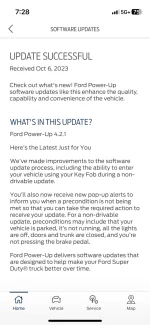
 just noticed this in my FordPass app today! Wonder if I have 934 Sync version now. Maybe OTA updates actually work for once.