Full Screen CarPlay is here for Sync4 in my SD!

Just ordered the Mongoose cable after doing and trying literally everything else.

Recently installed an Aruba access point directly above the truck on the garage ceiling and it still hasn’t downloaded any files of substantial size.

I hope the 2 day FDRS subscription is long enough to update all my truck modules. At least the installed access point will help with download speeds while updating the truck.
I did the same thing, but my APIM update would not show up in FDRS even after I did all the other updates. Two weeks later I get an update notification but it won't download. I spent another $50 last night on a 2 day FDRS license, spent 3 hours downloading the update with FDRS, putting it on a thumb drive and still it won't update. I'm going to try again today, but very frustrating.

I'm a tech guy so very familiar with doing these types of things but I never got the upgrade prompt on Sync4 screen, just an update failed error.

That points to a real possibility of a hardware or firmware issue blocking all APIM updates, which is intriguing, and would require a hardware fix (replacement module).
 
That points to a real possibility of a hardware or firmware issue blocking all APIM updates, which is intriguing, and would require a hardware fix (replacement module).
This all makes no sense. The dealership also failed when they tried to manually update mine and blamed a bad module. Went on vacation and didn't turn on the truck for 5 days and was surprised to come back to see it updated. No notice on the screen or in FordPass that anything was updated. I called the dealer and cancelled the module replacement. Maybe the long wait was the trick. I was in front of my house and the truck connects to my WiFi but I did nothing else differently when I parked it.
 
This all makes no sense. The dealership also failed when they tried to manually update mine and blamed a bad module. Went on vacation and didn't turn on the truck for 5 days and was surprised to come back to see it updated. No notice on the screen or in FordPass that anything was updated. I called the dealer and cancelled the module replacement. Maybe the long wait was the trick. I was in front of my house and the truck connects to my WiFi but I did nothing else differently when I parked it.
It’s possible you were experiencing a slightly different version of the issue that could be remedied. Or, like you say, maybe the truck has to sit untouched for a long time. That’s something most folks aren’t able to do (including dealerships) barring a trip that doesn’t involve driving.
 
This all makes no sense. The dealership also failed when they tried to manually update mine and blamed a bad module. Went on vacation and didn't turn on the truck for 5 days and was surprised to come back to see it updated. No notice on the screen or in FordPass that anything was updated. I called the dealer and cancelled the module replacement. Maybe the long wait was the trick. I was in front of my house and the truck connects to my WiFi but I did nothing else differently when I parked it.
I don't drive anywhere for days on end. Maybe to the store once a week. I've got great wifi and cell coverage. Still, nothin for the past year.
 
I tried again this morning and the USB update screen popped up within a minute of starting up the truck and my Sync4 is now updated! After that update I had another TCU update show up which I did. I will check again tomorrow to see if there is any other updates before my 2 day license expires. So based on my experience it took 3 tries and about 4 hours total to get my APIM module upgraded at home. I have 1Gig fiber but I think the download restriction is FDRS as I was seeing very slow speeds. I would try downloading after hours when all the dealerships aren't logged in. I started my download at 6:45pm and it took 2 hours to download and almost another hour to write to my thumb drive.

Another thing to note, I had several USB thumb drives but none that were 32GB-64GB and USB 3.0. I tried 4 different USB drives that were 32GB or larger and none of them worked. I did format them to exFat and also read on the F150Forum that you need to name the USB drive with less than 5 characters... mine was named "ford".

Below is a link to the USB Thumb drive I purchased from Amazon. Hoping this will save someone on here a bunch of time.


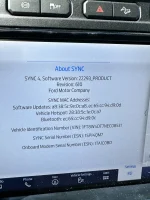
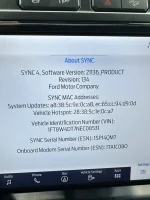
Before the update I was running Sync Revision 134 and now I'm on 610. Is that the latest version?
 

Attachments

  • IMG_1392.webp
    IMG_1392.webp
    285.8 KB · Views: 494
  • IMG_1244.webp
    IMG_1244.webp
    300.8 KB · Views: 78
Last edited:
I checked again this morning with FDRS and no APIM update. Not sure what else to do
Probably a stupid question. Was does APIM and FDRS stand for? Thanks.
 
Probably a stupid question. Was does APIM and FDRS stand for? Thanks.
Accessory Protocol Interface Module
Ford Diagnostic & Repair System
 
Does anyone have the most updated version of the maps for navigation. I believe mine was last updated in 2021. Thinking there should have been an update since then.
 
Does anyone have the most updated version of the maps for navigation. I believe mine was last updated in 2021. Thinking there should have been an update since then.
When I updated my APIM module it updated the navigation maps at the same time. I think once you get off the old version of APIM that afterwards your Over the Air updates "should" start working and keep you updated.
 
Finally got a copy of the technician’s notes when I got mine fixed. Hope this helps someone.

60EBCD35-F3ED-4D1E-9A1D-2303AB4C9D11.webp
 
Bloody hell that’s the write up of a tech that was slowly being driven to madness.
Yeah I think it shows a whole lot goes wrong before it goes right. You need a tech that doesn’t give up easy.
 
Gateway Module
Thank you so much. I'm going back to the Dealer this week with some ammunition. I had my truck for two years now without one update. Went back twice trying to explain this and they kept on telling me there is no update available. Frustrating!
 
Does anyone have a write up of how to go through the update process once in fdrs?
I used this write up on how to update software modules via FDRS and it worked perfectly:

 
I think I’m ready for module updating this week.

Bought that confirmed to work 64GB flash drive linked above in addition to a ‘dumb’ 2/10/50 amp battery charger from Harbor Freight.
 
Back
Top Bottom