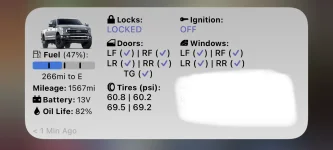
FordPass iOS Widget

Now just need to make it so that I can have my Bronco at the same time. I re-ran the process and used my Bronco's VIN and it changes both widgets to the Bronco. Change the settings for it back to my Tremor's VIN and it switches them both to the Tremor. I use the same process to produce 2 Scriptable widget apps using different VINs....
Non the less nifty way to display info from the Ford Pass app

That issue is being tracked here: https://github.com/tonesto7/fordpass-scriptable/issues/7
 
Has anyone followed the scripting to ensure it doesn’t copy your truck data and send it to someone?
I have not looked at it closely yet, but that’s my first concern with using someone else’s Java script.
Didnt see anything. Just a API call to retrieve and no redirect or caching. It's a onetime, one way call.
 
Got the widget set up in scriptable with the preview of the app working correctly. However, I can not add it to the widget. Scriptable does not populate as a widget to select when trying to add a widget. iOS 15.2 limitation?
 
Has anyone followed the scripting to ensure it doesn’t copy your truck data and send it to someone?
I have not looked at it closely yet, but that’s my first concern with using someone else’s Java script.
It was the first thing I did. Not exactly my programming style, but no sense in cleaning it up.
 
Got the widget set up in scriptable with the preview of the app working correctly. However, I can not add it to the widget. Scriptable does not populate as a widget to select when trying to add a widget. iOS 15.2 limitation?
It works with 15.2

  • Go to your iOS homescreen and make a long press to enter "homescreen edit mode"
  • Press "+" on the upper left corner and choose "Scriptable" as a medium sized widget
  • Still in "wiggle mode" tap on the newly created widget (The one you just created) and choose from the list under "Script"
Perfect, just got it to work. Thank you!
 
Has anyone followed the scripting to ensure it doesn’t copy your truck data and send it to someone?
I have not looked at it closely yet, but that’s my first concern with using someone else’s Java script.
It does. Reason why I don’t use ford pass.
 
This is a fun idea, and it's great to see individuals crafting things the community can enjoy. If I used FordPass I'd download this in a heartbeat... Once it's mature, it has the promise to be a truly useful widget - and that's coming from the perspective of someone who never uses widgets for anything!

As always, I'm concerned with how permissive the Ford API is regarding the breadth of the available data and I wish there was even a cursory nod to security built in to the system... Particularly because Brandon has just mandated an open-system kill switch be incorporated into every new vehicle sold in the US™ by 2026. That manufacturers aren't locking the vehicles down is a real liability for the consumer.
 
I am trying to make the background white and the text black on the widget but I am having trouble... my iPhone is in light mode. Does anyone know how to edit the script? My eyes suck and need more contrast.

edited code - lines 163 and 164 changed from EDEDED to 111111
//* Customize the Appearance of widget elements when in dark or light mode
//***************************************************************************
const runtimeData = {
textColor1: usingDarkMode ? 'EDEDED' : '000000', // Header Text Color
textColor2: usingDarkMode ? 'EDEDED' : '000000', // Value Text Color
backColor: usingDarkMode ? '111111' : 'FFFFFF', // Background Color'
I thought the color was based on the color of the truck. But I’ve only seen a couple widgets completed. One white one silver and my blue, in each case it matched the vehicle color.
 
It does. Reason why I don’t use ford pass.
While I understand what you are saying, that information that is shared through ford pass is going to ford, who in turn sell some of it to perspective companies for various reasons, but does not include your vin, user login or password. This information would be easy to get through the Java script and then pass on to whoever wrote the code, giving them access to your vehicle. But there is nothing in the coding to do that, and that is what I was concerned about. Don’t worry, any info that ford might use from ford pass to deny a warranty claim or what not, they can still get by plugging into the vehicle.
 
This is so awesome! I cannot believe the ford pass app doesn’t show that your windows are closed and your doors are locked. This is the fix I was looking for for sure. Thank you! A824C90B-CBE8-41B3-9457-AED510F5232E.webp
 
While I understand what you are saying, that information that is shared through ford pass is going to ford, who in turn sell some of it to perspective companies for various reasons, but does not include your vin, user login or password. This information would be easy to get through the Java script and then pass on to whoever wrote the code, giving them access to your vehicle. But there is nothing in the coding to do that, and that is what I was concerned about. Don’t worry, any info that ford might use from ford pass to deny a warranty claim or what not, they can still get by plugging into the vehicle.
It’s a data mining app. That’s why I won’t use it.
 
Brandon has just mandated an open-system kill switch be incorporated into every new vehicle sold in the US™ by 2026.

1. That’s a stretch. The RIDE Act subsection of the Infrastructure Bill is a bipartisan passage sponsored by 4 senators: 2 democrat, 2 republican.


2. Why must you bring politics into every thread? We’re here to talk about trucks.
 
Back
Top Bottom